TechTarget.com/searchwindowsserver
https://www.techtarget.com/searchwindowsserver/tip/How-to-access-SharePoint-sites-through-Microsoft-Outlook
How to access SharePoint sites through Microsoft Outlook
By Brien Posey
If you use both Exchange Server and Microsoft SharePoint in your organization, it's possible to provide users with access to SharePoint sites through Microsoft Outlook. In this tip, expert Brien Posey explains step-by-step how to configure Outlook to access SharePoint sites.
Outlook Today
If you open Microsoft Outlook and click on the very top folder, which is labeled Mailbox – Your Name, it will display the Outlook Today screen. Normally, this screen gives you a brief overview of the number of unread email messages in your mailbox, as shown in Figure A. It also lists any pertinent Outlook calendar entries or tasks. This information can be helpful, but not used often.
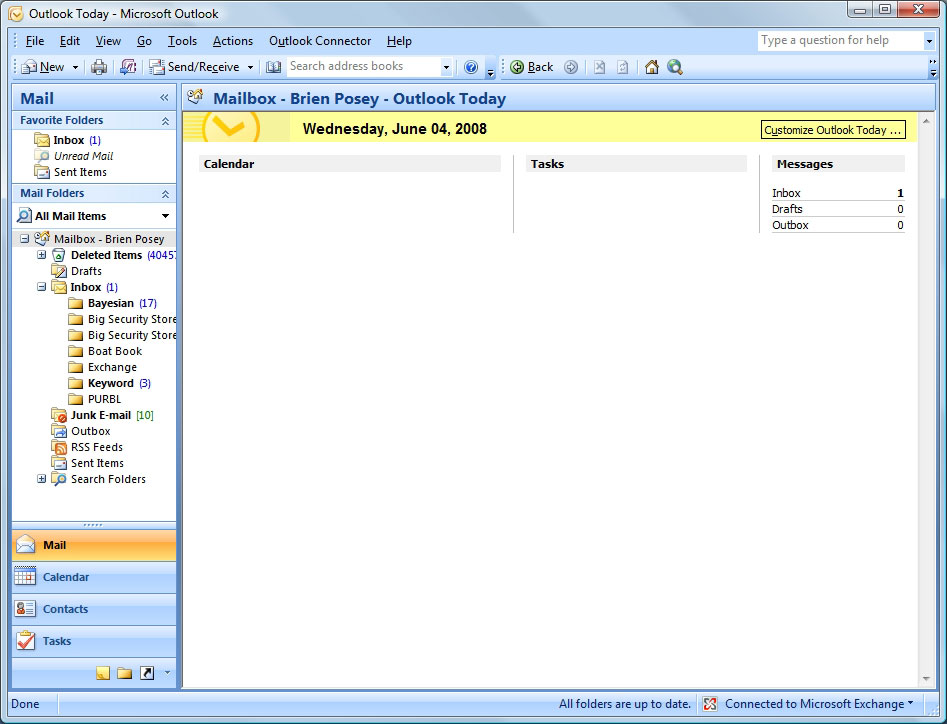
Figure A. The Outlook Today screen provides a summary of the current state of your mailbox.
(Click on image for enlarged view.)
The Outlook Today screen is HTML-based and it can be customized or replaced. Therefore, if you don't use the Outlook Today screen, you can replace it with a SharePoint site.
To replace the Outlook Today screen with a SharePoint site:
- Right-click on the Mailbox – Your Name folder and choose the Properties for Mailbox – Your Name option. You will see the Outlook Today properties sheet (Figure B).
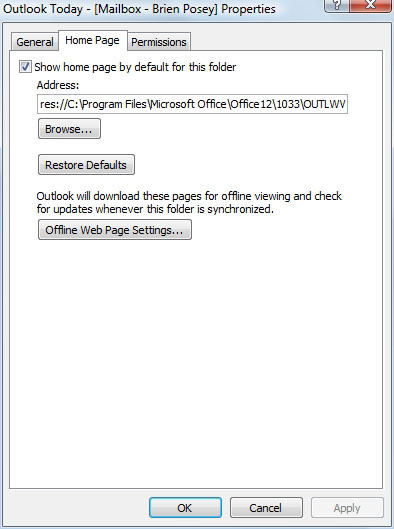
Figure B. The Outlook Today properties sheet lets you customize or replace the Outlook Today screen.- Enter the SharePoint site's URL in the Address field.
- Select the Show Home Page By Default For This Folder checkbox.
- Click Apply, and then OK. Now, go to a different folder and come back to the Outlook Today folder. You should see the SharePoint site displayed within Outlook (Figure C).
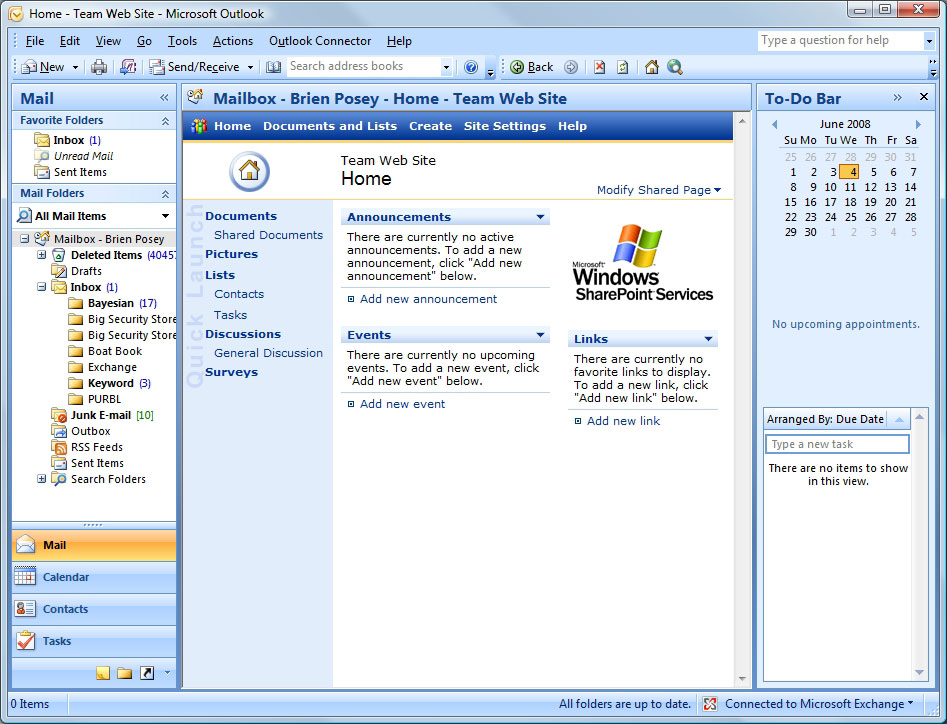
Figure C. You can display a SharePoint site through Microsoft Outlook. (Click on image
for enlarged view.)
Note: This technique was written for Microsoft Outlook 2007, but it also works for Outlook 2003. Some of the options may have slightly different names, but you should be able to configure this in Outlook 2003.
Accessing a SharePoint site through an Outlook folder
If you use Outlook Today or you have multiple SharePoint sites, replacing the screen may not be an option. Instead, you can create an Outlook folder that corresponds to a specific SharePoint site. Since you can create as many folders as needed, you can access multiple SharePoint sites through Outlook.
- 6 tips in 6 minutes: Integrating SharePoint Server 2007 and Exchange 2007
To create a SharePoint folder in Microsoft Outlook:
- Right-click on the Mailbox – Your Name folder, and select New Folder. Name the new folder and choose a location for it within the folder hierarchy. Outlook also prompts you to specify the type of data the folder should contain (Figure D). Set the Folder Contains option to Mail and Post Items.
-
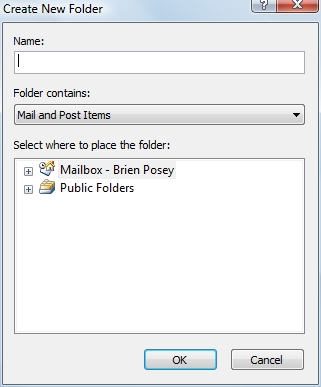
Figure D. You can create a new Outlook folder that corresponds to a SharePoint site. - Click OK. The new folder will be created in the location specified. It's a good idea to use a descriptive name for the folder, but you can always rename the folder by right-clicking on it .
- Right-click on the new folder and select Properties to display the folder's properties sheet.
- Go to the Home Page tab and enter the URL for the SharePoint site that you want to associate with the folder.
- Select the Show Home Page By Default For This Folder checkbox and click OK. Outlook should now display the SharePoint site whenever you select the folder (Figure E).
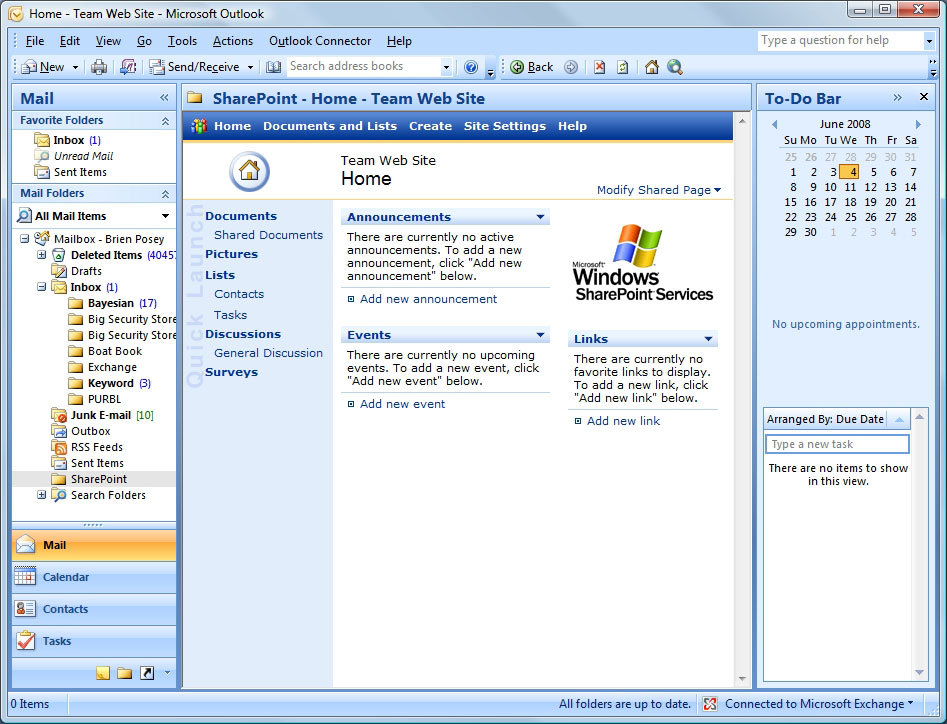
Figure E. You can associate an Outlook folder with a SharePoint site. (Click on image for
enlarged view.)
About the author: Brien M. Posey, MCSE, has previously received Microsoft's MVP award for Exchange Server, Windows Server and Internet Information Server (IIS). Brien has served as CIO for a nationwide chain of hospitals and was once responsible for the Department of Information Management at Fort Knox. As a freelance technical writer, Brien has written for Microsoft, TechTarget, CNET, ZDNet, MSD2D, Relevant Technologies and other technology companies. You can visit Brien's personal website at www.brienposey.com.
Do you have comments on this tip? Let us know.
Please let others know how useful this tip was via the rating scale below. Do you know a helpful Exchange Server, Microsoft Outlook or SharePoint tip, timesaver or workaround? Email the editors to talk about writing for SearchExchange.com.
24 Jun 2008