When cloud PCs make more sense than another hardware refresh
Hybrid work is reshaping endpoint management. Learn when cloud PCs, DaaS and VDI make sense versus traditional hardware and how to balance cost, flexibility and performance needs.
Hybrid work models have fundamentally changed endpoint management priorities, making flexibility and remote access essential. As enterprise decision-makers evaluate their endpoint strategies to improve efficiency while managing costs, they face the question of whether each employee still requires a traditional managed PC.
The answer is increasingly complex. The costs associated with migrating to Windows 11, along with expenses related to hardware refresh cycles, are straining resources and budgets. Additionally, the need to support remote, hybrid and temporary employees, along with BYOD initiatives, adds to the challenge.
Fortunately, alternatives to traditional hardware exist. Cloud PCs, desktop as a service (DaaS) platforms and virtual desktop infrastructure (VDI) each offer different trade-offs in cost, security, scalability, management complexity and user experience. The challenge is determining which option best fits which use case.
This article is designed to help CIOs and the administrators who advise them determine when cloud PCs make sense as an alternative to physical devices.
How do cloud PCs, DaaS and VDI platforms differ?
The three terms are closely related but describe different aspects of virtual desktop delivery. Understanding their relationship requires distinguishing between deployment models and service types.
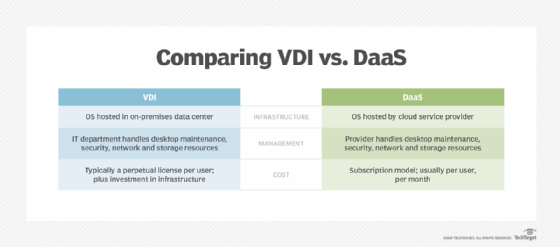
DaaS and VDI are deployment models that differ by the hosting infrastructure, with cloud PCs being a type of DaaS offering.
DaaS
With DaaS, a cloud provider delivers and supports the virtual desktop infrastructure. Cloud-hosted desktops simplify endpoint management by shifting responsibility to cloud service providers, freeing up enterprise IT teams to focus on other concerns. Organizations consume desktops as a subscription without maintaining the underlying platform. The approach reduces operational overhead while retaining many benefits of virtual desktops.
VDI
With VDI, the organization's IT team builds and maintains the virtual desktop platform, typically in an on-premises or private cloud environment. This requires expertise in servers, storage, networking and virtualization, which might be challenging to find. VDI offers the most control but adds the greatest management complexity.
Cloud PCs
Cloud PCs are a subset of DaaS. For example, each Windows 365 Cloud PC user connects to a persistent, dedicated desktop with fixed resources. Cloud PCs offer organizations simplicity and predictable licensing while providing users with a PC-like experience.
Cloud PCs, DaaS and virtual desktop examples
Cloud PCs are hosted by a provider and streamed to devices over a network. Users receive a consistent desktop system without using high-performance local hardware.
Consider the key examples for each category.
Cloud PC platforms
Windows 365 Cloud PCs provide fully managed Windows desktops that operate in the cloud.
DaaS and cloud virtual desktop services
Amazon Workspaces supports both Windows and Linux desktop environments.
Citrix DaaS provides an enterprise-grade virtual desktop delivery.
Cloud VDI platforms
Azure Virtual Desktop provides scalable virtualization for Windows desktops.
VMware Horizon Cloud offers hybrid and multi-cloud desktop options.
Amazon EC2 Mac instances operate on Apple hardware in AWS.
Cloud PCs are usually associated with Windows, although persistent cloud desktops also exist for Linux. Due to Apple's licensing, macOS cloud desktops are more specialized, typically delivered as cloud-hosted Mac instances running on dedicated Apple hardware.
When cloud PCs make sense -- and when they don't
Organizations should evaluate each approach based on relevant business considerations and technical implications, recognizing that a hybrid approach often delivers the best results. The decision often comes down to understanding the fundamental differences between traditional and cloud-based models.
The traditional hardware refresh cycle follows a Capex approach, which requires a significant upfront investment and ongoing management overhead. While this approach offers maximum control, it introduces procurement complexity, supply chain security risks, imaging requirements and device replacement challenges.
Cloud PCs operate on an Opex model, offering faster scaling, easier onboarding and offboarding, simplified endpoint management and improved remote user support.
Many organizations evaluate Windows-based cloud PC options during a hardware refresh cycle, when attention naturally shifts to endpoint costs, workflow changes, new applications and updated security and compliance standards.
Organizations should evaluate cloud PC options across six key areas:
Financial model. Spending shifts to an Opex model using predictable subscription pricing.
Total cost. Reduces hardware spending but adds recurring subscription costs. Organizations should monitor license utilization to avoid paying for inactive users.
Business agility and scalability. New desktops can be provisioned or retired in minutes, making it easier to manage growth or add contractors and seasonal workers. Cloud PCs enhance remote-first organizations and rapidly expanding teams.
User experience. Delivers a consistent experience across devices but requires reliable network connectivity and sufficient cloud resources.
Technical considerations
For IT administrators, migrating users to cloud PCs changes the operational model, but it does not eliminate desktop management or support.
Provisioning is faster, with standardized desktops and applications available quickly, reducing imaging and deployment effort. For example, Microsoft's automated process for provisioning Windows 365 consists of creating and configuring the virtual machine, installing software, applying custom configurations and then adding the user's Active Directory account to allow logins.
Traditional hardware refreshes remain practical for power users, offline work and specialized workloads.
Infrastructure administration also shifts. The cloud provider manages the underlying platform. In-house IT talent focuses on identity, policies, endpoint access, applications and user support, using tools such as Microsoft Intune to manage both physical devices and Windows 365 Cloud PCs. Security operations must adapt to a cloud-first model, with strong emphasis on identity, conditional access, data controls and compliance monitoring.
Centralized desktops can also simplify recovery and improve business continuity metrics. However, IT teams must monitor network performance, cloud resource allocation and application compatibility. Implementing additional services, such as Windows 365 Reserve, can help prevent outages from affecting users.
Neither approach is inherently better. Traditional hardware refreshes remain practical for power users, offline work and specialized workloads. However, they require larger upfront investments. Cloud PCs excel in teams that prioritize operational agility, rapid provisioning, simplified management and support for distributed workforces. However, cloud costs can appear misleading and unpredictable if organizations overprovision or fail to reclaim unused licenses.
Often, the ideal strategy is a hybrid approach that balances cost, flexibility and enterprise needs while improving ROI.
Cloud PC governance
Effective governance is essential to cloud PC management. While governance for traditional devices centers on long-term asset planning, procurement, refresh cycles and capital budgeting, the concerns for cloud PC deployments differ.
Cloud PC governance needs subscription management, user eligibility and cost optimization. IT leaders must establish policies for provisioning, deprovisioning and reclaiming licenses to prevent unnecessary spending. The model offers greater flexibility to scale with changing workforce needs but requires ongoing oversight of recurring operational costs.
Both approaches require governance that aligns endpoint investments with business priorities, workforce strategy and risk tolerance.
Key questions IT leaders should ask before choosing an endpoint strategy
The decision to adopt cloud PCs should be driven by workforce needs and corporate objectives rather than technology trends. IT leaders should begin by asking questions related to the organization's needs and infrastructure, including the following:
What percentage of users truly need high-performance local hardware?
How predictable is workforce growth?
Are contractors, temporary workers or seasonal employees a significant portion of the workforce?
Which licensing model best fits the organization?
Does the IT team already have centralized management for physical devices that can also manage cloud PCs?
Does the current network offer adequate performance for cloud-delivered PCs?
Will existing governance practices effectively manage licensing and avoid overprovisioning?
Implementation strategy
Organizations should deploy cloud PCs strategically using pilot programs, phased rollouts and proactive change management to support successful adoption and implementation.
As workforce needs continue to evolve, the right endpoint strategy has grown into a business decision with technical implications. Start by matching available technologies to specific user needs, balancing cost, performance, security and operational efficiency. A comprehensive, strategic evaluation positions the organization for greater agility, security and scalability tomorrow.
Damon Garn owns Cogspinner Coaction and provides freelance IT writing and editing services. He has written multiple CompTIA study guides, including the Linux+, Cloud Essentials+ and Server+ guides, and contributes extensively to TechTarget editorial, The New Stack and CompTIA Blogs.