


As Microsoft builds AI deeper into the Windows experience, IT leaders face a critical governance challenge.
Integrated across Microsoft Word, Excel, Teams and Outlook, Microsoft 365 Copilot changes how users interact with data in ways that existing policy frameworks weren't designed to handle. In addition, Microsoft has introduced new agentic tools that use different language models and run agents locally on the user's device. When these AI assistants can surface documents, summarize emails and trigger autonomous agents through Copilot Studio and even on the local device, the risk surface on every managed endpoint expands significantly.
As Copilot becomes a permanent part of the Windows desktop, organizations must understand what that change means in practice, the guardrails Microsoft provides, the risk factors IT teams should account for and the concrete governance practices to implement.
What is Microsoft 365 Copilot?
Microsoft 365 Copilot is an AI assistant built into Microsoft 365. It uses large language models combined with organizational data such as emails, documents, meetings and chats to help users draft content, summarize information and answer questions directly within apps like Word, Excel and Teams. It also operates through Copilot Chat, a cross-application interface where users can query information across their entire Microsoft 365 data estate.
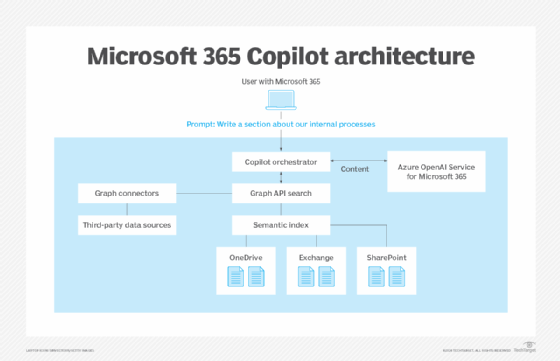
For these functions to work, Microsoft Graph provides Copilot with a search capability into all the user's Microsoft 365 data. Alongside this, all Microsoft 365 users have access to the semantic index, a metadata catalog that helps Copilot understand relationships between content and return more relevant results.
Microsoft has also been expanding the 365 Copilot portfolio significantly. Recent additions include Copilot Cowork, an AI workspace similar to Anthropic's Claude Cowork, and Microsoft Scout, which is a personal AI assistant powered by OpenClaw.
Beyond the core agents, there's also Copilot Studio, a low-code platform that enables organizations to build custom AI agents. These agents can be connected to internal systems and configured to act autonomously on behalf of users or business processes, extending Copilot's reach well beyond the standard Microsoft 365 ecosystem.
Why Copilot creates governance concerns
The issue with Copilot is not that it introduces new data, but that it makes years of bad data governance more visible. For many years, the oversharing of information and data has been a problem in most organizations. It's common to have multiple SharePoint sites with broken inheritance where data is shared with everyone. Before Copilot, this wasn't a big issue, since it required the user to know where to look for the data. But Copilot removes that barrier, so anything that the user has access to can now surface directly through natural language.
This is because of the way that Copilot grounds its answers. When it queries, it runs through Microsoft Graph and the semantic index. It not only returns documents but also relationships and relevance across the entire data estate. A prompt from a user does not need to name a specific file; it only needs to ask the right questions.
A prompt from a user does not need to name a specific file; it only needs to ask the right questions.
The risk becomes a bigger issue when moving toward the use of virtual agents such as Copilot Studio and always-on agents like Scout, which operate with their own identity and can take actions across SaaS like Microsoft 365, and even locally on the user's machine.
Each agent is effectively becoming a new non-human identity that needs to receive provisioning, monitoring and lifecycle management.
Microsoft's built-in security features and guardrails
To get some control of these GenAI features, agents and the data they can access, there are some built-in guardrails and capabilities that IT can use. However, many of these mechanisms are not enabled by default, as they can have major consequences if configured poorly.
Enterprise data protection
Microsoft's baseline enterprise data protection (EDP) standards affirm that by default, all prompts, grounding data and responses stay inside the organization tenant and geolocation, and the data is not used to train the foundation models. This set of stipulations covers external exposure, not internal oversharing.
Remediating oversharing
Use SharePoint Advanced Management's content management assessment feature to find overshared, ownerless or inactive sites and risky sharing links. IT can also use the restricted content discovery feature to exclude sensitive sites from Copilot. These capabilities are included as part of the Microsoft 365 Copilot license.
Setting up durable guardrails
Require site sensitivity labels at provisioning of new files and auto-apply sensitivity labels so new sensitive content is protected at creation. Additionally, disable users from setting links to be accessible to anyone.
Sensitivity labels are the most important part, since classification travels with the content and stays enforceable when Copilot reads it. A best practice is to layer data loss prevention (DLP) for Copilot policies. This blocks specific labels from grounding, or blocks prompts containing sensitive data.
While these apply when it comes to Microsoft 365 Copilot, for Copilot Studio, there are other safeguards and features IT must consider.
Environment strategy
Keep agents in dedicated environments, use environment groups and routing, and restrict the Environment Maker role to control who can build and set up environments.
Authentication
Agents default to "Authenticate with Microsoft," but an agent creator can switch any agent to "No authentication" at any time, making agents reachable by anyone with the URL. The single highest-value control is blocking the "Chat without Microsoft Entra ID authentication" connector in DLP across all environments.
Power Platform DLP policies
Classify Microsoft Power Platform connectors as "Business," "Non-business" or "Blocked" to stop risky combinations, and block publishing channels that the organization doesn't allow, such as Direct Line or Facebook. Administrators should manage these security policies centrally at the tenant or environment level.
Identity and least privilege access
Agents act under a connection, often as the person creating the agent, so IT should scope security roles narrowly and treat each agent as a non-human identity. Ensure that connectors are using their own service principal to connect to resources and services.
Risk factors IT teams must evaluate
Copilot's governance risks mainly pertain to the conditions it operates in. IT teams should pay particular attention to the following issues:
- Latent oversharing. Most tenants carry years of broken permission inheritance, links that anyone can access and ownerless sites. Copilot doesn't create this, but it makes it instantly discoverable through a single prompt. If admins can't confidently say what would come back when a user asks for "anything about salaries, layoffs or the acquisition," they aren't ready to enable it broadly.
- Identity sprawl from agents. Copilot Studio agents and always-on agents like Scout run under their own connections and act on behalf of users. Each is a non-human identity with standing access that often remains active long after the person who created it has left or moved on. While these agents carry the same security risks as traditional service accounts, they are much easier for users to create and much harder for IT teams to see.
- Data residency and model variation. Cowork and Scout use different language models, and Scout runs locally on the device. Teams need to confirm where prompts and grounding data flow for each, since EDP applies only to Microsoft 365 Copilot, not to every newer agent.
- Local execution surface. Agents running on the endpoint rather than in the tenant shift the boundary that endpoint management was built around. Local agents might sit partly outside that visibility, requiring organizations to invest in services like Microsoft Agent 365.
Copilot does not intentionally introduce new risk, but it does remove the friction that kept old risk hidden. Oversharing and many years of limited to no data governance have existed in most tenants for many years. Services like Copilot, Cowork and Scout simply make it more visible.
Governing Copilot is less about restraining the AI than about finally paying down the data and identity debt it makes impossible to ignore.
Marius Sandbu is a cloud evangelist for Sopra Steria in Norway who mainly focuses on end-user computing and cloud-native technology.