
How IT can support file-level encryption on managed iPhones
Learn what Apple's built-in iOS file encryption delivers by default, where the gaps exist for corporate data and what steps IT teams can take in mixed-OS and BYOD environments.

When it comes to mobile devices like iPhones and iPads, file encryption exists, but it isn't completely hands-off for IT teams.
Here's what administrators need to know about how iPhone encryption works out of the box, its limitations and how to properly manage fleets containing a mix of devices with different OSes and ownership statuses.
Apple's default file encryption capabilities
At its core, the encryption mechanism on iPhones and iPads uses hardware-accelerated Advanced Encryption Standard 256. This is applied at the file level, as opposed to the entire drive, making it far more resistant to brute-force attacks. Each file receives its own unique encryption key attached to the phone's unique device identifier. These keys are then stored in Apple's dedicated security processor, the Secure Enclave. Because encryption is hardware-based, even if the Secure Enclave chip were removed from the device, there would be no way to access the files, as the keys are no longer available.
Encryption on iOS devices is enabled as soon as the user sets a passcode or enables Face ID or Touch ID, and it can be easily verified by going to Settings > Face ID & Passcode.
Apple's encryption framework assigns each file to one of four distinct "protection classes," which define when encryption keys are accessible in memory and when files can be accessed by the user:
- Protection Class A. Users can only access the file when the device is unlocked.
- Protection Class B. Users can access the file when the device is locked, as long as the file was previously open.
- Protection Class C. Users can access the file after the first time they unlock the device following a reboot.
- Protection Class D. Users can access the file anytime the device is on.
Apple's own apps mostly use Class A encryption, while third-party apps typically use Class C encryption, unless the developer opts for greater or less key handling.
Is Apple's default encryption enough for the enterprise?
The iOS out-of-the-box file encryption still leaves significant gaps in user and policy management. It also introduces dependencies that might not be enterprise-ready in certain scenarios. In this case, it's up to the organization's IT team to actively manage and monitor encryption. Admins should implement the following practices and tools:
- Passcode strength and biometric authentication enforcement. Allowing users to set a weak passcode while disabling biometrics undermines Apple's built-in encryption protections. Instead, IT teams should enforce complex passcodes and require biometric authentication through a mobile device management (MDM) platform.
- Adjusting protection classes. Most apps use the Class C level of protection, which makes data within the app accessible after the very first unlock. This data has a far wider range of exposure than many IT security teams are comfortable with. To better protect mobile app data, take advantage of features within mobile application management (MAM) tools like Microsoft Intune, Jamf and MobileIron. These platforms let admins interact with app-level controls or create wrappers that add an extra layer of encryption and data loss prevention policies around corporate data.
- Auto-lock settings. By default, users have control over how much time without activity can pass before their device automatically locks. Options range from "30 seconds" to "Never," which can leave apps and data vulnerable for long periods. Employee security training is one method to help users understand this risk, but policy-driven auto-lock timeouts are a more comprehensive tactic that IT teams can control and validate over time. Auto-lock settings can be enforced on iPhones using most enterprise-grade MDM tools.
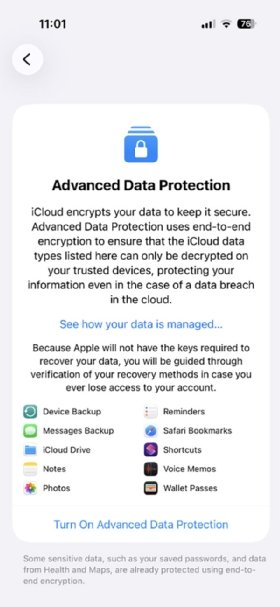
- Turn on Advanced Data Protection. Default iCloud backups are properly encrypted, but Apple maintains the encryption keys. In situations where highly sensitive and regulated data is used on iPhones, this might be a security concern. In these situations, IT can enable Advanced Data Protection, which enforces two-factor authentication, recovery contacts and recovery keys, among other requirements.
Keep in mind that, in mixed iOS and Android fleets, the dependencies and risks create even larger encryption security gaps. Android devices handle encryption very differently, resulting in uneven protection levels across the user base. For highly sensitive environments with regulated data, IT should make use of both MDM and MAM to provide unified encryption standardization across the OSes.
How to strengthen iPhone file-level encryption
When looking to better secure iPhones with file-level encryption for sensitive data, Apple's native capabilities are a great start. When combined with the following user policies and tools, enterprise-grade protection is possible, even in mixed-OS or BYOD environments:
- Enforce strong passcodes and require biometric authentication.
- Use mobile per-app VPN and selective remote wipe capabilities.
- When possible, adjust data protection classes. When that's not an option, use wrappers.
- Consider whether Apple controlling backup encryption keys is too risky or against data protection regulations.
- Layer MDM and MAM for consistent encryption policy enforcement.
Challenges with iPhone file-level encryption
BYOD and mixed-OS environments are pain points that IT teams must address. For example, in BYOD scenarios, IT can't fully supervise, enforce comprehensive profiles or perform deep forensic audits without raising privacy concerns.
Mixed-OS fleets only compound these issues. Because iOS and Android use vastly different encryption frameworks, encryption policies -- along with IT's ability to properly perform compliance audits -- tend to suffer.
These common challenges mean that IT must conduct careful planning, implement the right set of tools and develop clear segmentation strategies when it comes to the complete support of file-level encryption on all mobile devices, including iPhones.
Andrew Froehlich is founder of InfraMomentum, an enterprise IT research and analyst firm, and president of West Gate Networks, an IT consulting company. He has been involved in enterprise IT for more than 20 years.