Enterprise software complexity does not always come from custom code. Sometimes it comes from settings.
A field added for one team. A role created for one region. An approval path adjusted for one product line. A template copied and modified. A workflow rule left in place because no one was sure who still needed it. A dashboard filter that became part of month-end reporting. A permission granted temporarily and never removed.
None of those choices may look risky on its own, but together, they can become software debt.
That is the configuration problem.
Enterprise applications are supposed to be configurable. ERP, HR, CX, collaboration and endpoint management tools need to reflect the way the business works. Administrators and business teams need ways to adapt screens, workflows, roles, reports, forms, alerts and approvals without rewriting the underlying software.
But the same flexibility that makes software useful can make it harder to manage.
Configurations accumulate. Exceptions multiply. Local choices become enterprise assumptions. Admin settings become part of the operating model.
Fields, templates, roles, approvals, local settings and review gaps turn into hidden software debt. Configuration cleanup must become part of normal enterprise software management.
The code may belong to the vendor, but the configuration belongs to the enterprise.
Configuration sprawl usually shows up in several practical places.
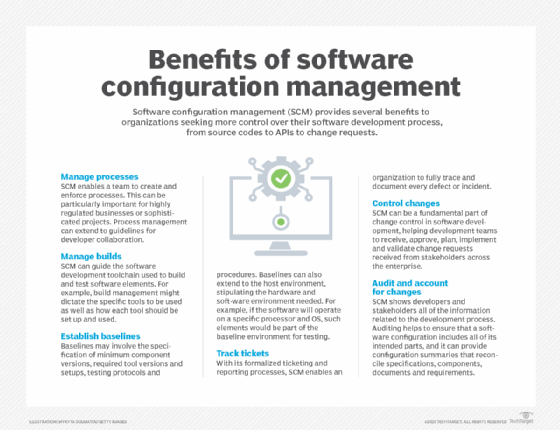
Software configuration management helps organizations track changes, control processes and maintain visibility into configuration decisions.
Settings become process over time
A setting may start as a small choice. Over time, it can become part of the process.
That happens when settings begin to shape how the business operates. A required field determines what information teams collect. A workflow rule controls when work can move forward. A permission model governs who can see or approve a transaction. A report definition determines what information leaders see. A template standardizes how teams communicate with customers, employees or suppliers.
At first, these choices may feel like normal administration. Over time, they become dependencies.
That is when configuration sprawl becomes dangerous. The business may not see these settings as critical because they do not look critical. They are not servers, databases, integrations or custom applications. They are simply options inside a system.
But they still control behavior.
They decide what users can do, what they must enter, what gets routed, what gets blocked, what gets reported and what becomes visible to managers. In many enterprise applications, configuration is where business logic quietly settles.
A configuration review should therefore ask more than whether a setting exists. It should ask what the setting does to the business.
Who relies on it? Which workflow does it support? Which report does it affect? Which team asked for it? Which exception does it handle? What would break if it were removed?
Without that context, companies may treat configuration cleanup as a technical housekeeping task.
It is not.
It is a way to understand how the software has learned the business.
What to include in a configuration review
A practical review should focus on settings that affect work, risk or reporting. A configuration review does not need to cover every setting at once. Start with the settings most likely to affect work, risk or reporting:
Required fields that shape what users must enter.
Role and permission sets that control access.
Approval paths that route work or block progress.
Workflow rules that move, pause or escalate tasks.
Report filters that affect business numbers.
Templates and forms that users copy or reuse.
Notification rules that trigger follow-up work.
Local exceptions for regions, teams or product lines.
Administrative access that gives users broader control.
Settings connected to active integrations or automations.
For each item, ask who uses it, what business purpose it serves, what would break if it changed and when it should be reviewed again.
Fields and templates can preserve old assumptions
Fields and templates can look harmless long after the assumptions behind them have changed.
A field added during implementation may no longer collect useful information. A required value may reflect an old organizational structure. A customer template may still describe a service model that the company has moved away from. An HR form, a finance report or a dashboard filter can keep shaping work simply because no one has revisited it.
These artifacts often outlast the business reasons for which they were created.
That is how software carries old habits forward. A required field that no longer fits the work may push users toward placeholder data. A copied template may survive because rebuilding it takes more effort than reusing it. An old dashboard view may stay in place because the numbers still look familiar.
Over time, those choices can keep defining work in ways the enterprise no longer intends.
The result is not always a visible failure. More often, the damage shows up in small operational friction: reports that are harder to trust, workarounds that users treat as normal, training that takes longer than it should and data that becomes less useful over time. New features can also become harder to adopt because old configurations still shape what the software allows.
This is configuration debt.
It does not always announce itself as debt. It looks like a field, a form, a report filter, a template or a local option that everyone has learned to work around.
A review should ask what these settings still mean.
The code may belong to the vendor, but the configuration belongs to the enterprise.
Which fields are required but not useful? Which templates are still current? Which report filters correctly define the business? Which values are filled with junk because users have no better answer? Which settings were added for a one-time need and never removed?
Those questions are practical because they show where configuration choices have outlived their purpose.
Roles and approvals multiply quietly
Configuration sprawl often shows up in roles and approvals.
These are easy to create and hard to clean up.
A new role may be created for a project. A temporary approval path may be added during a rollout. A manager may need special access during a transition. A support team may be granted broader permissions to resolve a problem quickly. A workflow may require an additional approval step because one incident has made leaders cautious.
Each change may make sense at the time, but roles and approvals rarely shrink on their own.
They multiply. That creates two problems. The first is access risk. Users may keep permissions they no longer need. Roles may overlap. Administrative access may be broader than the business realizes. Temporary permissions may become permanent.
The second problem is slower work. Approval paths pick up extra steps. Exceptions take longer to clear. Users wait on approvers who may no longer know why they are part of the workflow. Managers keep approving work because the system asks them to, not because the step still adds judgment, control or value.
Configuration sprawl can therefore make software both riskier and slower.
A review should look for unused roles, duplicate roles, old project access, unnecessary approval steps, inactive approvers and permission sets that no longer map cleanly to current jobs.
It should also ask whether the workflow still reflects how the business wants to operate.
Sometimes the software is slow because the business is complex. Sometimes it is slow because no one cleaned up the settings.
Local settings make testing harder
Local settings often begin as reasonable fixes.
One team needs another field. A region has a workflow requirement. A department adds an approval step. A customer-facing group creates its own template. An admin creates a role so work can keep moving. Each choice may make sense in the moment.
The testing problem appears later.
Standard test plans often miss those local differences. A process may work in the main configuration but fail for a region, business unit or customer segment with its own settings. A report may look correct until a local filter changes the numbers. Access can also become harder to validate when similar roles carry different permissions in different parts of the organization.
That is how configuration sprawl makes change harder.
The more local variation exists, the harder it becomes to know what a software change will affect. SaaS releases, workflow updates, reporting changes, permission reviews and automation projects all become more complicated when teams do not know which settings are standard, which are local and which are old exceptions that no one wants to touch.
This is not an argument against local configuration.
Some variation is necessary. A global company may need to comply with local rules. A business unit may have legitimate workflow differences. A customer-facing team may need a different template because the work is different.
The problem is unmanaged variation.
Software testing depends on knowing what must be tested. If teams cannot see the settings that shape the process, they cannot easily test the process. They may test the official path while the actual business still depends on several local paths.
That gap matters.
A release can pass the standard test and still disrupt the way people actually work. A configuration review should therefore shape the testing plan before a release, workflow update or reporting change goes live.
Teams need to know which local settings matter, where workflows vary by region or business unit, which roles are exceptions, which reports depend on nonstandard filters, which templates are used most often and which fields drive work downstream.
Testing should not only ask whether the software works. It should ask which version of the configured business is being tested.
Common signs of configuration sprawl
Configuration debt often shows up as ordinary admin complexity before it becomes a larger software problem. Watch for these signs that application settings have outgrown the review process:
Roles with unclear purpose or overlapping permissions.
Required fields that users fill with placeholder data.
Approval paths with inactive, unnecessary or poorly understood steps.
Templates, reports or dashboards that duplicate other assets.
Workflow rules that are tied to old products, regions, policies or reorganizations.
Temporary exceptions that no one can explain or that never expire.
Settings that admins avoid changing because no one knows what depends on them.
These signs do not always mean the configuration is wrong. They mean it needs review.
Cleanup needs a review cycle
Configuration sprawl grows because review is often irregular.
Teams configure software during implementation. They adjust it during rollout. They fix it during support. They change it during reorganizations, policy updates, product launches, vendor releases and process changes.
But they may not revisit it systematically.
That is how configuration debt builds up. Not through one bad decision, but through many decisions that outlive their original purpose.
A routine configuration review does not have to be massive. In fact, it should not be. A practical review can focus on one area at a time: roles, approval paths, required fields, workflow rules, templates, reports, notification settings or administrative permissions.
The key is to make review part of software operations.
What has changed since the last review? Which settings are unused? Which roles have too many users? Which workflows have too many exceptions? Which templates duplicate each other? Which fields are required but rarely useful? Which automations still reflect current policy?
Configuration management can help give teams discipline for tracking and controlling change. A configuration management database may help with infrastructure assets, services and relationships. But enterprise application settings also need business explanation.
A role is not only a role. It represents a job, responsibility or exception.
A workflow rule is not only a rule. It represents an operating decision.
A field is not only a field. It represents data someone thought the business needed.
Cleanup without context can break things. Context without cleanup preserves too much.
The discipline sits between the two.
The same discipline applies to infrastructure-as-code environments, where unmanaged changes can cause configuration drift outside the approved template.
Configuration is part of the operating model
Configuration sprawl is easy to overlook because it does not always look like a project. It looks like administration.
That is what makes it dangerous.
A field here. A role there. A workflow change. A template copy. A temporary permission. A local setting. A report adjustment. A one-time exception that becomes standard practice.
Over time, these small choices become the software's version of the business.
If no one reviews them, the application can drift away from the operating model the company thinks it has. It can preserve old processes, roles, controls, assumptions and exceptions after the business has moved on.
That drift creates real cost.
Teams move more slowly because they must work around old settings. Testing takes longer because no one is sure which variations matter. Training becomes harder because the software no longer aligns with the current process. Access risk grows. Reports become harder to trust. Modernization also becomes more difficult because teams cannot tell which settings are still important and which ones are leftovers.
The answer is not to configure less, but to manage configuration as part of software ownership.
That means documenting important settings, reviewing them regularly, assigning review cycles, retiring old exceptions and treating configuration cleanup as normal operational work.
This also matters as application sprawl and SaaS sprawl make enterprise software estates harder to see. If the organization already has too many tools, unmanaged settings inside those tools create another layer of complexity. The company not only has to know which applications it runs. It must know which configured processes within those applications are important to the business.
Cloud asset management creates a related visibility problem: Teams need to know not only what services exist, but how they are configured, tagged, secured and governed.
As IT automation expands, old configuration choices can become automated assumptions that repeat faster than people can review them.
Software debt does not always live in code. Sometimes the debt is in the settings.
James Alan Miller is a veteran technology editor and writer who leads Informa TechTarget's Enterprise Software group. He oversees coverage of ERP & Supply Chain, HR Software, Customer Experience, Communications & Collaboration and End-User Computing topics.