It is much quieter about whether the work got better.
Usage is not value.
A busy system can still waste time. A rarely used tool can still support a critical monthly task. A report can be opened repeatedly because people trust it. It can also get opened again and again because people do not trust it.
The first question is not, "Are people using it?" but rather, "What happens when they do?"
Usage data needs a second question
Usage data is good at proving activity.
It is weaker at explaining work.
Login counts are blunt. A person got into the system. That says little about whether the task was finished cleanly. Feature clicks and dashboard views have the same problem. They mark activity. They do not explain the work.
Software reviews often begin there because the numbers are easy to collect.
Active users. Assigned licenses. Feature clicks. Login frequency. Teams with low adoption. Users who have not opened the application in 90 days.
Those are useful signals. They are not verdicts.
The missing piece is usually the workflow. What got easier? What went away? What still happens in Excel, email or Slack after the official task is done? Those answers rarely live in the usage report.
Usage points to the conversation. It does not finish it.
Where usage numbers can fool a software review
Usage numbers are most tempting when a renewal is coming up. The report is already there. It shows who logged in, which licenses are active and which features people touched. That feels like evidence, and it is. It just is not the whole case.
The first thing to ask is whether users had a choice. Required software almost always looks active. Employees might log in because the HR process, finance approval, support queue or ERP task gives them no other path. That kind of usage says the tool is embedded. It does not say the tool is working well.
The next thing to watch is repetition. A user who exports the same report every week might not be getting value from the system view. A team that keeps checking the same dashboard could be trying to settle a trust problem. Heavy activity in a collaboration tool might show that people are working hard, but it might also show that the process around the work is unclear.
Low usage can fool a review, too. A feature might look irrelevant because it was never trained, enabled for the right role, or connected to the workflow it was supposed to improve. A lightly used application might still matter if it supports monthly close, compliance, customer escalation or another task that cannot fail.
Usage data should initiate a review. It should not be allowed to complete the review on its own.
High usage can hide bad work
Some software is used heavily because employees have no choice.
That is common with ERP, HR, finance, customer service, collaboration and endpoint tools. The application is part of a required process. People use the tool because the work routes through it.
That is not the same as value.
A user might log in repeatedly because the workflow is confusing. A team might run several reports because no single view is trusted. Employees might spend all day in a messaging tool because the underlying process is unclear. Someone might enter the same information twice because the integration work never got finished.
That is where software usage metrics need a process owner. Someone close to the work must explain what the number means before leaders decide whether a tool is valuable, redundant or underused.
Heavy use might mean the tool is essential.
It could also mean the work is harder than it should be.
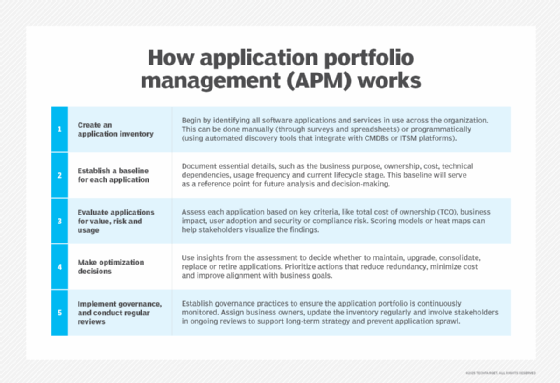
Application portfolio management can help enterprises compare software usage, ownership, cost, risk and business value across applications.
Low usage is not always failure
Low usage is easy to misread.
A feature might be ignored because no one knows it exists. It might not be enabled for the right roles, or it might need data or permissions that are not yet available. It might have been included in the contract but never tied to a real workflow.
Or it might simply not matter.
Those are different answers.
Before treating low usage as failure, teams should go back to the reason the feature was bought or enabled. What was it supposed to replace? Who was supposed to use it? Was the old process retired? Did training happen at the right point in the rollout? Did the feature depend on another system change that never arrived?
High feature use deserves the same skepticism.
A used feature is not always a valuable feature.
A feature might be popular because it saves time. It could also be popular because it helps people get around a weak process. A report export might be heavily used because users need offline analysis. It could also mean the system does not give them the answer where the work happens.
Feature use should start a conversation. It should not end one.
A used feature is not always a valuable feature.
Usage data still needs a decision
Usage data is most useful when it changes what the organization does next.
It can point to unused licenses, redundant tools, training gaps, feature confusion and unexpected dependencies. It can help with SaaS sprawl, subscription reviews, license reallocation and SaaS management. It can also give software asset management teams a starting point for portfolio discussions.
But the number should not make the decision by itself.
Low usage might point to waste, or it could also point to a rare workflow that cannot fail. High usage might point to value. It could also point to a required tool that makes users work too hard.
Application portfolio management needs that distinction. A portfolio review should connect activity to purpose, risk, cost and workflow importance.
Start with the tool people are defending, renewing or trying to cut.
Who depends on it? What work does it support? What breaks without it? What old process was supposed to go away? What would users do if the tool disappeared tomorrow?
The enterprise should count usage. Then it should ask what the usage means.
Better questions for software value reviews
A software value review should connect activity metrics to business purpose, workflow evidence and outcomes.
Ask these questions before judging value from usage alone:
• What business problem was this software bought to solve? • Which workflow was supposed to improve? • Which users or teams depend on it? • Which features matter most to the process owner? • Does high usage reflect value, obligation or friction? • Does low usage reflect irrelevance, poor training or bad fit? • Are users exporting data because the system view is not trusted? • Has the software reduced manual work, errors, cycle time or support tickets? • Did the organization retire the old tool or process it was meant to replace? • Who decides whether the software is still worth funding?
The point is not to ignore usage metrics but to make them answer to business value.
James Alan Miller is a veteran technology editor and writer who leads Informa TechTarget's Enterprise Software group. He oversees coverage of ERP & Supply Chain, HR Software, Customer Experience, Communications & Collaboration and End-User Computing topics.