
Microsoft Outlook is far and away the most common email client for enterprise use.
The feature-rich Outlook is an excellent enterprise-grade email client, especially in organizations where users work with Microsoft Office and Office 365 because it integrates with both suites. The licensing fees and other factors can push IT toward finding alternatives to Outlook, however.
Fortunately, there are some alternate enterprise email clients organization can turn to that provide comparable features for cash-strapped organizations. Even though non-Outlook enterprise email clients may not provide full-scale integration with the organization's office suite that Microsoft Outlook does, they still have potential.
IT pros should understand where these alternatives to Outlook excel and where they fall short.
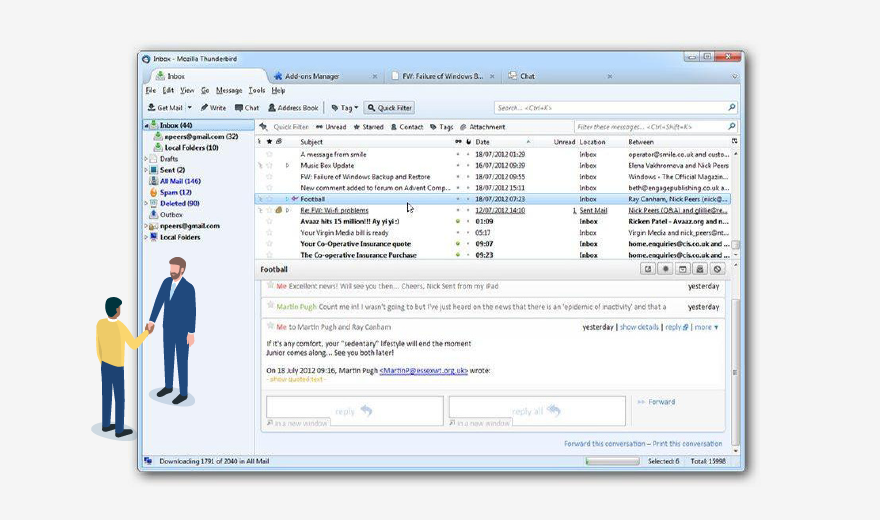
Mozilla Thunderbird is a well-known, free and open source Outlook alternative. Mozilla Thunderbird email runs on Linux, Microsoft Windows and Apple macOS. It also integrates directly with the Mozilla Firefox web browser.
Thunderbird supports basic calendar and chat functions. Like other enterprise email clients, IT can design its servers to run Post Office Protocol 3 (POP3), which allows users to move emails from a remote server directly to their devices. IT may also consider the Internet Message Access Protocol (IMAP), which allows users to access emails stored in a network database and interact with them as though they are local emails.
Ultimately, Thunderbird is not as polished as Outlook because Mozilla simply does not have the resources to pour into email client product development. For example, Mozilla's email developers rely on user reporting to fix bugs.
There are even some unresolved bugs that have persisted through several versions of Mozilla Thunderbird email, such as corrupting data in POP3 folders, errors with saving and uploading large attachments, and incompatibility with McAfee Anti-Spam. IT can work around these problems by using alternate antispam add-ons and working with Thunderbird's linking feature for large attachments.
Where Mozilla Thunderbird email excels is its range of compatibility, which Outlook falls short on. Thunderbird works natively on Linux and Unix. Linux and Unix can only run Outlook as a web app.
Outlook has many features that Thunderbird needs add-ons to match, such as delayed email delivery and Google Calendar connectivity. Thunderbird does allow IT to design the UI and select features to match the exact needs of its users.
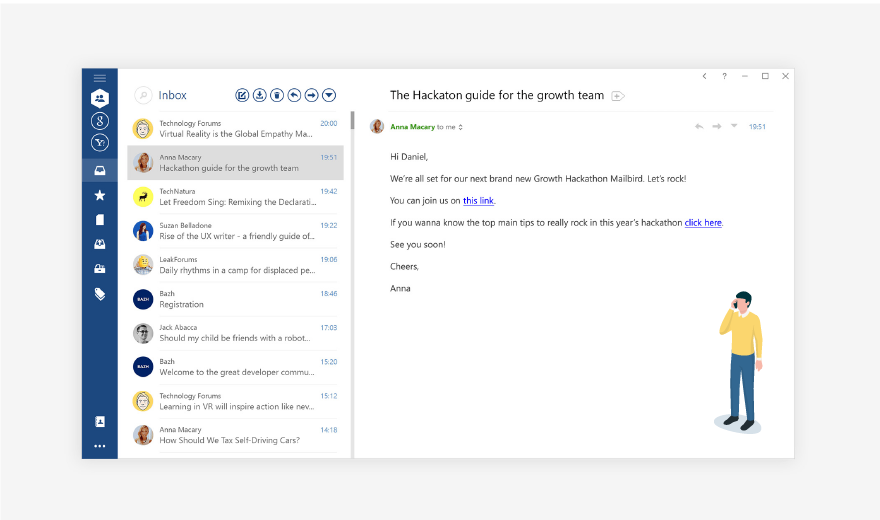
Mailbird's developers designed it with a straightforward UI and simplistic feature selection because they found that most enterprise email clients were more feature-intensive than some users needed.
Mailbird email allows users to switch between accounts and mute email notifications, for example. Some of Mailbird's features, such as the calendar, require a paid subscription, but Mailbird supports Google Calendar and Facebook event integration, making the pay-to-use calendar a more attractive option at a fraction of Outlook's licensing cost. Other applications, such as WhatsApp, are free to integrate, as well.
Outlook features Microsoft Edge integration, and Thunderbird features Mozilla Firefox integration. Mailbird email, on the other hand, has a built-in app section that can open add-on web features without leaving the business email client.
Organizations can also integrate IMAP and POP3 with its servers. The only drawback is that IT must input the server information and connect each endpoint manually.

The FastMail client is a paid service that is a cheaper email client for organizations. It supports IMAP and POP3 server integration and high-level antispam detection to go along with its highly customizable feature set and UI.
IT can choose from several options for email viewing, text formatting, rule-based email filtering and email notification settings in FastMail. FastMail's calendar function supports event notifications and invites, as well as calendar syncing with other web applications.
Alternate enterprise email clients aren't known for security, but the FastMail client offers several methods of two-factor authentication (2FA), including an authenticator app that generates new logon codes, an authentication device that provides a one-time password or a text message code sent to a mobile device. When a user is on his mobile device, he must use an authentication app because mobile devices do not support 2FA for FastMail.
With the FastMail client, users can send email attachments of up to 50 MB, which is more than double the limit of Outlook. This feature may be less impressive than it sounds in many use cases, however, because users tend to send files through a shared database or cloud storage system.

The Zoho Mail client is part of the Zoho Corp.'s Office Suite, a paid web-based suite. There is a free version, but it is missing many of the crucial features, such as IMAP and POP3 server integration.
If an organization transitions away from Microsoft Office to Zoho's suite, the Zoho Mail client provides many of the same benefits Outlook did for Microsoft Office, such as maintaining user account settings across the suite. The Zoho Mail client works like a social media platform with user tagging, an organization-wide directory, and file or folder sharing in a chat-like function.
IT can set user profiles to aggregate multiple email identities so users can keep up to date with work email and shared emails for job applicants or sales solicitations, for example. Users can set automatic response emails, thread-style email chain viewing and other standard features for enterprise email clients.
If IT adopts Zoho Mail it may be well served to also use the entire suite in place of Microsoft Office.