
Is your cloud storage ready for AI workloads?
Cloud storage design directly impacts AI performance, scalability and cost. Learn how to choose the right storage types, optimize data pipelines and apply best practices.

At a high level, modern cloud storage systems all do the same thing -- house data -- in the same basic way. Yet, in the context of enterprise AI adoption, cloud storage becomes more interesting. Since many AI applications are so data-intensive, storage system design and configuration play a key role in AI performance, scalability and cost optimization.
Enterprise cloud storage spending is projected to grow from $57 billion in 2023 to $128 billion by 2028, driven heavily by AI demand, according to Omdia, a division of Informa TechTarget, research.
Cloud storage plays a vital role in AI success. Read on for guidance as we explain how to evolve your organization’s cloud storage strategy for AI.
An overview of cloud storage systems
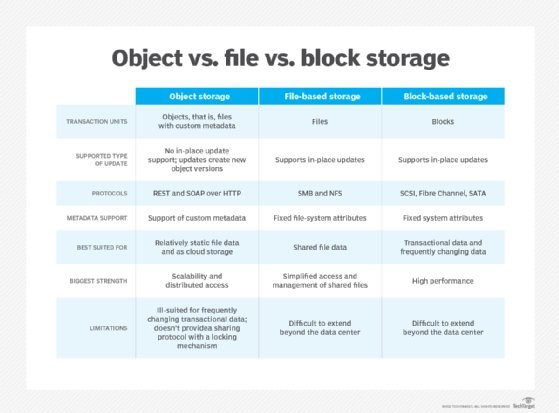
Part of the reason why cloud storage strategy affects AI is that cloud providers offer different types of storage solutions. The main options include:
-
Object storage. Object storage services, such as Amazon S3 and Azure Blob Storage, enable organizations to store vast quantities of data in a relatively unstructured way.
-
Block storage. Block storage, such as Azure Disk Storage and Amazon Elastic Block Store, are designed mainly for hosting file systems used by cloud servers.
-
File storage. File storage services, such as Amazon Elastic File System, can also be used to provide storage for cloud servers, although performance is usually a bit slower.
-
Databases. Modern cloud offers a variety of managed database services, which can host both structured and unstructured data.
How cloud storage affects AI workloads
All of the storage systems types described above can host the data that powers AI workloads. However, the performance, cost and security of AI can vary significantly depending on which cloud storage option a business chooses.
For instance, consider the common AI use case of training a model. In most cases, training data could reside in any type of cloud storage system. But depending on the following considerations, one type of storage might be better than others.
-
Scalability. For hosting very large amounts of data, object storage is usually ideal because its scalability is virtually unlimited.
-
Data structure. If you’re training a model using a variety of different types of unstructured data -- such as documents and media files -- object storage works well because it can accommodate any type of information. However, when using more structured types of data -- for instance, if you're training a model based on entries from log files -- a structured database is likely to deliver better performance.
-
Training speed. If you need to train a model particularly quickly, a storage system with high I/O speed can help. For example, I/O rates on services like EBS can be up to about 20 times faster than those for S3. RAM-based databases also offer very high I/O performance, but they tend to be very costly as well.
-
Cost. Cloud storage systems come at varying costs. Measured in terms of cost per gigabyte of data, object storage is usually the cheapest way to store data in the cloud, which makes it attractive if you have a very large training data set to work with. But there are exceptions; for example, a database might prove more cost-effective if you have many small, structured data assets -- whereas object storage tends to be most affordable when working with files of widely varying sizes.
Variables like these illustrate the importance of weighing competing pros and cons when selecting a cloud storage system for AI. For instance, if cost optimization is a priority when training a model, it makes most sense to use object storage. Alternatively, block storage or an in-memory database are a better choice if a primary goal is to reduce overall training time.
Cloud storage best practices for AI workloads
In addition to selecting the ideal type of cloud storage for a given AI workload or use case, businesses should also consider best practices like the following, which can help to optimize the performance and cost of cloud storage in the context of any AI deployment.
1. Clean data
Data cleaning is the process of removing inaccurate, redundant or otherwise low-quality data from a data set. Cleaning AI data is important for improving AI model performance. But it can also reduce storage costs and increase storage scalability by reducing the overall amount of data that cloud storage systems need to house.
2. Implement observability for data pipelines
To ensure that the cloud storage you use performs as well as expected, monitor and observe data pipelines -- meaning the routes that data takes as it moves between storage systems and AI workloads.
Observability helps identify bottlenecks, such as a specific file type that takes longer than it should to reach an AI application. It can also help with cost monitoring by tracking how much data you're storing and moving. Keep in mind that many cloud storage services are priced not just based on overall storage volume, but also on how frequently customers transfer or access data.
3. Consider storage tiers
Some types of cloud storage systems -- particularly object storage -- offer multiple storage tiers. They usually consist of three main categories: hot, warm and cold. The hotter the storage tier, the faster workloads can access data, but the more customers pay.
To optimize the balance between storage cost and performance, select the right storage tier based on workload type. For instance, during model training, it makes most sense to keep data in hot storage, where models can ingest it faster. After training, if the organization wants to keep training data on hand in case it decides to retrain a model later, the data can migrate to cold storage.
4. Ensure data protection
As with any type of workload, you must protect the data that AI models consume and generate by backing it up. Although cloud storage services rarely experience downtime, they can still fail. Plus, users or AI applications themselves might accidentally delete data, making it critical to have backups on hand.
For these reasons, businesses should invest in data protection options for cloud storage systems. The best way to do this depends on the type of storage system and data in question. In some cases, it might suffice to simply make copies of the data and store them in the same cloud as the primary data. But for added reliability, consider copying data to a different cloud or to on-prem storage, which will help ensure that it remains available if the primary cloud fails. Configuring backup storage to be immutable -- which makes it impossible to delete or modify data -- can also enhance protection by preventing the malicious or accidental erasure of backups.
Chris Tozzi is a freelance writer, research adviser, and professor of IT and society. He has previously worked as a journalist and Linux systems administrator.