plus69free - Fotolia
How do data processing units support enterprise storage?
While only a handful of hardware vendors offer DPUs, the technology has significant implications for IT storage systems -- and the admins who manage them.

While data processing units are a hot trend in IT storage, the basic concept behind them is not entirely new.
Modern computer operating systems, such as Windows and Linux, perform computationally intensive tasks not directly related to the system's primary workload. Over the last few decades, IT vendors have found creative ways to offload some of these tasks to specialized hardware. This hardware frees up CPU resources to run the system's primary workload. Data processing units (DPUs) are one of the latest examples.
In the 1980s and early 1990s, for instance, systems created to run computer-aided design applications often used a math coprocessor to handle mathematically intensive operations. As a result, the primary CPU wouldn't need to handle those tasks. In more recent years, hardware vendors have introduced network cards that offload TCP/IP-related tasks from the CPU, as well as dedicated GPUs that prevent a system's CPU from wasting resources to render graphics.
What is a Data Processing Unit (DPU) and How Does it Work?
Data processing units adhere to this same basic concept of hardware offloading, but with one key difference: while earlier accelerators typically offloaded a specific class of computations, DPUs are designed to offload specific infrastructure services associated with moving and securing data across servers and networks.
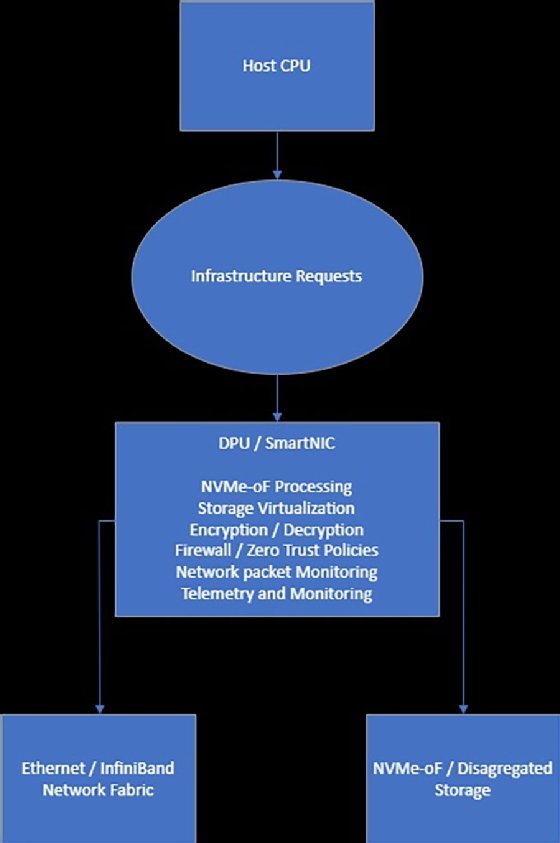
Modern DPUs contain a multi-core CPU, which is usually ARM-based. Additionally, the DPU features a high-performance NIC, operating at 25 gigabits per second or higher, and a hardware acceleration engine that commonly handles tasks related to networking, security and storage.
The DPU is positioned within the server's I/O path, sitting between the host CPU and external networks or storage resources. Its job is to offload storage I/O and dependency services such as packet processing or encryption. While the DPU can sometimes improve storage performance, its main job is to offload these tasks from the CPU, thereby allowing the CPU to focus more on business workloads and less on infrastructure tasks. As an example, Nvidia's BlueField Storage Architecture sits between the host CPU and the network. BlueField DPU's dedicated CPU handles storage, networking and security-related processing, thereby lessening the load on the system's main CPU.
The Role of DPUs in Modern Data Centers
One of the big challenges for modern datacenters is that infrastructure has increasingly become software defined. Although this software-defined approach is undeniably flexible, it is not without its tradeoffs. Specifically, CPU cycles that might better be used by an application are instead spent managing hardware. This is why DPUs matter. A DPU allocates a dedicated CPU to the task of managing certain infrastructure.
As previously noted, a DPU is more than just a high-end NIC. It doesn't just move packets between a network and a host. Instead, the DPU's dedicated CPU enables the device to inspect traffic and enforce policies before the traffic ever reaches the host operating system.
This distinction goes well beyond improving performance. It means that zero-trust principles can more easily be applied at the infrastructure level. Normally, a host server runs various security controls (such as firewall rules or encryption policies) within the host operating system. However, the simple fact that security controls reside at the host level means that if the host were to become compromised, then those security controls are likely to be neutralized. A DPU doesn't eliminate the need for host-level security. It's always important to practice defense in depth, but DPUs enable organizations to create an independent trust boundary between hosts and networks.
DPUs can also help organizations to create hardware isolation boundaries. Whereas organizations have traditionally relied on hypervisors to enforce hardware isolation, a DPU can reduce the CPU overhead associated with hypervisor functionality by moving certain network and storage policy tasks to dedicated hardware. As an example, a DPU may be able to enforce storage access permissions, bandwidth limits and QoS policies, network segmentation, and even the use of encryption keys and telemetry collection. Placing such controls outside of the hypervisor means that tenants are far less likely to interfere with one another. Additionally, using a DPU may simplify compliance by ensuring that security policies remain in effect regardless of what someone might install within a virtual machine.
Why DPUs Matter for Storage Performance and CPU Efficiency
Modern servers often spend significant CPU resources on storage-related tasks. Tasks such as NVMe driver processing, NVMe-oF transport and TLS or IPSec encryption and decryption all consume CPU cycles. Furthermore, the amount of required CPU overhead will only increase as storage gets faster. In fact, it's possible that the CPU could eventually become the main storage performance bottleneck.
DPUs can help with this problem by offloading various CPU-intensive tasks. Some of these tasks include NVMe-oF protocol handling, storage queue management, encryption, compression, traffic shaping and some NVMe command handling, just to name a few.
Storage Use Cases and When to Use a DPU
Although DPUs can be tremendously beneficial, both from a security and a storage standpoint, not every environment or workload is going to benefit from a DPU.
DPUs work especially well in environments that use high-performance NVMe-oF fabrics or environments that operate large-scale multi-tenant storage platforms. DPUs are also frequently used alongside AI workloads that need to ingest vast amounts of data. AI training clusters are also sensitive to storage and network bottlenecks. By offloading NVMe-oF traffic, RDMA networking and other data-movement tasks from the host CPU, DPUs help keep high-value GPU resources fully utilized.
Likewise, newer hyperconverged infrastructure (HCI) and software-defined infrastructure platforms are increasingly being built around DPUs.
Although DPU use remains optional, even in these types of environments, DPUs tend to become essential when CPU cores start to become saturated as a result of network or storage-related overhead. In such situations, NVMe-DPU offload can significantly improve performance. DPUs are also especially valuable when an organization needs to ensure a specific level of throughput or when an organization wants to perform inline packet inspections.
Conversely, DPUs probably aren't going to offer much benefit to an organization with legacy SAN environments and low NVMe adoption. A DPU is probably also going to be overkill for compute-bound workloads with relatively modest IO traffic. The exception, of course, is that such environments may still find DPUs useful from a security standpoint, but DPU storage performance gains will likely be modest at best.
Top DPU Vendors
According to a recent Fortune Business Insights article, "the global SmartNIC and DPU market is expected to exceed USD 4 billion by 2027, reflecting the increasing integration of DPUs into next-generation data center architectures to support cloud and AI workloads." This same article identifies the key DPU companies as being:
- Nvidia Corporation.
- Intel Corporation.
- Advanced Micro Devices.
- Marvell Technology.
- Broadcom Inc.
- Amazon Web Services, Inc.
- Microsoft Corporation.
- Fungible, Inc.
- Netronome Systems Inc.
- Napatech A/S.
Brien Posey is a former 22-time Microsoft MVP and a commercial astronaut candidate. In his more than 30 years in IT, he has served as a lead network engineer for the U.S. Department of Defense and a network administrator for some of the largest insurance companies in America.