
carloscastilla - Fotolia
Guide to cloud container security risks and best practices
Containers are an integral part of a growing number of production environments. But they can become security risks if not managed correctly.

Cloud containers are a hot topic, especially in security. Technology giants Microsoft, Google and Facebook all use them. Google uses containers for everything it runs, totaling several billion each week.
The past decade has seen containers anchoring a growing number of production environments. This shift reflects the modularization of DevOps, enabling developers to adjust separate features without affecting the entire application. Containers promise a streamlined, easy-to-deploy and secure method to implement specific infrastructure requirements and are a lightweight alternative to VMs.
Let's examine the evolution of containers and discuss why cloud container security can't be overlooked.
How do cloud containers work?
Container technology's roots were based on partitioning and chroot process isolation developed as part of Linux. Modern containers are expressed in application containerization, such as Docker, and in system containerization, such as Linux containers (LXC). Both enable IT teams to abstract application code from the underlying infrastructure as they work to simplify version management and enable portability across various deployment environments.
Containers rely on virtual isolation to deploy and run applications that access a shared OS kernel without the need for VMs. Because they hold all the necessary components -- files, libraries and environment variables -- containers run desired software without worrying about platform compatibility. The host OS constrains the container's access to physical resources, so a single container cannot consume all of a host's physical resources.
The key thing to recognize with cloud containers is they are designed to virtualize a single application. Consider a MySQL container. It provides a virtual instance of that application and that is all it does. Containers create an isolation boundary at the application level rather than at the server level. If anything goes wrong in that single container -- for example, excessive resource consumption by a process -- it only affects that individual container, not the whole VM or whole server. It also eliminates compatibility problems between containerized applications that reside on the same OS.
Major cloud vendors offer containers as a service, such as Amazon Elastic Container Service, AWS Fargate, Google Kubernetes Engine, Microsoft Azure Container Instances, Azure Kubernetes Service and Oracle Cloud Infrastructure Kubernetes Engine. Containers can also be deployed on public or private cloud infrastructure without the use of dedicated products from a cloud vendor.
Containers are deployed in two ways: by creating an image to run in a container, or by downloading a pre-created image, such as those available on Docker Hub. Docker -- originally built on LXC -- is by far the largest and most popular container platform. Although alternatives exist, Docker has become synonymous with containerization.
Cloud container use cases
Enterprises use containers in a variety of ways to reduce costs and improve the reliability of software. Among the most common and beneficial are the following:
- Microservices architecture. Containers are ideal for microservices-based application development, where apps are broken into smaller, independently deployable services. This improves scalability and simplifies development cycles. Kubernetes orchestrates the deployment, scaling, and management of these services, enabling enterprises to deploy updates with minimal downtime.
- Hybrid and multi-cloud deployments. Containers enable cloud-agnostic portability, letting enterprises run the same workloads across AWS, Azure, Google Cloud Platform or on-premises without changes to the application. This supports disaster recovery, cost optimization and vendor neutrality strategies.
- DevOps and continuous integration/continuous delivery automation. Enterprises use containers in CI/CD pipelines to ensure consistency from development to production. Containers enable developers to test in isolated environments that mirror production, reducing bugs and streamlining integration and deployment workflows.
- Legacy application modernization. Many enterprises use containers to refactor legacy monolithic applications into more agile and maintainable services. By containerizing older apps, organizations can incrementally modernize their infrastructure without full rewrites.
- Edge and IoT deployments. Containers can be deployed at the edge for use cases such as IoT, manufacturing and retail. Container runtimes such as K3s (lightweight Kubernetes) help IT staff support orchestration at the edge with limited resources.
- Security and policy enforcement. By containerizing applications, enterprises can enforce policy as code using services like Open Policy Agent and manage runtime security through integrations with cloud workload protection platforms (CWPPs) and cloud-native application protection program (CNAPP) tools.
Cloud containers vs. VMs
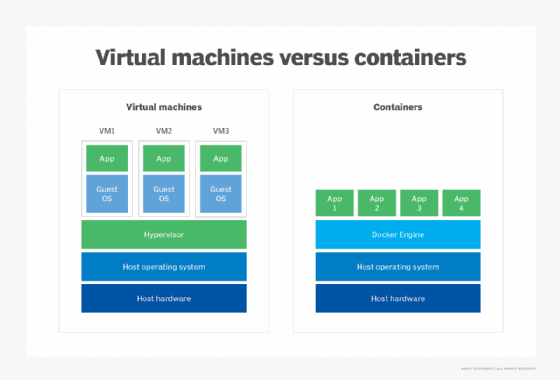
Compared with VMs, container deployments consume only a minimal amount of resources. Unlike VMs, they don't need a full OS to be installed within the container, and they don't need a virtual copy of the host server's hardware.
Containers need only minimal resources to perform the task they were designed for -- a few pieces of software, libraries and the basics of an OS. As a result, enterprises can deploy two to three times as many containers on a server as VMs, and they can be spun up much faster than VMs.
Benefits of containers
Cloud containers are portable. Once a container has been created, it can easily be deployed to different servers. From a software lifecycle perspective, this enables enterprises to quickly copy containers to create environments for development, testing, integration and production. From a software and security testing perspective, this ensures the underlying OS is not causing a difference in the test results.
Containers also offer a more dynamic environment. IT can scale up and down more quickly based on demand, keeping resources in check.
Challenges of containers
One downside of containers is the issue of splitting the virtualization into a lot of smaller chunks. When there are just a few containers involved, it's an advantage because the team knows exactly what configuration it is deploying and where. If, however, the organization fully invests in containers, it's quite possible to have so many containers that they become difficult to manage. Imagine deploying patches to hundreds of different containers. Without an easy process, updating a specific library or package inside a container image due to a security vulnerability can be difficult.
Container management is often a constant headache, even using systems such as Docker that aim to provide IT with easier orchestration.
Cloud container security risks
While containers offer many advantages, they also introduce unique security risks that enterprises must address. The ephemeral and dynamic nature of containers demands a modern security approach that is proactive, automated and integrated into DevOps workflows. The following are some of the key risks that organizations should prioritize with cloud containers:
- Vulnerable images. Containers are built from images, which often include system libraries, runtime dependencies and custom code. Many enterprises use public base images from registries such as Docker Hub, which could contain unpatched vulnerabilities or malware. Organizations should scan images continuously, use signed and verified sources, and establish image allowlists to ensure all builds are secure.
- Container escape. Containers are isolated, but not impenetrable. A container breakout occurs when a malicious actor escapes the container runtime to access the host OS. This risk is elevated if containers run with privileged access or root permissions. Mitigations include running containers as non-root users, using kernel security modules, such as AppArmor and SELinux, and deploying sandboxed runtimes, such as gVisor or Kata Containers. In cloud environments, some of these mitigation options might be difficult or impossible due to client lack of control and configuration.
- Secrets exposure. Storing credentials, API keys or tokens inside containers or environment variables poses significant risk. If compromised, attackers could gain access to databases, cloud resources or internal assets and services. Best practices include using secret management tools, such as HashiCorp Vault or AWS Secrets Manager, and avoiding hardcoded secrets in images or Git repositories.
- Supply chain attacks. Containers are part of a broader software supply chain that includes code, images, pipelines, registries and CI/CD tooling. Attackers can exploit vulnerabilities in this chain to inject malicious code or compromise deployments. Mitigation requires enforcing code signing and image integrity, using software bills of materials where possible to track dependencies, and monitoring for anomalies in build pipelines.
- Runtime threats. Once deployed, containers remain vulnerable to attacks, including reverse shells, cryptomining malware and lateral movement in Kubernetes clusters. Security teams should deploy runtime protection tools -- most CNAPP and CWPP platforms prioritize this functionality -- to monitor system calls, container behavior, and network activity to detect and stop threats in real time.
- Misconfigured orchestration. Misconfigurations in Kubernetes or other orchestrators are among the top container security risks. Common mistakes include exposing Kubernetes dashboards and APIs to the internet, running default or weak authentication settings and granting broad cluster roles to service accounts.
- Insufficient network segmentation. Containers often communicate across virtual networks in a cluster. Without proper network policies, any compromised container could potentially facilitate attackers moving laterally. Enforce least privilege using Kubernetes network policies, Calico or service meshes, such as Istio, to limit connectivity.
Cloud container security best practices
Once cloud containers became popular, the focus turned to how to keep them secure. Consider the following:
- Set access privileges. Docker containers once had to run as a privileged user on the underlying OS. If key parts of the container were compromised, root or administrator access could potentially be obtained on the underlying OS, or vice versa. Today, Docker supports user namespaces, which enable containers to run as specific users.
- Deploy rootless containers. These containers add an additional security layer because they do not require root privileges. Therefore, if a rootless container is compromised, the attacker will not gain root access. Another benefit of rootless containers is that different users can run containers on the same endpoint. Docker currently supports rootless containers, but Kubernetes does not.
- Consider image security. Pay attention to the security of images downloaded from public repositories, such as Docker Hub. By downloading a community-developed image, the security of a container cannot necessarily be guaranteed. Images can be scanned for vulnerabilities. This step can provide some assurance, but its verification processes might not be thorough enough if you are using containers for particularly sensitive applications. In this case, it would be sensible to create the image yourself to ensure your security policies have been enforced and updates are made regularly. Note, however, that company-made images are only as secure as employees make them. Proper training for those creating images is critical.
- Monitor containers. Treat containers for sensitive production applications in the same way as any other deployment when it comes to security. If a container starts acting oddly or consuming more resources than necessary, it's easy enough to shut it down and restart it. It's not quite a sandbox, but containers provide a way to keep untrusted applications separate and unaware of other applications on the endpoint.
- Prioritize security threats and vulnerabilities. Follow container and cloud container security best practices and be aware of container security vulnerabilities and attacks. Proper deployment and management are key. Regularly scan containers to ensure images and active containers remain updated and secure.
- Do not forget the security of the server hosting the containers. If your organization is using a cloud container provider, that company is responsible for operating, patching and hardening the service.
One final point: Although containers are a newer technology, this doesn't mean traditional security policies and procedures shouldn't be applied.
Rob Shapland, Ben Cole and Kyle Johnson previously contributed to this article.
Dave Shackleford is founder and principal consultant at Voodoo Security, as well as a SANS analyst, instructor and course author, and GIAC technical director.