Part of:Assess your cloud infrastructure for AI readiness
Is your compute strategy ready for AI workloads in the cloud?
AI workloads require tailored compute strategies. Learn how hardware, cloud models and deployment choices affect performance, scalability and cost optimization.
But the exact types of compute resources that AI workloads need, and the best way to obtain them, can vary widely. This is why it's important for business leaders to understand the nuances of the relationship between compute and AI, and how best to align their organizations’ compute strategies with their AI investments.
Read on for guidance as we unpack the complexities of AI workloads and compute, as well as best practices.
Why AI workloads need compute
AI workloads require tremendous compute resources because most AI models work by parsing vast amounts of information. To do that, they need lots of computing power.
Traditional applications -- meaning those that aren’t powered by AI -- tend not to be so computationally intensive because they rely solely on preprogrammed internal logic in the form of computer code. Executing traditional code usually doesn’t consume so many compute resources.
But when your workloads need to interpret huge quantities of data -- as AI workloads do -- they require exponentially more compute power than conventional apps.
How compute needs vary based on AI workload type
But again, the specific types of compute that AI workloads require can vary significantly from one workload to another. Here’s a look at the main points of divergence.
1. GPUs vs. CPUs
Compute hardware -- meaning the computer chips that actually perform computational operations -- come in multiple forms.
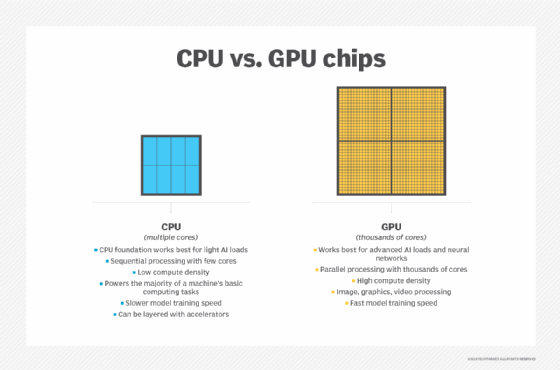
The simplest and most traditional are CPUs. CPUs are good at executing code quickly. However, their ability to perform multiple tasks at once is limited because most CPUs have relatively few cores -- usually no more than a few dozen -- and each core can handle only one task at a time.
This differentiates CPUs from GPUs, which can have thousands of cores. Each core is less computationally powerful than a typical CPU core, but because they have so many cores, GPUs can perform many more tasks simultaneously.
In the context of AI, this means that workloads that benefit from parallel computation -- the ability to perform multiple tasks at once -- work best when they are powered by GPUs. These include most types of generative and agentic AI models, which rely on deep learning and neural networks to operate. AI models based on deep learning and neural networks must parse many data points -- especially during the training process, through which models identify patterns in existing data. The ability to analyze thousands of data points at the same time speeds up the performance of these workloads.
In contrast, more traditional types of AI -- like AI systems that use simple preprogrammed logic instead of machine learning -- usually won’t see a major performance boost from running on GPUs instead of CPUs. In addition, GPUs won’t necessarily benefit AI models during inference -- the process through which a trained model responds to prompts -- especially if the inference data is limited in scope. But this is not always the case; models that need to interpret large prompts often perform better using GPUs.
It’s worth noting, too, that other, more specialized types of AI hardware exists beyond GPUs -- such as NPUs, TPUs and FPGAs. These are typically designed for specific types of advanced AI workloads and can boost performance even more than a GPU.
Note, too, that all AI workloads require access to a CPU of some kind, since CPUs execute the standard logic used to run AI apps. This is why every server includes CPUs. If servers also provide access to GPUs, AI models can use them to execute computationally intensive tasks -- i.e. training -- that work better when large amounts of parallel compute resources are available.
2. Burst vs. sustained computing
Compute resources can also be categorized based on the duration of their availability. There are two main options:
Burst compute resources. These provide access to a large quantity of computing power on a temporary basis. Cloud-based IaaS options are a convenient way to obtain burst compute, since they essentially let organizations rent servers and them stop paying for them when they no longer need them.
Sustained compute resources. These provide access to fixed computing power on an ongoing basis. Businesses can obtain sustained compute resources by purchasing their own servers, or they can use a cloud IaaS service. In the latter case, reserve instances, which provide pricing discounts on compute power in exchange for a long-term commitment to use cloud servers, can save money without compromising on compute availability.
In general, burst resources are best for AI tasks that cause large but temporary spikes in compute usage. A prime example is model training, which consumes vast compute resources, but ends once all training data has been processed. Batch inference -- meaning the feeding of a series of prompts into a model in a batch -- also requires significant compute resources on a temporary basis.
Meanwhile, for tasks that occur regularly and continuously -- such as on-demand or real-time inference -- sustained compute power is best.
3. Reserve vs. on-demand compute strategies
The way a business consumes and contracts for compute resources can have a major effect on the relationship between compute cost and AI performance.
For example, reserve cloud server instances can help save money on compute for AI workloads that require ongoing access to a fixed capacity of compute resources.
Another way to save money on cloud compute is to choose spot instances. These are cloud servers that are available at steep discounts -- sometimes as much as 90% less than standard cloud servers -- with the caveat that the cloud provider can shut down the instance at any time. Spot instances don’t work well for AI workloads that need ongoing compute power, like inference.
However, spot instances can be a great way to save money for workloads that can be disrupted and restarted -- like training. One downside of using spot instances for model training is that it might delay the overall training process, because training pauses whenever the cloud provider revokes its spot instances, but the cost savings might be worth it.
4. Bare metal vs. virtualization vs. containers
A fourth factor to consider is the density of servers that host AI workloads. This refers to how many workloads fit on a single server, as well as how much overhead -- in terms of software services necessary to run and orchestrate those workloads -- the servers contain.
There are three main ways to deploy AI workloads on modern servers, each with varying density and overhead tradeoffs.
Bare metal. Workloads run directly on physical servers. This minimizes overhead because there is no virtualization layer or virtualized operating systems, but it can make workloads less portable. It also doesn’t provide isolation between workloads. If a workload that is hacked or becomes unstable, it can easily affect other workloads.
Virtualization. Virtualization enables a single physical server to host multiple workloads, each inside a dedicated virtual machine. The virtual machines are usually portable between servers and they provide workload isolation. But they also increase compute overhead, because running the virtual machines requires additional compute power.
Containerization. Containers offer a middle ground between bare metal and virtualization. They run workloads in semi-isolated environments. Containers create some overhead, but generally less than VMs. One drawback is that because the isolation between containers is limited, it’s possible for problems in one container to affect other workloads.
When it comes to deploying AI workloads, businesses should choose a deployment model that provides the best balance between efficient use of compute resources to avoid unnecessary overhead, workload isolation requirements and workload portability.
Just because certain types of compute hardware -- like GPUs -- can speed up AI performance doesn’t mean that the cost is worth the benefit.
Also worth noting is that with virtualization, it’s typically challenging for AI workloads to use physical hardware devices, like GPUs, to boost performance. This is sometimes possible to do using a method known as passthrough, but it doesn’t work with all types of servers or virtualization platforms, and it can add complexity to workload deployment. With bare metal and containers (usually), direct workload access to physical hardware devices is possible.
Best practices for AI compute management
Given the many compute options available for AI workloads, business leaders and IT organizations must work carefully to choose the ideal option for their needs. To do this effectively, they should consider the following best practices:
Identify AI performance needs. Just because certain types of compute hardware -- like GPUs -- can speed up AI performance doesn’t mean that the cost is worth the benefit. It’s important to determine which performance requirements the business actually needs to meet before investing in a certain type of compute.
Assess short-term vs. long-term needs. Short-term compute requirements -- like those necessary to support a model training process -- might differ from those the business faces in the long-term. Meeting these diverse needs might require choosing different types of compute resources, such as using the cloud to address short-term needs while investing in on-prem hardware for sustained, long-term computing.
Optimize compute utilization. Also critical is reacting to compute monitoring data by taking steps to optimize usage. One example might be consolidating workloads from multiple servers onto a single server if the latter has enough compute power to support them all. This can save money by allowing the business to stop paying for the additional servers.
Monitor compute utilization. Actual compute usage could vary from projections, which is why it’s important to track usage on a continuous basis.
Chris Tozzi is a freelance writer, research adviser, and professor of IT and society. He has previously worked as a journalist and Linux systems administrator.