Choosing an IT process automation platform for 2026
Enterprises that depend on large-scale IT processes must be strategic about their automation tools. Explore nine platforms to determine the best one for your organization.

The processes that occur in the context of IT work -- such as software installation, user account provisioning and incident response operations -- are numerous. They are also tedious and error-prone when completed manually.
But with help from IT automation platforms, IT teams can streamline and scale these processes.
IT automation platforms are software products that perform common IT-related tasks automatically, substantially reducing the time and effort IT staff must devote to them.
For enterprises that depend on complex, large-scale IT processes, IT automation provides these key benefits:
- Enhanced operational efficiency. Automating tasks, rather than relying on IT staff to perform them manually, delivers results faster. It can also help to reduce costs by enabling organizations to operate with smaller IT teams.
- Improved consistency and predictability. Automated workflows typically ensure processes will be completed in the same way, every time. Manual operations don't always guarantee this because there's a risk that different admins might perform the same task in different ways.
With so many IT automation platforms available, choosing the right one can be challenging. What's more, emerging technologies, such as AI agents, offer new approaches to IT automation -- but they're not always the right fit for every use case. This makes it even more important for businesses to think strategically about the IT automation tools they choose.
To help IT leaders navigate the complex IT automation ecosystem, this article compares nine popular products and lists important considerations for choosing a platform.
This article is part of
What is IT automation? A complete guide
How IT automation is changing in 2026
IT automation tools have existed since computer scientists first began writing scripts to automate workflows in the 1950s. But this ecosystem is currently undergoing significant changes, due especially to the integration of AI agents, or agentic AI technology, into IT automation platforms.
AI agents are autonomous software programs that use large language models (LLMs) to interpret user needs and then take action by connecting to software utilities, APIs or other tools that let them perform tasks. This reliance on LLMs is what distinguishes agentic automation from traditional IT automation tools, which rely on preprogrammed logic, such as scripted workflows, to carry out tasks.
AI agents can operate in more open-ended ways, without requiring every possible condition or action within a workflow to be spelled out ahead of time. But this can also be a limitation in cases where it's important to follow a specific process. For example, relying on AI agents to modify user permissions might create security risks, as agents could hallucinate and assign excess permissions.
The good news for organizations interested in taking advantage of modern IT automation is that both types of offerings -- those that use agentic AI and those that rely on more traditional, deterministic workflows -- are widely available and can often be used side by side.
Beyond agentic AI integrations, other recent trends in IT automation include a focus on low-code/no-code automation, which can implement automated workflows with minimum coding requirements. Although these offerings aren't new, increased investment in low-code/no-code automation reflects an ongoing effort to reduce the time and complexity that IT staff must devote to configuring automations.
Types of IT automation platforms
There are two basic ways to categorize IT automation tools. First, they can be sorted by functionality, with the main offerings including the following:
- Provisioning software. Products in this category can complete processes such as setting up user accounts and installing OS images on servers.
- Configuration management tools. These tools include any software that can automatically define, apply and manage configurations within software systems.
- Software installation tools. This category includes offerings that automate the process of installing and updating software applications on servers or PCs.
- Continuous integration/continuous delivery software. CI/CD tools automatically build and deploy software during the software delivery process.
- Monitoring and anomaly detection. Software in this category can monitor applications and detect anomalies that might signal performance or security issues.
- Help desk automation. Help desk automation tools streamline processes involved in operating an IT help desk, such as accepting user requests, translating them into tickets and managing the tickets until each request is complete.
IT automation platforms can also be categorized based on their scope and/or automation approach:
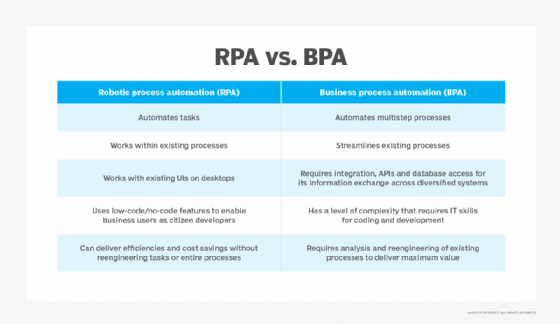
- Robotic process automation. RPA tools automate actions that humans would traditionally perform by clicking buttons within front-end interfaces. RPA is valuable for automating workflows in situations where traditional, command- or API-based scripting isn't feasible.
- IT process automation. ITPA typically refers to tools that automate back-end IT processes, such as installing software updates or setting up user accounts, rather than the types of front-end workflows that RPA supports. Most ITPA tools rely on APIs or software utilities to execute workflows.
- Infrastructure management. This category encompasses IT automation platforms that support infrastructure management needs, such as provisioning servers and cloud environments.
- Agentic automation. Some traditional IT automation platforms now include agentic AI features, but other products are emerging that are powered entirely by AI agents.
- Service orchestration and automation platforms. These platforms can be viewed as "automators of automators." They manage and scale workflows, often by connecting disparate IT automation tools that focus on specialized types of tasks.
In practice, many IT automation platforms span multiple categories, although some offer more extensive functionality in certain areas than others. For instance, Chef and Ansible are primarily infrastructure management platforms, but they can automate certain types of IT workflows, such as software installations and user provisioning. In that sense, they can meet some ITPA needs. However, they are less flexible in this respect than true ITPA platforms that can integrate with a wide variety of third-party applications and APIs to automate complex IT processes.
9 popular IT process automation platforms for 2026
Although this is by no means an exhaustive list of IT automation platforms currently available, this sampling -- listed in alphabetical order -- aims to capture key examples of the various types of products on the market, focusing on distinctive features and the types of use cases for which they are best.
1. Ansible
Red Hat Ansible is one of the most flexible open source IT automation frameworks. Using code-based configurations, Ansible can automate various common IT workflows, such as configuring OSes, installing applications, orchestrating complex workflows and managing infrastructure across multiple servers.
Key features
- Ansible uses code written in YAML, an easily readable data serialization language, to define workflows.
- Its modular design makes the platform highly extensible and able to support varying types of IT automation tasks.
- It can run across clusters or distributed infrastructure to operate efficiently at high levels of scale.
- Ansible offers AI agents as add-ons to help with tasks, such as generating automation code.
Potential downsides
- Ansible is a Linux-centric tool that offers limited Windows support.
- The platform's coding syntax is complex and presents a learning curve for new admins.
- Although graphical interfaces are available as add-ons, Ansible is primarily a CLI-driven automation platform. IT staff who prefer point-and-click interfaces might find the platform frustrating.
- Ansible offers less robust agentic AI capabilities than similar configuration management platforms.
Best for: Large-scale automation of core IT processes, such as software infrastructure and service provisioning, by technically skilled teams.
2. Chef
Like Ansible, Chef is a flexible, code-based IT automation framework. However, Chef is often considered more user-friendly than Ansible.
Key features
- Chef offers a simplified coding syntax based on the Ruby programming language. This is partly why Chef is often said to be more user-friendly than Ansible.
- It uses an imperative approach to process automation. This means admins write code that spells out the steps necessary to achieve a desired state within IT resources, and Chef then performs the work automatically.
- Chef offers robust support for automation processes in legacy environments that lack API support as well as for modern, cloud-based ones.
Potential downsides
- Some users might see Chef's imperative approach to IT process automation as a downside because it requires more extensive coding.
- Chef relies on a somewhat complex server-client architecture, which can be complicated to set up and manage.
- Resource overhead can be high, due especially to the load that Chef agents place on servers.
Best for: Automating frequently repeated IT processes in large-scale environments that include a mix of modern and legacy resources.
3. Glean
Glean has an extensive library of AI agents that can drive automations across an organization's various functions, including IT processes.
Key features
- Glean deploys AI agents that can perform tasks on demand by automatically determining how to execute complex workflows.
- It integrates with a broad variety of enterprise systems and platforms, including but not limited to IT tools.
- The platform can automate workflows across IT and other domains.
Potential downsides
- Although the platform can theoretically automate any type of IT process using custom agents, its core focus in IT automation is on user support and management. Back-end processes, such as software provisioning, have not historically been a major focus.
- Agent behavior might be somewhat unpredictable due to reliance on nondeterministic AI models.
Best for: Organizations seeking a general-purpose, AI-based automation platform that covers basic end-user IT tasks. Glean is less ideal for organizations that need powerful back-end automations or highly customizable and controllable workflows.
4. Kissflow
Kissflow is essentially a no-code development platform designed to help business users create software applications. These applications can automate some types of IT processes -- including tracking IT assets, such as PCs and networking equipment, and assigning tickets for help desk teams.
Key features
- No-code configuration offers a low barrier to entry.
- The platform offers a broad suite of integrations to help move data between other types of IT and business systems, such as HR and finance platforms.
- It includes generative and agentic AI features to help with writing automations and optimizing automated workflows.
Potential downsides
- Kissflow might not be flexible enough to implement highly customized workflows for advanced users.
- Its no-code approach offers less customizability and control.
- AI capabilities are mostly limited to helping users get more value out of the platform, rather than adding brand-new functionality.
Best for: Enterprises with limited IT staff resources seeking to empower business users to automate workflows on their own.
5. Moveworks
Launched in 2016 as an IT support automation product, Moveworks has expanded its focus in recent years while also investing very heavily in agentic AI technology as a cornerstone of IT automation.
Key features
- Moveworks enables low-code approaches to building custom AI agents that carry out IT tasks autonomously.
- It automatically draws on organizational knowledge bases to help contextualize and guide the behavior of AI agents.
- The platform can automate processes in other business domains, such as HR, in addition to IT.
Potential downsides
- The platform's AI-centric approach to automation might result in less control than methods that rely on deterministic tools instead of generative and agentic AI. Moveworks offers ways to control agent behavior by establishing rules that limit what agents can do, but these controls only go so far in guaranteeing consistent workflows.
- Some users report a high learning curve and extensive effort required to deploy the platform.
Best for: Organizations seeking to take full advantage of modern AI to automate IT processes while being able to tolerate some level of unpredictability in agent behavior.
6. ProcessMaker
Launched in 2000, ProcessMaker is a well-established traditional business process automation (BPA) platform that, in recent years, has expanded to include a number of AI-powered capabilities.
Key features
- ProcessMaker offers a no-code approach where users structure and automate tasks through a drag-and-drop interface.
- The platform integrates with FlowGenie to provide AI-driven process modeling and development.
- It can support IT automations as well as automations in other domains, such as finance and HR.
Potential downsides
- Some users complain that ProcessMaker's interface is more complex than similar BPA platforms and that automating processes involving numerous discrete steps can be challenging.
- Using AI features requires the use of the additional FlowGenie software that is also owned by ProcessMaker. This could potentially increase costs and create vendor lock-in risks.
Best for: Implementing general-purpose automation that includes, but is not limited to, IT process automation. The ability to use traditional BPA alongside agentic capabilities is also a benefit.
7. Pulumi
Pulumi is another open source IT automation offering. Its main distinction in this category is how it allows users to define processes and configurations using a variety of programming languages, while most tools require the use of a specific language or syntax.
Key features
- Pulumi takes a language-agnostic approach to IT automation.
- It offers extensive support for loops, conditionals and other programming capabilities. These can help admins write more complex automation rules.
- Automations can be embedded into application code, making it possible for applications to configure their own infrastructure -- as opposed to treating tasks such as infrastructure provisioning as separate processes performed by isolated tools.
- Neo, Pulumi's optional AI agent, can help generate automation code, as well as detect risks and compliance gaps. However, the platform's core automation capabilities don't depend on generative or agentic AI.
Potential downsides
- Although Pulumi code can be very powerful, its complexity can also make it challenging to maintain for non-coders.
- Detecting errors in Pulumi automations can be more difficult because it requires the ability to debug complex code.
Best for: IT teams that are already skilled at coding and want tight integration between IT process automation and software delivery and management.
8. Puppet
Like Ansible and Chef, Puppet is an open source tool that can automate a variety of IT processes. However, Puppet is distinguished by its heavy focus on a declarative approach to configuration management.
Key features
- Declarative automations enable users to describe how they want a system to behave. Puppet then enforces the desired configuration manually, without requiring admins to spell out the steps necessary to achieve it.
- Puppet can detect and correct drift -- deviations from desired state in IT resources -- in real time, resulting in greater configuration consistency across IT environments.
- The enterprise version of Puppet offers the Infra Assistant AI agent, which can help interpret infrastructure and design automations. Importantly, the core Puppet platform doesn't depend on AI technology; it automates tasks using traditional, logic-based approaches. Admins can optionally take advantage of agentic AI to accelerate management tasks.
Potential downsides
- Declarative automations can result in less control over how resources are configured because users leave it up to the automation platform to "decide" how to implement a desired state.
- It requires the use of a domain-specific language -- called Puppet -- which presents a learning curve for admins new to this platform.
Best for: IT teams that prefer a low-touch approach to large-scale automation and are comfortable allowing automation tools to make decisions for them.
9. Zapier
Introduced in 2011, Zapier is one of the longest-established BPA offerings in use today.
Key features
- Zapier uses a simple, "if this, then that" approach to automating workflows in areas such as ticketing, incident management and user provisioning.
- The platform fully supports no-code approaches to defining workflows but also offers the ability to customize processes using code if desired.
- Zapier's popularity and long history translate into a large selection of integrations.
Potential downsides
- Zapier requires workflows to be broken into simple steps, called Zaps. Although this simplifies workflow design, it can also mean that users must implement numerous steps to automate complex processes. Power users might prefer the ability to develop more complex automations in one go.
- It doesn't have a mobile app, although users can trigger workflows from mobile devices.
- Some users dislike Zapier's pricing, although exact costs and pricing vary depending on how the platform is used.
Best for: Enterprises where IT staff and nontechnical users both play a hand in developing automations. Zapier helps by enabling a no-code approach while also supporting more complex, code-heavy automations where desired.
Choosing the right process automation platform
Selecting the best process automation tool boils down to the following factors.
IT processes to be automated. As noted earlier, many general-purpose BPA products can only automate basic IT workflows, such as ticketing and reporting. Dedicated IT process automation platforms can go further.
IT process complexity. Automating highly complex processes that involve many steps, variables and conditionals requires a more feature-rich platform.
User skill level. IT staff with limited technical skills will benefit from platforms that offer a code-free approach to automation. Those who are comfortable working with code might find more value in code-based workflow management, which is easier to scale.
Integrations. In many cases, building IT automations requires integrating with external systems, such as an HR database that stores employee information or a sales database with customer identities. It's important to check which integrations a process automation offering supports to ensure it can connect to your business systems.
Cost. Pricing models for automation platforms vary. Open source platforms typically cost nothing to use, although there might be costs associated with hosting. Charges for paid offerings can vary depending on factors such as how many people use them, how many tasks they automate and how often they are accessed.
AI capabilities and use cases. AI-powered process automation can reduce the effort and skills necessary to develop automated workflows. But many AI-based tools also present consistency risks, making them a poor fit for scenarios where it's key to achieve total predictability regarding how processes will play out.
Chris Tozzi is a freelance writer, research adviser, and professor of IT and society. He has previously worked as a journalist and Linux systems administrator.