
Getty Images/iStockphoto
4 shutdown risks that complicate legacy modernization
Turning off a legacy system requires more than a replacement. Teams need to resolve integrations, access, ownership and fallback habits first.

Agreeing that a legacy system should go away is not the same as being ready to turn it off. That is where modernization plans often get too optimistic.
The replacement system might be live. Users might be trained. The vendor contract might be signed. The project plan might show that the old application is ready for retirement. But the shutdown still has its own risks.
That makes application lifecycle management more than a build, support and maintenance discipline. Retirement has to be managed as part of the application lifecycle, not treated as a cleanup task after the replacement is live.
A legacy system can stop being strategic long before it stops being operationally important. It might still exchange data with other systems. It might still have users with special access. It might still lack a clear shutdown owner. It might still serve as the unofficial fallback when people do not fully trust the replacement.
Those issues are different from the hidden dependencies that keep legacy systems alive. Dependencies explain why old software still matters. Shutdown risks explain what can go wrong when the company tries to take it away.
Here are four shutdown risks to resolve before legacy system retirement becomes another long-running exception.
1. Integrations still make it operationally important
Integrations can make old software look more alive than the roadmap suggests. A system might have few daily users but many downstream effects. It might send data to finance, HR, procurement, customer service, analytics, compliance or operations. It might receive a file from one system, enrich it with a code or status and pass it to another system that still assumes the old step happened.
That is why a retirement plan can determine when the old system should shut down but still fail to make the surrounding systems ready to live without it.
Teams should know which integrations are still active, which ones are critical and which ones exist because no one wanted to change the downstream process. That requires an application integration strategy, not just a shutdown date.
Teams should also know which integrations can be removed cleanly and which ones need to be replaced by a new data flow, API management process, event, workflow rule or reporting process. This work becomes more important as automation and AI features spread across enterprise software. If an automation, agent or workflow depends on data that still passes through a legacy system, retirement could change more than the application landscape. It could also change the timing, context or quality of decisions that newer tools make.
This is one reason enterprise software is harder to manage by category. A legacy system might belong to one application area, but the risk of retiring it can show up in another. That is not an argument against retiring the system, but rather an argument for understanding the system's role before it is shut off.
A legacy application can be strategically outdated and operationally important at the same time. And that is the hard part: Leaders might want the risk gone, but the business might still depend on the path the risk created.
2. Access and permissions still need cleanup
Legacy system retirement is also an access problem.
Old applications often accumulate permissions over time. Some users still need access. Some used to need it. Some inherited it through a role, project, region or workaround that no longer applies. Some access might belong to service accounts, integrations, reporting tools or administrators who have not touched the system in years.
That makes shutdown more complicated. If access is removed too early, someone might lose the ability to answer a legitimate business question. If access remains too long, the company keeps an unnecessary security, privacy or compliance risk in place, especially when privileged accounts are not covered by privileged access management controls.
The retirement plan should separate active business need from historical convenience. A formal user access review can help teams identify who still needs the old system, who used to need it and which privileges have become risky leftovers.
Who still logs into the old system? Why? What data can they see? Which permissions support integrations or reports? Which accounts exist only because no one cleaned them up? Which users need temporary access during a transition period? Which data should move to an archive instead of staying inside a live application? These questions matter because old access paths can preserve old risk. A system can be mostly retired and still create exposure if users, administrators or service accounts continue to reach data that should have been locked down, archived or deleted.
Access cleanup also forces a governance decision. The company has to decide who is allowed to see historical data, who approves exceptions and when temporary access ends. That means user provisioning and deprovisioning should be part of the shutdown plan, not handled as an afterthought.
Without that discipline, the old system can remain alive as a controlled exception. Then the exception becomes normal.
3. The shutdown plan has no clear owner
Modernization programs usually have owners. Retirement work often has interested parties.
That difference matters. Replacing a system can have an executive sponsor, project team, vendor partner, budget and timeline. Retiring the old system can become a collection of leftover tasks: archive the data, turn off access, rebuild reports, clean up integrations, notify users, update documentation and make sure no one needs it anymore.
Those tasks sound administrative. They are not. In fact, they are governance work. Someone has to decide what data is retained, what is deleted, what is archived, what remains searchable and what is no longer needed. A data retention policy can help make those decisions explicit before the shutdown date arrives. Someone has to decide when a workaround becomes unacceptable. Someone has to approve the shutdown of reports, integrations and access paths that might still matter to parts of the business.
Who owns the old system while the new one stabilizes? Who decides when it can be turned off? Who resolves conflicts between teams that want to keep it and teams that want it gone? Who monitors the cost of keeping it alive? Who checks whether the system is still creating security, compliance or support risk?
Shared ownership is not enough. It still needs a model. The owner might sit in IT, business systems, finance, operations, data governance, security or a business function. The structure can vary. What cannot vary is accountability. If no one owns the shutdown, the old system can drift into a long tail of exceptions, special access, partial integrations and recurring conversations about why it is still there.
That long tail is where retirement plans lose their value: The replacement goes live. The old system remains. The cost does not disappear; it just becomes harder to see.
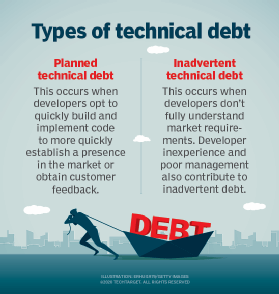
That is how technical debt not just a development problem, but an operating problem.
4. The fallback habit keeps it alive after go-live
Some legacy systems stay alive for a reason that does not always show up in the modernization plan: People still trust them.
A team might keep checking the old system because its screen, report or history feels more reliable than the replacement. That can look harmless at first, but if users still need the legacy system to confirm, challenge or correct the new one, the retirement is not finished.
The fallback habit is easy to rationalize. A user says the old system is just a backup. A manager says it is only for reconciliation. A team says it needs one more quarter before letting go. A leader says the old view is still helpful because everyone understands it. Sometimes those arguments are valid. Sometimes they are signs that the new environment has not fully earned the work yet.
The difference matters. If the old system reveals missing data, weak reporting, incomplete workflows or broken definitions in the replacement system, then the fallback habit is telling the company something useful. If the old system remains only because people are more comfortable with it, then the habit might be slowing the transition and preserving unnecessary risk.
A shutdown plan should make that distinction explicit: What problem does the fallback use solve? Is it temporary? Who approves it? What evidence will show that it is no longer needed? What report, workflow or data view has to improve before people stop checking the old system?
Without those answers, the fallback habit becomes the retirement plan. The old system stays; the company just stops calling it strategic.
Retirement needs proof, not hope
Legacy system retirement is part of modernization. It is not just cleanup after modernization. That distinction matters because turning off the old system requires proof -- proof that the data is available where it needs to be, that integrations have been removed or replaced, that access has been cleaned up, that reports and workflows no longer depend on the old application. It requires proof that someone owns the shutdown decision after the replacement goes live.
A retirement plan that lacks that proof is really hope -- hope that no one still needs the system, that the integrations are gone, that the access is safe, that users will stop checking it. It is hope that the old system will fade away on its own.
That is not how enterprise systems age. They gather dependencies. They accumulate exceptions. They become part of how people prove, check, reconcile and move work.
Modernization can replace the platform, but retirement has to unwind the ties.
James Alan Miller is a veteran technology editor and writer who leads Informa TechTarget's Enterprise Software group. He oversees coverage of ERP & Supply Chain, HR Software, Customer Experience, Communications & Collaboration and End-User Computing topics.
Dig Deeper on ERP & Supply Chain
-
![]()
Kiteworks CISO: Why We Shut Down Systems Before Finding Vulnerability
By: Nathan Eddy
-
![]()
POTS retirement and the business case to modernize
By: Andrew Froehlich
-
![]()
Decommission legacy UC hardware before copper sunsets
By: Venus Kohli
-
![]()
More than 300 operators in 89 markets engaged in 3G switch-offs
By: Joe O’Halloran