IT automation promises faster operations and lower costs, but legacy systems, AI risks, maintenance complexity and skills gaps often prevent initiatives from scaling.
Fast-paced business environments leave little room for error. The promise of real-time data, AI and automation -- evidenced by hyperscalers and other industry leaders -- makes it clear that software automation has moved beyond automated machinery and processes to digital transformations across financial services, healthcare and other industries.
Digital automation in these environments can help streamline infrastructure management, cloud service costs (e.g., autoscaling and shutting down idle resources), application performance monitoring and incident response, QA testing, software development and AI/data pipelines.
Enterprise automation often remains siloed, with separate tooling and data models for IT operations and business process automation. However, AI-powered tooling is beginning to blur these boundaries by introducing more context-aware and cross-domain capabilities.
As some enterprise organizations transition from conventional IT automation toward environments that incorporate more AI-assisted orchestration, IT leaders face several challenges. These include integration complexity, governance of automated decision-making, data consistency across systems and maintaining security and compliance across increasingly interconnected automation layers.
Traditionally, IT teams have used scripting languages (Python, Bash and PowerShell) alongside integrated tool sets, spanning identity and access management, configuration management, policy enforcement and endpoint management systems, to automate repetitive or complex operational tasks. These capabilities are commonly used for routine responsibilities, such as user account provisioning, server configuration and automated backup operations.
In some enterprise environments, a host of IT professionals -- system automation specialists, cloud automation engineers, DevOps engineers, platform engineers, site reliability engineers (SREs), AI and machine learning (ML) engineers and security automation (DevSecOps) specialists -- focus on systems, applications and services/data integration.
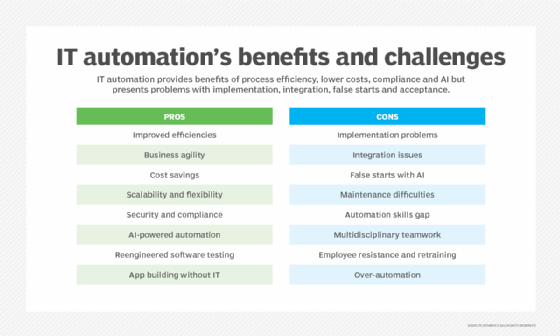
The advantages and disadvantages of IT automation adoption are many and varied.
Their work typically involves developing scripts, APIs and infrastructure as code (IaC) workflows to connect systems and automate operational and deployment tasks. In practice, however, these responsibilities often overlap, and automation is embedded within platform engineering, DevOps and SRE functions rather than centralized within a single team.
IT and engineering teams are increasingly using generative AI (GenAI)-assisted tools to generate code. A growing share of scripts, infrastructure configurations, templates and CI/CD pipeline definitions are now generated or modified with AI assistance. Although this improves development speed and consistency, it also introduces operational and security risks if outputs aren't carefully reviewed by trained staff.
These risks include subtle logic errors, insecure default configurations, misconfigured IaC templates and the potential propagation of vulnerabilities across environments. Because these systems often operate at scale and can directly affect production infrastructure, even small mistakes in generated code can lead to outages, security exposures or compliance failures.
Underlying issues with corporate data often compound these challenges. Problems with data quality, access and governance can disrupt IT automation deployments. At the same time, IT teams frequently contend with too many tools and pipelines, which further fragment automation efforts into a patchwork of disconnected systems rather than a unified, governed automation strategy.
Although automation is designed to increase reliability, accelerate deployments and reduce manual efforts, these benefits aren't always fully realized in practice. Organizations face common challenges that might help explain why many IT automation initiatives fall short of expectations.
The most common IT automation challenges
Enterprises are often advised to start small by automating high-impact tasks. This approach can help address common IT automation barriers, including high implementation costs, integration challenges, expensive technology upgrades, staff training requirements and concerns about job displacement.
Cost and ROI uncertainty
Some IT automation projects might appear sound from a technical perspective but fail to deliver clear reductions in manual work and operational costs. This is often due to uncertainty in measuring ROI, as benefits such as improved efficiency, faster deployments or fewer incidents can be indirect, distributed and difficult to assign to automation improvements. As such, IT managers need to define KPIs and evaluate both technical outcomes and business impact when assessing automation initiatives.
Legacy infrastructure constraints
IT automation is a major undertaking -- and not just in terms of financial investment. Many businesses have hybrid cloud environments with legacy systems on-premises, multiple platforms and large volumes of data. These types of environments can make automation projects technically challenging.
Projects might require customizations, partly because of a lack of APIs and compatibility with modern tools, necessitating major investments in tools and training. Complex tasks and poorly designed workflows can create additional problems and make the benefits of IT automation hard to realize.
Integrating software so that data can flow between interconnected systems that support AI tools and other business processes can present significant challenges. Businesses often need to invest in API management software and integration platforms because legacy automation tools might lack native support for API-driven cloud services. Integration PaaS can connect various systems and applications across cloud and on-premises environments, reducing the need for custom coding and traditional middleware layers.
Endless evaluation cycles
As organizations adopt broader automation strategies, the expanding mix of platforms and capabilities can quickly become overwhelming as IT teams try to define the right technology stack. The introduction of AI-assisted tools has further intensified evaluation cycles and, in some cases, led to decision paralysis as leaders debate whether to adopt new AI-enabled technologies or extend existing technologies.
According to Gartner research, 39% of CIOs and infrastructure and operations (I&O) leaders identified choosing the right AI technology as a top challenge.
False starts with AI
Despite investing in GenAI projects, many businesses have found that only about one-third of them make it into production.
"The most important thing is selecting the right use case," said Craig Le Clair, vice president and principal analyst at Forrester Research. "You have this combination of the control that you give to AI and the extent of action that the agent is doing, and what we're recommending is that companies focus on the more conversational, less actionable agents first."
Maintenance complexity
Changing requirements, evolving APIs and OS updates -- particularly in cloud systems and managed platforms -- can make maintaining and fixing automation more difficult than implementing it. IT automation systems can be prone to dependency and configuration changes and often require ongoing updates to remain functional and reliable. For example, a workflow automated six months ago might require periodic adjustments due to upstream API changes and infrastructure modifications.
In addition, when key engineers responsible for designing and maintaining automation leave an organization, a skills gap can emerge, increasing the risk of reduced maintainability and system failure if documentation and standardization are insufficient.
Skills gap and training needs
Although automation can improve efficiency and enable IT teams to focus on other tasks, many companies grapple with a skills deficit and training challenges. Effective automation capabilities require specialized expertise in areas such as cloud platform engineering, IaC, CI/CD pipeline design, systems orchestration, DevSecOps and -- where applicable -- AI integration.
These roles demand strong technical proficiency in scripting and development (Python, Bash, PowerShell, JavaScript) as well as hands-on experience with modern tooling, such as Terraform, Ansible, Kubernetes and CI/CD platforms.
In addition, IT and engineering teams need a solid understanding of cloud architecture, distributed systems and secure-by-design principles. However, the required depth of expertise varies significantly by role, making it difficult to apply uniform training approaches. As a result, organizations face a key challenge in aligning targeted role-specific training programs with the diverse and evolving skill requirements of automation-focused engineering teams.
Multidisciplinary teamwork
IT automation and business process automation remain siloed at many companies. End-to-end process automation can encompass IT and non-IT domains. AI-powered tools and enterprise automation strategies will require better transparency and centralized management of automated systems, workflows and processes.
Understanding which systems and tasks to automate will require cross-functional teams, said Frances Karamouzis, group chief of research and distinguished vice president analyst at Gartner. These teams often involve IT and security, business, data management, enterprise risk and finance and procurement personnel.
Overautomation
Some businesses fall down the rabbit hole when they try to automate complex tasks that require manual intervention. Other companies have acquired multiple robotic process automation (RPA) tools but don't have the skill sets in-house to implement and integrate the different technologies. It's important to avoid poorly designed processes and workflows that bake design flaws into automated systems.
"You don't want 17 different ways to do networking or provisioning," said Karamouzis. "You actually want one way, so the more you can get to a consistent, standardized process, then it makes it easier for you to automate it."
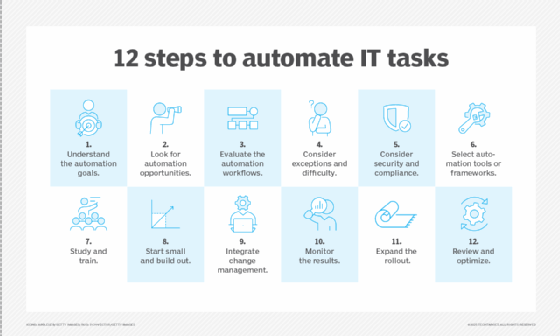
This chart outlines the steps to transition a manual IT task to an automated process.
The business impact of these challenges
Many of these challenges can limit the ability to scale automation consistently across environments. In some cases, poorly designed automation introduces operational risk and ongoing maintenance overhead, undermining expected gains in speed, reliability and cost efficiency.
As organizations prepare to adopt AI for IT automation, Gartner researchers recommend investing in pilot programs. However, they also note that many of these initiatives stall due to high costs and unclear ROI. A survey of 782 I&O leaders, conducted in November and December, found that 28% of AI use cases were successful and met ROI expectations, while 20% failed to deliver expected outcomes. Successful use cases often involved GenAI applied to IT service management and cloud operations.
To deliver value, automation initiatives must extend beyond IT optimization and align with measurable business outcomes, such as revenue growth, operational efficiency and customer experience. Ultimately, the effectiveness of automation depends on the extent to which the technical implementation supports broader business objectives and scales across the enterprise.
How IT leaders can overcome IT automation challenges
Before implementing IT automation processes and workflows, IT leaders are increasingly focusing on a set of foundational steps to improve project success rates. Setting realistic expectations from the outset is often cited as essential, particularly regarding delivery timelines, scope and expected efficiency gains.
Define business outcomes
Communicate the measurable improvements the business gains from automating IT processes, expressed in terms of business value rather than technical actions -- e.g., faster delivery of digital services, lower infrastructure costs.
Focus on high-impact use cases
Avoid poorly designed processes with structural design flaws. Instead, prioritize consistent, well-structured repeatable workflows that are scalable, maintainable and resilient across environments.
Map the IT environment
Identify automation opportunities by taking inventory of all current tools, workflows, applications, infrastructure components and system dependencies in both on-premises and cloud environments. The goal is to establish a clear understanding of how systems interact, where manual processes exist and where dependencies or integration points might introduce complexity or risk.
Prioritize security and governance
Establish appropriate policies to control how automation is designed, deployed and operated across the enterprise. Governance frameworks should address risk management, change control and oversight of automated decision-making, particularly when AI-assisted automation is involved.
Embrace change management
Prepare the workforce for AI-powered automation by clearly communicating how it will affect roles, responsibilities and ways of working. Organizations should also establish ongoing training and upskilling programs to ensure IT and engineering teams can work effectively with AI-driven automation tools and adapt to evolving technology and process requirements.
"Companies that don't get on this more autonomous approach to business are just going to be left behind," Forrester's Le Clair said, because ML and RPA bots can only take a business so far. "It's this new way of thinking -- adding human intelligence -- that is evolving," he added. "Thinking of new ways of innovating, new ways of doing work -- that's really where the future is."
Kathleen Richards is a freelance journalist and industry veteran. She's a former features editor for TechTarget's Information Security magazine.