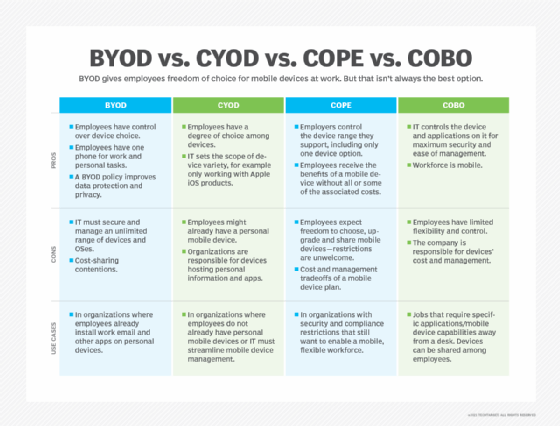
BYOD policies are no longer a fringe workforce accommodation. For many organizations, they are a response to cost pressure, hybrid work expectations and employee device preferences. The question for CIOs and CISOs is no longer whether employees will use personal devices for work, but whether the organization will govern that reality strategically.
In a zero-trust, SaaS-driven environment, a BYOD policy affects more than hardware budgets. It shapes identity controls, data segmentation, endpoint visibility and risk exposure. When designed correctly, BYOD can support cost discipline, workforce flexibility and sustainability goals. When poorly governed, it can expand the attack surface and complicate compliance efforts.
The following benefits explain why many organizations formalize BYOD policies, as well as where leadership should evaluate the tradeoffs.
7 benefits of implementing a BYOD policy
BYOD policies deliver value across cost, workforce flexibility and sustainability -- but only when governance maturity keeps pace with access and data risks.
1. Lower upfront cost for hardware
The money saved from not purchasing a fleet of endpoints is perhaps the most obvious and easy-to-quantify benefit of a BYOD program. With BYOD in place, the burden of cost is shifted to the end users, but not in a way that drastically affects an end user's bottom line. After all, BYOD users will simply be adding functionality to the devices that they would own anyway.
These cost savings are not only upfront but also on the timeline of a refresh cycle. Consider an example organization with an endpoint refresh cycle of three years. The organization will save hundreds of dollars by not purchasing a new device for each user operating a BYOD endpoint. Further, a user would likely bring a corporate-owned device in for repairs if damaged, but they would usually handle a damaged personal device themself.
Some organizations could even consider passing on some of the savings to the end users by offering a BYOD stipend for a portion of the new device's cost if the device is truly critical to the user's day-to-day work.
2. Increased employee satisfaction
This benefit is more difficult to quantify precisely, but users often report a better overall working experience if they don't need to carry around two smartphones -- or even laptops -- every day. Of course, each user might have a different preference for a device ownership program, but market research points to employees, in the aggregate, being more satisfied when they work using BYOD.
Workforce surveys consistently show that employees prefer using familiar devices, particularly in hybrid and remote roles where mobility and convenience influence overall engagement.
3. Improve user productivity
Organizations that formalize BYOD often report productivity gains, largely because employees work faster on devices and workflows they already know.
Familiarity reduces onboarding friction and shortens the time required for employees to become productive in new roles or projects. In distributed teams, eliminating device constraints can also reduce informal workarounds that introduce security gaps.
Productivity gains, however, assume mature identity management, conditional access policies and data segmentation to prevent unmanaged data exposure.
If a user is familiar with Apple devices, it might be difficult to adapt to using an Android smartphone or a Windows desktop. The same applies to someone familiar with Windows and Google Android: Corporate-owned Apple devices might present a learning curve. Even if a user is used to Android devices, moving from a Samsung-manufactured device to a Google-manufactured device could prove challenging.
In a zero-trust, SaaS-driven environment, a BYOD policy affects more than hardware budgets. It shapes identity controls, data segmentation, endpoint visibility and risk exposure.
4. A more connected workforce
Users who rely on their personal devices for work tasks are more likely to be able to access work materials at all times than users with a dedicated work device. If users have a dedicated work device, they are more likely to turn it off and put it fully away compared to an endpoint that also functions as a personal device.
A BYOD program's goal is not to trick users into checking their email and absentmindedly returning to work during their time off. However, in the event of time-sensitive tasks that need immediate approval or a work-related emergency, it's crucial to reach key employees immediately.
In time-sensitive scenarios -- such as incident response, financial approvals or operational disruptions -- consistent device access can improve responsiveness without requiring employees to manage multiple endpoints.
These benefits are also present with corporate-owned personally enabled endpoints, but only if users adopt those devices as their primary personal devices, which isn't always possible.
5. Easier for employees to keep track of one device
The notion that one device is easier to keep track of than two is almost too obvious, but it's worth exploring why that is key for organizations. One of the dangers of allowing any smartphone -- personal or corporate-owned -- to access an organization's business data and internal services is the risk of that device falling into the wrong hands.
From a governance perspective, formalizing BYOD reduces unmanaged device sprawl. Devices enrolled in MDM platforms, equipped with remote wipe capabilities and governed through conditional access controls, provide more visibility than ad hoc personal device usage.
A stolen or lost device can be catastrophic for an organization. Cybercriminals can gain access to internal data, change passwords to key accounts, view private communications and eventually elevate their privilege to access information beyond the user's permissions.
6. Limit the reasons to use personal devices improperly
In an ideal world, organizations could prevent BYOD use until they deploy an official policy, but unfortunately, that isn't the reality. Whether for convenience or out of desperation in a time-sensitive situation, users will find workarounds to use personal devices if they truly want to.
Many organizations still operate with informal or inconsistently enforced BYOD practices. A clearly communicated policy reduces shadow IT behavior and establishes guardrails for SaaS access, cloud storage usage and AI-enabled tools that might process sensitive corporate data.
A well-communicated BYOD policy can mitigate both issues by providing a roadmap for securely handling work materials on a personal device.
Formal governance helps prevent data from flowing between unmanaged personal apps and enterprise environments.
7. Improve sustainability by limiting hardware-related emissions
Sustainability considerations increasingly influence IT procurement decisions. Because most device-related carbon emissions occur during manufacturing and distribution, reducing enterprise-issued hardware can meaningfully affect Scope 3 supply chain reporting.
When calculating the sustainability impact of endpoint policies, practices that reduce device purchases or extend device lifecycles improve sustainability outcomes.
Issuing smartphones to users with a similar endpoint for their personal lives is a practice that significantly increases an organization's overall carbon emissions. As organizations look for ways to quickly reduce their emissions without overhauling their entire day-to-day operations, implementing BYOD programs can provide that value if the user base is on board.
Potential drawbacks of implementing a BYOD policy
There are several reasons that organizations might not want to deploy a BYOD policy despite all the benefits that these programs offer. Managing these devices is one of the most common challenges associated with a BYOD policy.
Organizations that adopt BYOD successfully typically pair it with zero-trust architecture, identity-based access enforcement, endpoint detection and response tooling and containerization features that separate corporate and personal data.
With a corporate-owned device, the organization gets to maintain full control of the device's settings and preset the device to block certain apps, functions or actions. However, a personally owned device presents more management challenges. Organizations can try to enact a comprehensive BYOD policy that gives them control over the device, but users might balk at this as an invasion of their privacy.
Smartphone manufacturers have been adding BYOD-friendly features that separate a device's work and personal sides. Apple's User Enrollment feature enables organizations to control the aspects of an Apple device that are within a managed Apple ID through MDM while ignoring anything on the device that is associated with a personal Apple ID.
Google offers Android work profiles to keep Android devices under proper management while respecting user privacy. The organization gets to choose the apps and services to deploy on the work profile, and once the device is registered, the user can switch back and forth between the profiles as needed.
Even with these controls, data leakage risks remain if identity governance, logging and monitoring practices are immature.
There are also concerns about user preference and corporate culture when implementing BYOD. Some users might prefer a second device they can bring when needed but put away when they're off the clock.
When BYOD might not be appropriate
BYOD policies are not universally beneficial. Highly regulated industries, organizations managing sensitive intellectual property or enterprises with limited identity governance maturity might determine that corporate-owned devices offer stronger control and auditability. Leadership teams should assess regulatory exposure, incident response readiness and support capacity before expanding BYOD programs.
Editor's note: This article was updated in February 2026 to improve the reader experience.
John Powers is a former senior site editor for Informa TechTarget's Enterprise Desktop, Virtual Desktop and Mobile Computing sites. He graduated from the Philip Merrill College of Journalism at the University of Maryland.