Pros and cons of building up VDI in the current market
Determining how to host and manage desktops across an organization is a major decision. Business leaders should understand the pros, costs and complexity of modern VDI.
Organizations evaluating desktop delivery models must weigh the advantages and disadvantages of virtual desktop infrastructure (VDI) before making long-term platform decisions. While VDI can offer strong security and centralized management, building and operating a virtual desktop environment requires significant planning, infrastructure and licensing investment.
Because VDI environments are complex and resource-intensive, IT leaders should carefully evaluate whether traditional VDI, cloud-hosted virtual desktops or desktop as a service (DaaS) best aligns with their organization's workforce, security and infrastructure requirements.
Pros and cons of building a modern VDI environment
Perhaps the single biggest advantage of virtual desktops is that IT teams can make them far more secure than physical desktops. Because virtual desktops run on a back-end server, organizations can lock them down to prevent any alterations or unauthorized software installations. If a user does manage to change anything, administrators can reset the virtual desktop to a pristine state at the end of the session.
Another advantage to virtual desktops is the ease of management. It is typically far easier to centrally manage a collection of virtual desktops than it is to manage a collection of physical PCs. Virtual desktops also work well in BYOD environments. Depending on the virtualization platform, organizations can deliver a virtual desktop to several different device types.
Of course, virtual desktops do have some disadvantages, one of which is complexity.
Virtual desktop deployments involve a lot of different components, which tends to make troubleshooting more difficult than it would be in a physical desktop environment.
Virtual desktop deployments involve a lot of different components, which tends to make troubleshooting more difficult than it would be in a physical desktop environment. This complexity also means that the initial startup cost tends to be high. An organization must purchase and deploy several components before it can provision the first virtual desktop. These components vary by platform, but can include virtualization hosts, load balancers, security servers and more.
There are also licensing costs to consider, and VDI licensing costs can be quite high. In an environment that uses physical desktops, each desktop needs an OS license. Virtual desktops also require an OS license. However, users must still use a physical device to access their virtual desktop, and that physical device, whatever it is, will need a license for its native OS.
This native operating system license is a nonissue for some devices. If a user is working from an iPad, for example, the OS license is included with the device. If, however, the user is accessing the virtual desktop environment from a Windows PC, then two OS licenses are required -- one for the native OS, and one for the virtual desktop. These desktop OS licenses are in addition to any server licenses and client access licenses that might be required. Again, the licensing requirements vary by platform, and some organizations have found that using an open source technology yields significant savings.
It's also important to consider whether any users' applications will run on a virtual desktop. While most applications will generally work fine in a virtual desktop environment, some will require minor alterations. There are also applications that either will not work or are not licensed for use in virtual desktop environments.
Virtual desktop administrators must carefully design virtual desktop environments to avoid having any single points of failure. This means organizations must invest in redundant hypervisors, connection brokers, load balancers and more. Redundancy improves reliability and performance, but it also increases hardware and licensing costs. This will affect both upfront costs and monthly payments, as well as overall support and maintenance costs.
Is VDI still relevant today?
Given the cost and complexity associated with VDI, organizations must stop and consider whether VDI is still a viable option in today's desktop market.
In some ways, VDI is still relevant. In recent years, trends such as hybrid work and BYOD have increasingly gained traction, so users frequently work from outside the office using a wide variety of devices. VDI can go a long way toward meeting the challenges associated with BYOD and hybrid work because it enables users to work from a carefully configured and secure enterprise desktop regardless of where they are working from and what type of device they are using. Additionally, the virtual desktop serves as an abstraction layer, reducing the chances of a user saving corporate data on their personal device.
Another reason why an organization might choose to use VDI in 2026 is the need to support legacy applications. One of the best things about VDI environments is that most VDI platforms give administrators a great deal of flexibility for the way that virtual desktops are configured. This means an organization might be able to configure a virtual desktop to run custom and legacy applications, while running the same application on a cloud-based platform might not be an option.
Organizations might also opt to continue using VDI because of legal or compliance reasons. VDI environments enable virtual desktops to run on virtual machines in the organization's own data center. This can make it easier for an organization to comply with certain regulations, particularly regarding the geographic location of data.
Finally, there are also business reasons to consider. Specifically, if an organization has invested in a pricey virtual desktop environment, then it might not seem prudent to abandon that investment just to move to a cloud-based DaaS environment. This might be especially true if the organization has not yet fully depreciated the hardware cost or if the organization is locked into long-term support contracts.
DaaS as an alternative to modern VDI
While many organizations continue to run traditional VDI environments, the market has expanded to include cloud-hosted desktops and DaaS. These alternatives reduce infrastructure management while still delivering centralized desktops.
Modern platforms such as Azure Virtual Desktop, Windows 365 and other hosted desktop services now offer alternatives that combine traditional VDI capabilities with cloud-based management.
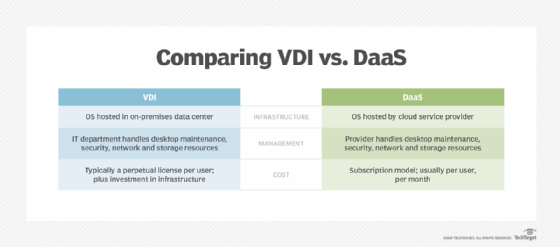
Key differences between VDI and DaaS include where desktops are hosted, who manages the infrastructure and how licensing and costs are structured.
One of the biggest advantages of DaaS is that it's generally offered as a managed service, meaning that IT pros don't have to worry about managing or maintaining the underlying infrastructure. The hosting company handles everything from patch management to hardware refreshes.
Another advantage of using DaaS is that by moving virtual desktops out of a data center, organizations might free up a considerable amount of internet bandwidth for other uses. This is especially true if most of the users work remotely.
Finally, DaaS is likely going to be the obvious choice for organizations that are just getting started with virtual desktops. Setting up a VDI environment from scratch requires a large upfront investment and a considerable amount of time. Building up VDI also requires certain skills from the IT department and might take up a significant portion of their time, thus pulling resources away from other tasks. In contrast, organizations can implement a DaaS environment in a matter of hours and for a small fraction of the VDI startup cost.
Brien Posey is a former 22-time Microsoft MVP and a commercial astronaut candidate. In his more than 30 years in IT, he has served as a lead network engineer for the U.S. Department of Defense and a network administrator for some of the largest insurance companies in America.
While only a handful of hardware vendors offer DPUs, the technology has significant implications for IT storage systems -- and the admins who manage ...
Continue Reading
Roaming profiles let user settings follow employees across Windows desktops, but IT must manage profile size, versioning and alternatives such as ...
Continue Reading
Autonomous endpoint management tools promise AI-driven device oversight, but are they truly innovative, or just rebranded automation? Here's what IT ...
Continue Reading