Enterprise desktop strategy used to be easier to explain. That does not mean it was easy. It was never easy. But the old map was at least familiar.
Which PCs would employees use? Which OS would IT support? Which applications had to run locally? Which users required a virtual desktop? Which devices needed to be refreshed, secured, locked down or replaced?
Those questions still matter. They just no longer cover the whole problem.
A lot of enterprise work now starts somewhere else. It starts in a browser, a SaaS application, a cloud desktop, a mobile app, a collaboration platform or an AI-enabled feature inside software the company already owns. The endpoint is still there. The OS is still there. But the more important question is often what happens before the user reaches the work.
That is why the desktop is becoming an access layer.
The desktop matters less as a destination and more as a control point.
The following five control points now shape enterprise desktop strategy.
1. The browser is now part of desktop control
The browser used to be one application on the desktop. That description feels too small now.
For many employees, the browser is where the workday starts. It is where they open SaaS apps, move between systems, enter prompts, join meetings, share files, use extensions and interact with data that used to sit inside more clearly bounded applications.
That creates an awkward management problem.
The browser feels lightweight to the user. It does not always feel lightweight to IT.
A browser session can carry customer data, financial information, HR details, project plans or source material for AI tools. A browser extension can look harmless and still create risk. A second browser can become a workaround. A personal profile can blur with a work profile. A web app can become important before anyone treats it like part of the enterprise application estate.
The desktop matters less as a destination and more as a control point.
That does not mean the browser replaced the desktop. It means the browser became part of desktop control.
That is why browser management and security now belong in desktop planning. Desktop strategy must specify which browsers are allowed, which extensions are acceptable, what can be copied, what can be uploaded, what data can be entered into web apps and which browser sessions require tighter controls.
The desktop is no longer only what is installed on the machine. It is also what the user can reach through it.
2. Device posture has become an access signal
A device is not just a device anymore. It carries context.
Is it managed? Is it patched? Is it encryption-enabled? Is endpoint protection running? Is the user on a personal device, a shared workstation, a company laptop or a virtual desktop? Does the device meet the policy for the kind of work being attempted?
That information matters before the application opens.
This is where unified endpoint management (UEM) becomes more than device administration. UEM still helps IT manage desktops, laptops, phones and tablets. But its larger role is that device health can become part of the access decision.
A user might be the right person. The password could be correct. The application may be approved. Yet the device can still be wrong for the work.
That is a different desktop conversation.
Access is no longer judged only by identity. It is judged by identity plus context, and device posture is one of the most practical pieces of that context.
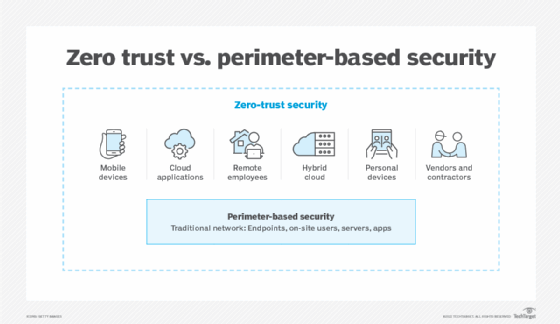
That is why the zero-trust comparison fits here. The old perimeter model assumed there was a cleaner line between what sat inside the enterprise and what came from outside it. Desktop strategy no longer gets that clean line. Users may work from managed laptops, personal devices, cloud apps, remote locations, virtual desktops and partner environments, sometimes all in the same day.
That does not make this a zero-trust article. But the shift from perimeter-based security vs. zero trust helps explain why desktop strategy has moved closer to access control. The question is less "Is this user inside the network?" and more "Is this user, device, session and application path trusted enough for this work?"
Zero-trust security reflects the access problem now shaping desktop strategy. Mobile devices, cloud applications, remote employees, hybrid cloud, personal devices and outside partners all weaken the old idea of a single trusted perimeter.
This is also where old desktop assumptions can get expensive. A company might say it supports flexible work, personal devices or multiple endpoint models. That may be true. But each access path carries different support, compliance and security assumptions.
Flexibility is real.
So is the operating work behind it.
3. SaaS access needs endpoint context
SaaS softened the OS question. It did not erase the desktop question.
That is the part enterprises sometimes miss.
If the work lives in SaaS applications, it is tempting to treat the endpoint as interchangeable. A managed laptop, a personal laptop, a virtual desktop and a mobile device may all open the same application.
But they are not the same control surface.
A SaaS contract can say who is entitled to use the application. It does not necessarily show how cleanly the enterprise controls every path into that application. The browser matters. The device matters. The session matters. The user profile matters. The local applications around the SaaS app matter too.
Some sprawl is obvious: too many tools, too many utilities, too many overlapping applications. Some of it is quieter. A browser extension here. A local sync tool there. A collaboration plugin. A shadow workflow that employees use because it is faster than the approved path.
None of that makes SaaS bad. It means SaaS access needs endpoint context.
The question is not only whether the SaaS app is approved. It is whether the route into the app is understood well enough for the data, user and workflow involved.
4. Virtual desktops are not an escape hatch
Virtual desktops can solve real problems. They can centralize data, standardize images, support contractors, separate work from the physical device and give users access to controlled environments. In the right case, that is useful.
But a virtual desktop is not an escape hatch from desktop strategy. It creates its own access layer.
A cloud desktop, DaaS environment, VDI session or VPN-based approach still depends on identity, session security, endpoint controls, monitoring, data movement rules and user experience. The user still must enter the environment from somewhere. That starting point matters.
This is why virtual desktop security cannot be treated as a separate side issue. Physical and virtual desktops need different rules because they create different access paths, data movement risks and support assumptions.
A virtual desktop might reduce the amount of data on the local endpoint. That does not automatically make every session safe. Can users copy and paste? Can they print? Can they download files? Can they take screenshots? Can unmanaged devices reach the environment? What happens when the session ends? Who can see what happened inside it?
Those are not side issues. They are the control model.
The mistake is treating different access paths as interchangeable simply because they lead to the same application. While they may arrive at the same place, they do not carry the same risk or management burden.
5. AI features raise the stakes for access control
Artificial intelligence gives desktop strategy another reason to matter.
These tools can summarize content, draft responses, search files, automate tasks, explain data or recommend next steps. They may appear in the browser, the productivity suite, the collaboration tool, the CRM system, the virtual desktop or the operating environment itself.
The combination of AI and the browser makes the access question even more important, especially when those features sit within the same workspace employees use to access SaaS apps, files, messages and enterprise data.
The issue is not only whether the employee can use AI. It is what the tool can see, what data it can reach, what it can produce and whether the device or session should be trusted for that work.
A device that was fine for routine email may not be fine for AI-assisted work involving customer information, financial data, employee records or regulated content.
That sounds like an AI governance problem. It is. But it is also a desktop problem.
The control point is often where the user, browser, device, application and data meet. If the enterprise cannot see or manage that layer, it will have a hard time understanding what AI-enabled work actually touches.
That does not mean every AI feature needs a new desktop policy. It means desktop strategy must stay close enough to AI adoption to know when the access model changes.
The desktop access layer needs an owner
The next enterprise desktop strategy will not be about Windows, Macs, Linux, DaaS, VPNs, refresh cycles or hardware standards alone.
Those choices still matter. They are just not enough by themselves.
The bigger question is how the enterprise governs work at the point where users try to reach applications and data.
That means desktop leaders need to ask more practical questions.
Which endpoints are trusted for which kinds of work? Which browser sessions need stronger controls? Which SaaS apps can be reached from unmanaged devices? Which data should require device compliance before access? Which virtual desktop use cases require tighter data movement rules? Which AI features create new visibility or policy needs?
And maybe the hardest question: Who owns the rules when identity, endpoint management, browser security, SaaS governance and user experience overlap?
The goal is not to turn every endpoint conversation into a governance exercise.
It is to recognize where the control point has shifted.
The desktop used to be the place where work happened. Now it is increasingly where access to work is judged.
That makes enterprise desktop strategy harder to separate from identity, security, SaaS governance, browser control and employee experience. It also makes the desktop more important, not less.
The desktop is becoming an access layer because enterprise work now begins before the user reaches the application.
And that first layer is where control starts.
James Alan Miller is a veteran technology editor and writer who leads Informa TechTarget's Enterprise Software group. He oversees coverage of ERP & Supply Chain, HR Software, Customer Experience, Communications & Collaboration and End-User Computing topics.