
Getty Images
Understand methods for virtual application delivery
Virtual app delivery technologies help centralize management and provide consistent UX across distributed workforces. But how do organizations know which delivery methods to use?

Organizations today support increasingly distributed workforces, diverse device fleets and rigorous security requirements. Delivering applications, in turn, has become more complicated than simply installing software on a user's PC.
Rather than relying solely on traditional client-installed apps, organizations can deploy technologies that centralize app management, simplify updates, improve security and provide a more consistent UX across locations and devices. IT can use these technologies whether the apps run in a data center, the cloud, a browser or a virtual desktop. Various delivery models are designed for different app types, user groups and enterprise needs.
To keep up with enterprise requirements and initiatives, it's critical to understand the common virtual app delivery methods used in modern IT environments. IT administrators should know how these approaches differ, as well as how to determine which delivery model -- or combination of models -- best aligns with an organization's needs.
7 virtual app delivery methods to know
Various virtual application delivery approaches exist, and each serves a different business need. Many organizations use specific methods for different apps, combining them into a single deployment strategy.
1. Application virtualization
Application virtualization runs software in a controlled, isolated environment instead of installing it directly on a device. The app is available from across the network and runs independently from the operating system.
Benefits include reduced app conflicts, simplified deployments and easier updates. Additionally, this method often supports legacy apps.
Challenges of app virtualization include compatibility limitations, network dependence and performance considerations.
This method is especially viable in managed Windows environments. Prominent app virtualization offerings include Liquidware FlexApp, Omnissa App Volumes and Microsoft App-V.
2. Application streaming
Application streaming delivers software to devices on demand, sending only the necessary components as the user works. The app runs locally but is assembled in real time, reducing local storage requirements.
This method offers fast deployments and reduced endpoint storage requirements. However, like app virtualization, it can present challenges related to network dependence and performance considerations.
App streaming works well with distributed workforces, temporary users and organizations that support large app catalogs. Examples include App-V, Citrix Virtual Apps and Omnissa ThinApp.
3. Session-based delivery
Session-based delivery lets multiple users access apps running on a remote server. The apps do not run locally on the endpoint. Instead, users interact with them remotely through a session that transmits screen, keyboard and mouse instructions between the client and server.
Benefits of session-based delivery include lower infrastructure costs, higher user density and simplified app management. Possible drawbacks include shared-resource limitations and reduced personalization.
This delivery method excels in standardized app environments and organizations seeking cost-efficient remote app delivery. It's also an especially useful option for task workers. Microsoft Remote Desktop Service (RDS) and Citrix Virtual Apps are common examples of this approach.
4. VDI and DaaS
Virtual desktop infrastructure (VDI) delivers virtual desktops to users. The desktops are hosted on the organization's on-premises infrastructure. The cloud-based version is desktop as a service (DaaS). Users access a complete desktop environment -- OS, apps and preferences -- running remotely rather than on their local device.
Benefits include the following:
- Strong security controls.
- Consistent UX.
- Support for demanding applications.
- Scalability.
VDI and DaaS can also introduce higher costs, greater complexity and cloud cost management concerns, however.
Power users typically benefit from this approach, including developers, contractors and those working in regulated industries.
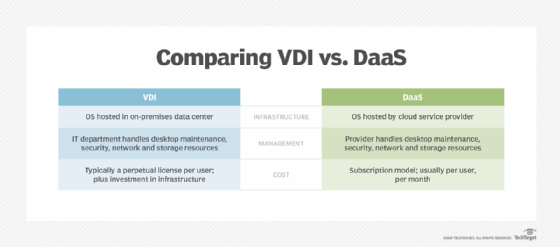
Many providers offer VDI and DaaS tools, including Microsoft Azure Virtual Desktop, Windows 365, Citrix and Omnissa Horizon.
Both methods provide users with virtual desktops, but they differ in who manages the infrastructure. VDI is best for organizations that need greater control over performance, security and customization. DaaS, on the other hand, is often a better fit for organizations seeking faster deployment, simplified management and cloud-based scalability.
5. Application layering
Application layering separates apps from the base OS by placing them into distinct layers. Each layer is added or removed independently, isolating management from the core desktop where they run. This helps to provide reduced image sprawl and faster updates.
Challenges can include compatibility limitations and increased management and troubleshooting complexity. It's also important to note that app layering usually works in conjunction with other delivery models.
6. Web applications and PWAs
Web-based applications run in a browser without requiring local installation or management. Progressive web apps (PWAs) are enhanced web applications that behave more like native apps, as they support offline access and installable interfaces on supported devices.
Benefits of this method include broad device compatibility, reduced client-side management and easier updates. Challenges can include browser dependency, as well as potential feature gaps compared to native apps.
Web applications continue the shift away from client-installed applications, especially with productivity apps for mobile workforces and cross-platform environments.
7. Containerized applications
Containerized applications are packaged with their dependencies into portable units called containers, which run consistently across different environments and platforms. They're isolated from the underlying system using platforms like Docker and Kubernetes.
Benefits include the following:
- Consistent performance and capabilities.
- Portability across platforms.
- Cloud-native support.
A disadvantage of app containerization is that it requires specialized expertise to manage. Additionally, it primarily supports app infrastructure rather than end-user programs.

Use cases include microservices-based enterprise and cloud-native apps. It's less common to use containers with end-user apps directly. Containerization works well for development, test and production environments.
Key factors to consider across virtual app delivery methods
Selecting the best delivery model means balancing cost, features, user needs and app requirements to achieve a manageable strategy. The following guidelines highlight the core considerations.
Application and user requirements
IT admins should begin by asking what application experiences users really need. In this evaluation, be sure to do the following:
- Assess user personas, roles and workstyles.
- Consider performance expectations, especially for resource-intensive workloads.
- Inventory applications, identifying legacy and modern deployments.
Review each application individually, as different apps might benefit from different virtual deployment methods. For example, office productivity suites aren't typically containerized, while legacy apps might not support web app functionality.
Security and compliance requirements
IT must protect app and data integrity by identifying where applications and related data should reside. Consider the following factors:
- Data protection requirements.
- Regulatory obligations.
- Access controls.
- Centralized vs. locally stored data.
The answers to these questions help determine the best deployment model.
Cost and management considerations
Changing app deployment models and management capabilities will likely shift spending requirements. While the final outcome might result in cost savings, the change could incur costs. Establish financial oversight for the following:
- Infrastructure investments.
- Licensing costs.
- Operational overhead.
- Cloud consumption costs.
- Internal talent development.
When assessing this aspect of the deployment, admins should clearly document which models are sustainable.
Single vs. hybrid delivery models
Most organizations deploy multiple delivery methods to maximize the benefits of each on a per-app basis. Combining SaaS, VDI, DaaS, RDS and locally installed software provides the flexibility, configuration control and security needed to meet business requirements and user expectations.
When implementing virtual app delivery, the goal is usually optimization, not standardization on a single platform.
Vendor selection and deployment best practices
Evaluating vendor platforms for deploying and managing virtual apps means matching vendor features to corporate requirements. Carefully consider the following factors:
- App compatibility.
- Ecosystem integration.
- Vendor support quality.
- Product roadmap alignment.
- Licensing flexibility.
Most organizations will rely on multiple models, depending on the app type, support options and desired UX. After the initial decision-making and implementation, admins must ensure the chosen strategy works well for their users. Successful deployments are measured by employee productivity and experience, not just infrastructure metrics. Integrate digital employee experience tools and automated end-user monitoring to supplement app performance analytics.
During deployment planning, IT should adopt the following best practices:
- Start with a limited rollout before broad deployment.
- Conduct application inventory and assessment.
- Match applications with suitable deployment models.
- Launch pilot programs for selected applications.
- Involve stakeholders early.
- Establish governance processes to manage cost.
- Provide user and support staff training.
- Define success metrics.
- Prioritize migrating high-visibility apps that demonstrate clear ROI, such as frequently updated apps, legacy software with deployment challenges or tools used by remote workers.
Virtual app delivery encompasses multiple technologies, each designed for different corporate and technical requirements. For many organizations, a hybrid strategy that combines remote app delivery, VDI/DaaS, PWAs and local installations provides the most practical long-term approach.
CIOs and IT teams should evaluate options based on application needs, user requirements, security goals, cost considerations and management complexity. As workforces and app environments evolve, organizations that align delivery methods with business needs will be best positioned to adapt.
Damon Garn owns Cogspinner Coaction and provides freelance IT writing and editing services. He has written multiple CompTIA study guides, including the Linux+, Cloud Essentials+ and Server+ guides, and contributes extensively to TechTarget Editorial, The New Stack and CompTIA Blogs.