
Getty Images/iStockphoto
The End of 10: How Linux could help Windows 10 PCs live on
With Windows 10 support ending, organizations are evaluating Linux as a viable option to manage costs, extend hardware life and maintain long‑term flexibility.

In the wake of Windows 10 end of support, a new initiative, dubbed End of 10, is urging users to skip costly hardware upgrades and instead extend the life of their devices by migrating to Linux.
Microsoft ended mainstream support for Windows 10 on Oct. 14, 2025, leaving most editions without security updates unless organizations enrolled in the paid Extended Security Updates (ESU) program. ESU will keep Windows 10 secure only through Oct. 14, 2028, giving IT teams limited time to decide whether to pay for temporary coverage or replace unsupported hardware for Windows 11.
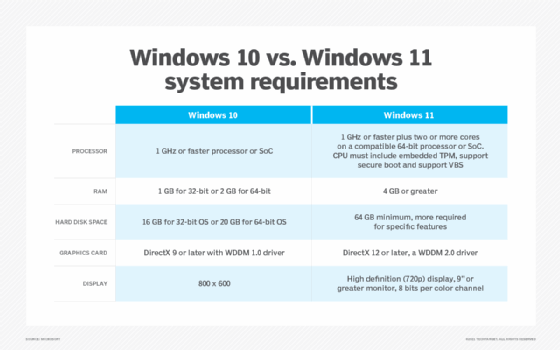
The hardware presents its own complex problem. Windows 11 requires more powerful hardware than Windows 10, so organizations that choose to migrate might incur severe hardware replacement costs. And those old Windows 10 PCs? They'll likely end up in a landfill or recycling center.
However, there is another way. The End of 10 initiative encourages users and organizations to consider migrating their existing hardware to Linux, thereby avoiding the cost of a Windows 11 deployment. The initiative emphasizes sustainability, cost savings and enhanced privacy for both home and business users.
What is the End of 10 initiative?
End of 10 is a global, open source project that aims to help Windows 10 users transition to Linux. It focuses on providing free support, educational resources and troubleshooting guides to make Linux deployments accessible to organizations and individuals.
With an emphasis on user inclusivity, the initiative's primary goals include the following:
- Enhance sustainability. A move to Windows 11 can generate waste, as IT must remove otherwise-functional hardware that the new OS doesn't support. Moving to Linux instead can prevent that waste.
- Reduce costs. Linux makes it easier for organizations and users to continue using existing hardware for longer. Linux also has no explicit licensing fees, as the OS itself is free to copy and use.
- Support user privacy. The Linux platform doesn't promote advertising or forced telemetry.
The project does not emphasize or recommend a particular Linux distribution.
Why choose Linux?
Linux is a Unix-like OS that consists of a kernel and bundled software. Various vendors package different software and configurations, creating unique distributions. Linux uses an open source licensing mechanism that lets anyone view, modify and distribute the source code, which encourages innovation.
Some Linux distros provide one or more GUIs. The GUI is optional, and many Linux servers operate without it. Administrators manage these servers using the command-line interface. This approach is a departure from operating systems such as Windows or macOS, which provide and require a single GUI.
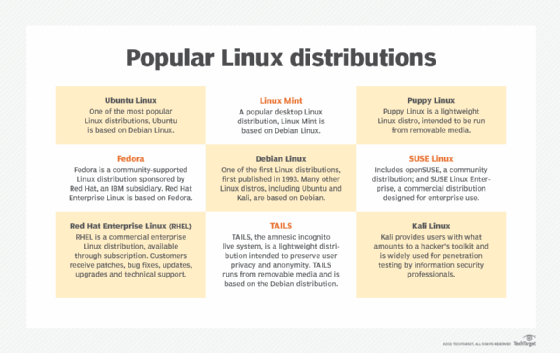
Linux distributions differ in purpose and in the applications they provide. Some focus on day-to-day end-user tasks. Others offer specialized functionality, such as penetration testing, or are optimized as servers or cloud computing platforms. Desktop and server options include the following:
- Ubuntu. A popular, user-friendly distribution with a stable release schedule that includes desktop, server and cloud versions.
- Fedora. A community-developed user platform sponsored by Red Hat that provides frequently updated software.
- Red Hat Enterprise Linux (RHEL). A common server platform that includes many enterprise-level apps and offers a subscription for support.
- Rocky Linux. An enterprise-class server distribution designed to emulate RHEL and replace the CentOS distribution.
- AlmaLinux. An alternative enterprise-class server distribution designed to emulate RHEL, including app compatibility and security.
- Linux Mint. A desktop-focused distribution that provides a familiar, user-friendly interface for transitioning from Windows or macOS.
- OpenSUSE. An enterprise-grade distribution backed by SUSE and available in two versions: Leap for stable releases and Tumbleweed for rolling updates.
- Kali Linux. A pen testing and cybersecurity platform that includes many effective security and forensics utilities.
Potential benefits of switching from Windows to Linux include the following:
- No licensing costs or update maintenance fees.
- Extensive control over configurations.
- Enhanced privacy and data control.
- Long-term support and updates.
- Lower hardware resource requirements.
- Flexible customization capabilities.
Potential drawbacks of switching from Windows to Linux include the following:
- App compatibility concerns.
- Limited vendor support, especially for legacy enterprise software.
- Migration costs for organizations.
- User retraining might be necessary.
Windows-to-Linux compatibility challenges
IT departments face specific challenges when planning a Linux migration from Windows 10. However, these challenges are no more daunting than those associated with migrating to Windows 11. Migration teams must deal with app compatibility testing, dependencies, hardware requirements and support for specialized devices.
The End of 10 project addresses these challenges by organizing and providing various resources tailored to both individual users and organizations. These resources include the following:
- Tutorials. Migration guidance and tutorials for individuals and IT teams to work with Linux and its native apps.
- Community and local support. Professional support and community groups that assist individuals and enterprise organizations alike.
- Migration tools. Tools like Operese, which automate the transfer of data, user settings and some apps to reduce manual effort.
- Educational events and workshops. Migration events and seminars to aid users and organizations.
Managing Windows app compatibility for Linux
App compatibility is crucial for both users and enterprise organizations. Many standard applications are available for Windows and Linux. The primary challenges arise around Microsoft programs. However, even Microsoft offers Linux versions for many of its most popular apps.
Consider, for example, the following applications and their compatibility options:
- Microsoft 365 online. Accessible through browsers.
- Office productivity suites. LibreOffice and OnlyOffice both offer strong support for Microsoft Office file formats.
- Microsoft Teams. Accessible through browsers with limited native support.
- Zoom, Slack and Mattermost. Support native Linux versions.
- Microsoft Visual Studio Code. Offers native Linux support.
- VPN. OpenVPN and WireGuard support Linux.
- Custom line-of-business applications. Accessible using Windows containers or virtual machines.
Many cloud and SaaS apps are independent of the host OS, enabling access from any platform with a web browser. This capability frees organizations from focusing on OSes or providing local support.
Another way to support Windows-only apps is to run them in Windows VMs or containers. IT can also use compatibility layer software, such as Wine.
How might a Linux migration affect an organization?
Migrating an organization from Windows to Linux can have various financial, security and technical support ramifications. The transition involves many considerations and potential trade-offs.
Positive financial implications include less downtime and possible cost savings. In particular, organizations can save money on licensing fees and tracking, as well as operations and maintenance tasks. There are also potential hardware savings due to longer lifecycles.
Negative financial implications include potential costs for retraining end users and IT support teams, particularly in the short term. There might also be costs for app compatibility testing and migration, including finding new Linux-compatible applications.
For security and privacy, a Linux migration can have positive effects. The platform has a strong and mature security stance, and it relies less on proprietary metrics and tracking than Windows. However, a migration can also lead to security gaps, governance concerns and inconsistent security policies due to the fragmented Linux ecosystem. Organizations can mitigate this issue by working with enterprise-oriented Linux vendors, such as Red Hat, Ubuntu or SUSE.
Possible technical support challenges include the following:
- Difficulty finding qualified Linux administrators and technical support team members.
- Increased tech support demand during and immediately following migration.
- Less mature support ecosystems unless working with enterprise-oriented Linux vendors.
- Desktop support issues, including user customizations, personalization, driver updates and other settings, particularly in the short term.
Regardless of whether an IT team chooses to work directly with the End of 10 campaign, now is an appropriate time to consider the future of its organization's preferred desktop OS. The forced migration to more expensive hardware makes moving to Windows 11 difficult for some. It also might make IT leaders wonder if future Windows releases will have the same implications.
Linux desktop platforms continue to evolve, and Linux-compatible software has never been more plentiful. Modern Linux desktop distributions are designed to be user-friendly and familiar, helping to reduce the learning curve for new users.
Organizations that carefully explore app support and Linux vendor offerings can often expect reduced operational and security costs. Enterprise-oriented distributions offer strong support channels to mitigate downtime.
As support timelines shift, evaluating all available OS paths can help organizations plan a sustainable and cost‑effective future.
Damon Garn owns Cogspinner Coaction and provides freelance IT writing and editing services. He has written multiple CompTIA study guides, including the Linux+, Cloud Essentials+ and Server+ guides, and contributes extensively to Informa TechTarget, The New Stack and CompTIA Blogs.