Part of:How to purchase and deploy a fleet of laptops
How to plan a full laptop deployment with app provisioning
Efficient laptop deployments require careful strategizing across seven key stages. Learn how to ensure security and productivity -- from initial planning to ongoing management.
Deploying a fleet of laptops to users can be a major undertaking for organizations. Distributed locations and remote users further complicate matters. Failing to plan and manage laptop deployments invites delays, security gaps, licensing violations or waste, and user disruption.
However, efficient deployments offer a strategic advantage by keeping employees productive and maintaining standards. To provide usable tools with as little disruption as possible, IT must prioritize automation, standardization and compliance.
Use the following deployment stages to establish a solid management plan for an enterprise laptop rollout:
Planning.
Initial assessment.
Deploying and provisioning.
Licensing.
Policy automation.
Operations.
Measuring success.
These concepts also apply to other deployment projects, so establishing a carefully thought-out workflow can benefit additional similar activities.
1. Deployment planning
As with any significant project, an enterprise-wide laptop deployment begins with aligning the rollout with business needs. These needs include speed, scalability, compliance, cost efficiency and support, ensuring employees can use the laptop fleet to complete work projects after the deployment.
Start by breaking the rollout into clear planning and operations phases, which should include the following:
Infrastructure readiness.
Device selection, preparation and OS strategy.
App selection and provisioning.
Policy and security configuration.
Ongoing support and optimization.
Be sure to work with key stakeholders during the planning phases. Stakeholders often include compliance, security, procurement, finance and end-user teams, in addition to the expected IT ops staff.
The following user populations might require additional attention:
Developers. Might require specific hardware or additional compute power for compiling software, running test VMs or containers, or other intensive tasks.
Remote workers. Might require additional attention for remote deployment and support, as well as specific network security needs.
Specialized users. Might have particularly intensive workloads or operate in environments with specialized hardware.
Potential timelines vary by environment, depending on existing infrastructure and governing body requirements.
2. Initial assessment
IT teams should assess a few key aspects of the deployment early on. Considerations include hardware, licensing, network capabilities and predicted timelines.
Hardware planning considerations
Matching hardware specifications to job requirements can be challenging. Begin by identifying standard roles in the organization. Then, evaluate specific apps, unique peripherals and other user needs. It's equally important to emphasize standardization to streamline support and simplify configuration management.
Take the following planning considerations into account as well:
Vendor and supply chain coordination, including any necessary security audits.
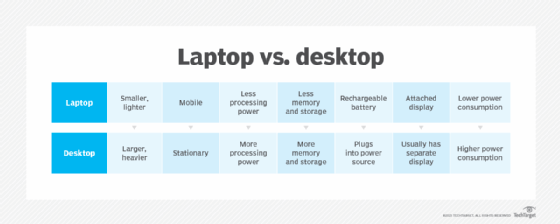
The evaluation process should also identify exactly which employees require laptops. Not all employees bring work outside the traditional workspace, and it's easier to secure information if it doesn't leave the premises. Laptops are also typically more expensive than the equivalent desktop systems. Determine which users really need to be part of the new laptop rollout.
Licensing considerations
Licensing is a significant part of any deployment. Begin with a software inventory that identifies the frequency of use and eliminates legacy and abandoned apps or those with non-standard licensing options. Be cautious about unauthorized or unknown apps installed in shadow IT situations.
Creating a standard applications catalog is essential. Categories include the following:
Productivity suites.
Collaboration tools.
Customer relationship management.
Project management.
Enterprise content management.
Web browsers.
Security software and agents.
Evaluate the use of subscription-based versus perpetual licensing models. This is also a great time to determine whether converting to SaaS tools would be beneficial.
Network distribution readiness
Many of today's deployment options are automated and occur over the network, so ensuring the network can handle the additional workload is critical. Many organizations use an isolated operations network segment for initial installations. This helps avoid potential security issues that might contaminate systems before security software is in place and configured.
For the actual distribution of systems after installation and configuration, establish remote delivery and direct-to-employee shipping.
Planning timelines
Hardware, licensing and network assessment times vary by environment. The process goes much more quickly for organizations that already have a comprehensive inventory and configuration management platform. The same is true if IT already measures network usage to identify peak traffic times and performance bottlenecks. Having a firm grasp of license management also helps prevent delays.
Deployment delays might occur if an organization needs to create these tracking mechanisms before starting the laptop deployment process. However, they're crucial to many deployment situations.
3. OS deployment and app provisioning
Traditional imaging approaches might work well for some organizations, especially for smaller deployments with more specialized configurations. Other organizations might prefer cloud-based tools, or even OS and app installations completed by the laptop hardware vendors and tailored to the organization's specifications and requirements.
Regardless, standardized configurations -- often called golden images -- are essential. They give support teams, trainers and users a consistent configuration to interact with. They also simplify security configuration and auditing, which are necessary to guarantee compliance.
App provisioning strategies
A major hardware rollout is a good opportunity to evaluate an organization's provisioning strategies. IT teams should verify that their app catalog is complete and current. This catalog defines exactly which applications users have access to.
A major hardware rollout is a good opportunity to evaluate an organization's provisioning strategies.
Next, determine how users access these programs. Options include self-service portals for on-demand installations or preinstalled apps that arrive with the new laptop. Many organizations offer a combination by providing standard applications to all users and offering on-demand installations for more specialized or department-specific programs.
Automated OS and app deployment workflows
IT should construct automated, zero-touch workflows to install OSes, apps and custom configurations to the new laptop fleet. This integrates the deployment into the organization's other automation initiatives. It also offers the same benefits as automating service deployments, including efficiency, consistency and scalability.
Zero-touch provisioning offers the following benefits for end users:
Less downtime and faster time to productivity.
Smoother onboarding for new team members.
Reduced setup frustration and errors.
Consistent experience across locations.
IT support staff members likewise experience lower support ticket volumes, improved compliance and easier lifecycle management.
Be sure to carefully sequence OS installations, app deployment, security tools and updates.
4. License management
License management remains a critical component of IT operations and governance. Modern licensing relies on automated processes that link license assignment to device enrollment and user identity within unified endpoint management (UEM) and MDM systems.
Effective license management offers the following advantages:
Fewer manual steps, resulting in time savings and reduced rick of misconfigurations or errors.
Enhanced tool availability for users.
Reduced overspending on unnecessary licensing for users who don't need specific apps.
Management provides centralized tracking and visibility, enabling greater control over deployed applications. It lets organizations reclaim unused licenses, which is crucial to avoid overpaying on subscription-based licensing when employees change roles or leave the company. It's also important for proving licensing compliance.
5. Policy automation
Policy automation is essential to securing a new fleet of laptops, ensuring each device receives a consistent, compliant configuration. Deployment teams reduce risk and avoid manual configurations by generating a workflow that includes security baselines. The goal -- and challenge -- is to balance security controls with UX and productivity. Overly restrictive policies might hinder employee productivity, especially for traveling or remote users who might need to adjust firewall or other configurations on the fly.
Deployment teams can enforce various types of policies during the deployment workflow. Policies should include the following:
Security baselines. Storage encryption, endpoint protection, access controls and service controls.
Configuration settings. Desktop icons, service availability, system settings and more.
User access controls and identity integration. Account management for Active Directory (AD), Azure AD and similar directory services.
Automated configurations ensure consistent security from day one. This consistency also benefits users, who have similar and familiar experiences on their systems. It also streamlines new employee onboarding and simplifies the jobs of training teams and support personnel. Additionally, policy automation enhances regulatory compliance by continuously enforcing settings and enabling auditing.
6. Operational planning
IT should plan to identify and mitigate potential obstacles early by following established best practices. Don't neglect patching and updating as part of the overall system lifecycle.
Various technical, resource and app challenges exist. Whether these will affect the deployment depends on the organization's unique environment. However, common challenges include the following:
IT can mitigate many of these potential challenges using the following best practices:
Establish a pilot deployment program.
Emphasize automation for all steps.
Enforce standardization to simplify configuration, support and training.
Provide cross-team coordination for the best user experience.
Plan for post-deployment support, particularly for remote users. Many organizations rely on remote control software that lets help desk team members connect to and reconfigure systems directly.
Ongoing updates and lifecycle management
During a major platform deployment, IT should reexamine the organization's OS and app patching and updating infrastructure. Automated updates are the norm, and it's essential to confirm that new systems receive the necessary configuration to install all required updates.
Updated configurations include the following:
Operating systems.
Standard and specialized applications.
Security software, including agents, antimalware and firewalls.
SaaS availability.
Remote connectivity or VPN software.
It's never too early to examine the lifecycle of laptop systems. IT must allocate resources in the future to procure new laptops and repurpose or recycle existing systems.
The standard laptop lifecycle consists of three stages:
Select, procure and deploy laptops.
Update and maintain laptops.
Repurpose or recycle laptops.
Enterprise-grade laptops typically include durability features that extend their lifespan beyond what one can expect with less expensive consumer systems.
Organizations often plan for three-to-four-year lifecycles for laptops, though many users find the devices remain viable for another year or two beyond that.
16-32 GB of RAM for future-proofing memory requirements.
Proactive battery replacement after three years.
Periodic clean installations of OSes and apps.
Well-designed heat management systems.
Responsible user care.
The following factors can decrease device lifespans:
Poor heat management.
Wear and tear from use over time and travel.
Nonreplaceable components, especially memory and batteries.
OS and app installations that are incompatible with older hardware.
Selection of consumer-grade laptops instead of more durable enterprise-class systems.
IT administrators should evaluate these conditions in their organizations and either adjust lifecycle expectations or correct practices that decrease system lifespans.
7. Measuring success and continuous improvement
As with any significant project, it's important to measure success and establish continuous improvement practices. Key metrics for measuring deployment success include the following:
Deployment time per device.
User readiness and satisfaction.
Support ticket volume.
Security and compliance postures.
Use these metrics to identify opportunities for other similar hardware deployments, such as desktop systems or servers.
Planning and verifying the support structure's readiness improves an organization's chances of avoiding productivity disruptions during a deployment. Major deployments and hardware lifecycle management are ongoing strategic capabilities rather than one-time projects. This means automation is one of the most effective investments an organization can make. IT teams should take the opportunity to streamline all their deployment processes.
Damon Garn owns Cogspinner Coaction and provides freelance IT writing and editing services. He has written multiple CompTIA study guides, including the Linux+, Cloud Essentials+ and Server+ guides, and contributes extensively to TechTarget Editorial, The New Stack and CompTIA Blogs.