After a software launch, the ownership question often gets harder.
IT might own the platform. Business leaders might own the outcomes. HR or change management teams might help with communication and training. Managers might be expected to reinforce new behaviors. Employees might be the first to see where the new process breaks down.
But if no one owns the handoff between those roles, adoption can stall even when the system itself is working.
That is why software adoption should not be treated as the final step of implementation. It is the point when the organization has to prove that the software changed how work gets done.
A system can be live and still leave a lot of unfinished work behind it. People might be using it unevenly, training may not match the real questions employees have, and workflows might need to change once the software is in daily use. At some point, someone has to be responsible for saying whether the system is doing what the company bought it to do.
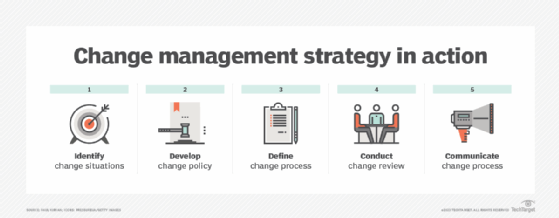
The 5 steps of change management strategy include identifying change situations, developing policy, defining process, conducting review and communicating process.
How to tell if software adoption is stuck
Software adoption does not always fail loudly. In many cases, the signs are quiet and familiar.
Employees might still rely on side spreadsheets, extra emails or informal workarounds because the new workflow does not fit the way work actually happens. Managers might ask for information outside the system because they do not trust the data or cannot get what they need from the platform. Employees might log in because they have to but still complete the real work somewhere else.
Training is another place where adoption can quietly break down. A launch webinar or one round of documentation might be enough to introduce the system, but it usually is not enough to help employees deal with the real questions that come up once they start using it. Those questions often involve exceptions, role-specific tasks, confusing handoffs or small workflow problems that were not obvious before go-live. A system can be available to everyone and still be understood well by very few people.
Feedback also matters. If employees are raising issues but those problems never reach the people who can adjust workflows, documentation, system configuration or training, the organization might keep treating adoption as an employee behavior problem when it is really a process design problem.
This is especially important in HR software projects, where employee feedback during HRMS projects can reveal whether the system fits real employee and manager workflows.
The issue is not always that the technology failed. More often, the organization bought the system to change something, but the work around the system has not caught up.
A software project can look finished when the system goes live, but adoption can still be incomplete.
Deployment metrics are not adoption metrics
Go-live dates, licenses, logins and training completion rates can show that a system has been deployed. They do not necessarily show that the software is improving work.
A stronger adoption view looks at whether the system is being used in the right workflows, by the right people, for the right reasons. Leaders should ask whether the software reduced friction, improved handoffs, eliminated duplicate work, made information easier to find or helped teams make better decisions.
The right metrics will vary by system.
For ERP, leaders might look beyond the initial ERP implementation to process consistency, data quality, reduced manual work, fewer side spreadsheets or better reporting.
For HR software, strongerHR technology adoption might show up in manager self-service, employee completion rates, onboarding efficiency or whether employees can complete routine tasks without extra support.
For communications and collaboration platforms, they might look beyond active users and ask whether the platform improved response times, meeting quality, handoffs or service coordination.
The common point is that adoption metrics should connect to the reason the software was bought. If the organization cannot explain how the system changed the work, it might be measuring deployment instead of adoption.
Post-launch software adoption checklist
A post-launch adoption plan should answer these questions:
Who owns the business outcome? The software should connect to a clear operational, financial, employee experience or customer experience goal.
Who owns the workflow changes? Business leaders and managers should know which processes are expected to change after launch.
Who owns training after launch? Training should continue as employees encounter edge cases, exceptions and role-specific questions.
Who collects and acts on user feedback? Employees need a way to surface friction, and leaders need a process for deciding what to fix.
Who decides whether adoption is working? Usage data can help, but adoption should also be measured against workflow improvements and business outcomes.
If the answers are unclear, adoption can stall even when the system itself is working.
Software adoption usually has many partial owners
Software adoption usually requires shared ownership, but that ownership can become unclear if handoffs are not defined.
IT plays a central role. It deploys, integrates, secures and supports the system. But IT usually cannot be the only group responsible for whether employees change how they work. That work often requires close HR and IT collaboration when software adoption affects employee experience as much as system access.
Business leaders need to define what the software is supposed to improve. They should clarify which processes should change, what outcomes matter and how the system fits the work their teams actually perform.
Managers play a different role. They see whether employees are using the system as intended, where old habits remain and where the new process is creating confusion. They are often closest to the practical adoption problems that do not show up in a project dashboard.
Employees also need a way to surface friction. They are the ones who encounter missing documentation, awkward workflows, unnecessary steps, confusing interfaces and process gaps.
The problem is not that one group owns adoption and another does not. The problem is that adoption often moves across all these groups without a clear owner for the transitions between them.
The problem is that adoption often moves across all these groups without a clear owner for the transitions between them.
The handoff needs an owner
The most important adoption question might not be, "Who owns the software?"
It might be, "Who owns the handoff between the software and the work?"
Someone has to make sure feedback reaches the right team. Someone has to decide whether a problem is a training issue, a workflow issue, a configuration issue or a business process issue. Someone has to keep measuring whether the software is solving the problem it was bought to address.
That does not mean one executive or one department should own every part of adoption. But it does mean the organization needs an ownership model that connects IT, business leaders, HR, managers and employees after launch.
That ownership model should answer some basic questions after go-live: Who is watching adoption? Who is collecting user complaints and deciding which ones matter most? Who can change the workflow if the process is not working? Who keeps training and documentation current? And who is responsible for saying, months later, whether the software is actually solving the problem it was bought to fix?
Without that structure, deployment can become the end of the project even though adoption has barely started.
Software adoption does not end when the system goes live. It becomes real when employees understand the new process, managers reinforce it, workflows adjust, feedback is acted on and leaders can show that the software changed the work it was supposed to improve.
James Alan Miller is a veteran technology editor and writer who leads Informa TechTarget's Enterprise Software group. He oversees coverage of ERP & Supply Chain, HR Software, Customer Experience, Communications & Collaboration and End-User Computing topics.