Free DownloadThe ultimate guide to mobile device security in the workplace
Organizations must lock down all endpoints that access business data and put measures in place to ensure the data doesn't fall into the wrong hands. When it comes to mobile devices, however, there are unique security challenges for organizations to mitigate. This guide covers the ins and outs of mobile device usage in the workplace, with an emphasis on mobile device security policies, including the steps for implementation and best practices.
9 mobile device management best practices for businesses
Organizations can't deploy mobile devices without accounting for their management complexity. IT should follow these nine best practices to manage mobile devices in the enterprise.
Mobile device management gives IT the control, security and visibility necessary to protect modern workplaces.
Mobile devices are especially vulnerable to loss, theft and unauthorized access, which complicates data security and regulatory compliance for most organizations. IT administrators need to think about getting devices to a securely managed and productive state while ensuring the onboarding process is simple, minimally invasive and streamlined for end users. Mobile device management is not only a tactical IT chore but a strategic issue.
What is mobile device management (MDM)?
Mobile device management (MDM) software enables IT to control, secure and enforce policies on mobile devices such as smartphones, tablets and laptops.
An MDM platform can manage various devices, including iOS, Android, Windows, macOS and even ChromeOS, in some cases. MDM is a flexible tool that gives admins many controls to ensure devices are secured and properly supported. Additionally, IT can consider programs such as Apple Business Manager and Android Enterprise, which integrate with MDM to give organizations more privileges on a device. Admins can then enforce higher-level security configurations, including advanced restrictions and settings controls, home screen layout, single app mode, multi-user and shared modes, and zero-touch enrollments.
Device ownership is an important factor in MDM. In particular, BYOD policies can add a layer of complexity to management. Under these policies, employees store corporate data and carry out work tasks on personal devices. The challenge with BYOD is that user devices are unmanaged by default, which can expose the organization to security and compliance risks.
MDM platforms help organizations manage BYOD endpoints using containerization mechanisms that enable app‑level controls and the separation of personal and work data. Admins can configure an MDM platform to define acceptable use, privacy boundaries and enforcement policies for devices based on their ownership status. This balances flexibility and security.
1. Manage mobile devices with an MDM policy
An MDM platform is only as effective as the policies that are configured and enforced by the organization using it. An MDM policy framework should define device enrollment requirements, security configuration standards and compliance monitoring procedures. Rather than implementing MDM as a purely technical tool, the strongest device management strategies establish clear, documented MDM policies that align technical controls with organizational security objectives.
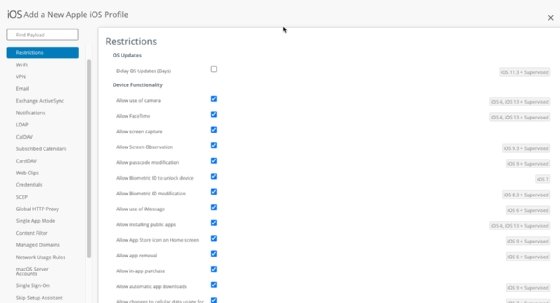
MDM's role is to provide the organization with the ability to enforce security compliance controls on devices. Figure 1 shows an example of these controls for an iOS device.
Figure 1. Device compliance policies that IT admins can enforce for iOS devices through MDM.
Some of the most common profile and compliance settings include the following:
PIN code and device encryption.
Certificate-based authentication.
Email configuration.
Wi-Fi configuration.
Device feature permissions and restrictions.
Blocklist and allowlist applications.
Single sign-on (SSO).
Enforcement and automation of iOS and Android updates.
Remote lock and device wipe capabilities for lost or compromised devices.
2. Manage authentication and access
Access management on mobile devices should include strong PIN and multifactor authentication (MFA) controls, enforced through MDM.
PIN code management
The PIN often serves as a password for mobile devices, preventing bad actors from gaining unauthorized access to a device. Organizations should enforce a PIN policy, which might include minimum length standards or require automatic lock after a short period of inactivity. Using MDM, IT can enforce these settings consistently across corporate-owned and BYOD devices enrolled in the environment.
Multifactor authentication
Once a device leaves the corporate network, it's exposed to untrusted networks and higher risk conditions that IT can't fully control. MFA provides more comprehensive protection by confirming that the end user logging on is who they claim to be. It requires two or more authentication methods, which can include PIN or password, SMS verification and biometric authentication. An admin can then set parameters for when to require MFA based on the device's trust and risk conditions.
MDM can distribute and enforce these MFA requirements by integrating with the organization's identity and access management (IAM) platform during enrollment and device compliance checks. This approach aligns mobile authentication with the broader zero-trust and IAM strategy.
3. Enable data loss prevention policies
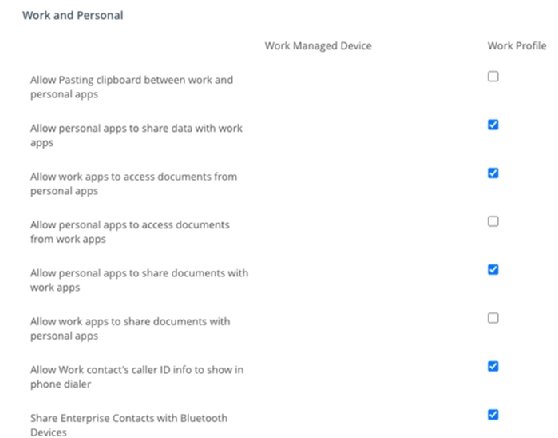
Users rely on multiple apps on their mobile devices to get work done, so IT admins must ensure any corporate data is not copied to, or accessed from, unmanaged or untrusted applications. App protection and DLP policies can prevent corporate data from being saved locally to the device storage or exported to personal locations. IT admins can also restrict data transfer -- for example, the Open in or Share options -- to only approved or managed apps, and limit specific capabilities such as copy, paste, download or local file export. Figure 2 shows an example of these settings for an Android device with a work profile.
Figure 2. Capabilities that IT admins can limit on personally owned devices with a work profile.
Platforms such as Microsoft Intune can even apply app protection policies to Microsoft apps without requiring admins to enroll devices in an MDM. For devices enrolled in an organization's MDM, the MDM is the mechanism to create and enforce these security restrictions to ensure data loss protection.
4. Set corporate and BYOD remote lock, device wipe policies
What happens if an employee loses a device or leaves the company? Every business should develop a corporate-owned and BYOD policy to handle device loss and data wipes.
Under this type of policy, whenever a mobile device is lost or stolen, the organization can take actions to secure data, including a data wipe, reset or device lock.
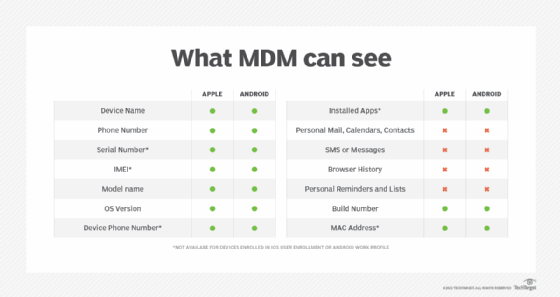
This type of policy gets messy with BYOD environments; not every user likes the idea of giving IT this type of control over their devices. However, both Google and Apple have addressed this issue with capabilities in their platforms. On Apple devices, User Enrollment limits what an MDM platform can do on a personal iPhone or iPad, focusing management on the work container. For Android devices, Google's Android Enterprise work profile feature enables users to keep work and personal apps and data distinct from each other. Each profile is entirely separate; the organization manages the work apps and data, while the end user's apps, data and usage remain untouched. This restricts invasive management tasks, such as factory resets.
5. Enable remote access management and monitoring
Remote access management lets IT troubleshoot and control devices remotely, without physical access. Monitoring uses centralized dashboards to provide real-time visibility into compliance, OS version, security status and other indicators of device posture, such as location, usage and threats.
These capabilities support enterprise security by enabling rapid incident response. IT can lock geofenced devices, quarantine threats or remotely wipe lost assets.
Implementation requires strong security measures to protect sensitive data and ensure functionality. Use secure channels with Transport Layer Security encryption, certificate authentication and MFA for admins. Cross-platform support must cover iOS, Android, Windows and macOS. Role-based access control (RBAC) limits admin access to sensitive actions, reducing the risk of accidental or unauthorized changes, such as wiping devices or locking them remotely. Security information and event management (SIEM) systems integrate with remote access tools to monitor and log security events, detect anomalies and provide real-time alerts about potential threats. Together, these measures ensure that remote access management is secure and effective across devices.
Other best practices include the following:
Enforce the principle of least privilege for admin access.
Automate alerts for noncompliance or jailbreak detection.
Be transparent about BYOD privacy and monitor only corporate data.
Set up regular compliance reporting for audits.
6. Keep BYOD and corporate devices updated
Keeping devices updated isn't an easy task, but it's extremely important. Mobile devices are a growing target for malware and other attacks, and one of the best ways to fight against that is to ensure that all managed devices are fully up to date.
There are plenty of different approaches IT admins can take to keep devices updated in a timely manner. Asking users to implement updates is a simple approach, but it's not always a successful one. A better approach is to enforce controls through the MDM. For devices enrolled with an MDM platform, an IT admin can schedule a mobile OS update for all users -- ideally during a low-use time, such as the middle of the night. On corporate-only devices, IT can take that a step further, and the MDM can schedule, download and auto-install the updates.
With BYOD environments, it can be a bit trickier. Mobile IT admins can schedule a prompt for the user to download and install the update, but it's still up to the end user to trigger the process. However, there are mechanisms IT can put in place through MDM. One mechanism is a compliance policy, which enables admins to create an "if this, then that" automation for devices.
Asking users to implement updates is a simple approach, but it's not always a successful one.
An example of this would be a compliance policy that targets devices with a specific version of iOS. IT can create an action that would send a notification to a user to update; then, after two days, if that device hasn't updated, an admin can take steps such as quarantine or removal of corporate email and access from the device. These restrictions would remain in place until the user updates the device OS.
These compliance policies help keep corporate data safe while also encouraging end users to stay up to date. The same approach applies to Android, ChromeOS and Windows devices, with platform-specific grace periods and remediation actions defined in the organization's MDM policy.
7. Integrate MDM with other IT and IAM systems
IAM is a system that manages user identities and controls user access. It includes features like SSO and RBAC. Integrating IAM with MDM synchronizes user identity with device compliance for unified security across endpoints.
This integration can help enable conditional access, which is critical for effective MDM policy. With conditional access, only MDM-enrolled, compliant devices associated with verified user identities can access corporate email, VPN or SaaS apps. It can also help automate user provisioning and deprovisioning. New hires get compliant devices instantly, offboarded users lose access and corporate data is selectively wiped.
Implementation involves API connectors between MDM and IAM platforms. Device certificates and unique identifiers establish trust, while continuous device posture feeds into IAM risk decisions.
Beyond IAM, MDM integrates with email servers, SIEM tools and endpoint detection platforms to help provide visibility and automated response across IT systems.
8. Monitor device compliance and automate with mobile threat defense
MDMs provide device-level security controls, but they can lack the ability to detect and prevent attacks from malicious apps, networks and phishing campaigns. To keep mobile data secure, organizations should supplement MDM with mobile threat defense (MTD).
MTD platforms detect man-in-the-middle attacks over Wi-Fi, identify suspicious behavior on a device and proactively search for malware, harmful applications and mobile phishing attacks. It can then remediate issues with various methods, such as killing the device's Wi-Fi or cellular connection to prevent further data leakage, or working in tandem with an MDM to quarantine a device. At a high level, an MTD platform can perform the following functions:
Monitor a device's activity to detect cyberattacks in real time.
Monitor device applications for suspicious behavior that might leak user data to untrusted sources.
Monitor for OS vulnerabilities and kernel exploits.
Monitor device networking activity for man-in-the-middle, Secure Sockets Layer (SSL) stripping and SSL decryption attempts.
Together, MTD and MDM platforms provide stronger security for mobile devices and users. MTD threat signals feed MDM compliance policies, automatically marking high-risk devices as noncompliant and blocking corporate access until remediation. This provides continuous threat detection with automated policy enforcement.
9. Keep your end users informed
IT admins can put as much technology as they want toward fixing a problem, but end users hold the keys to success. It is vital to train end users and keep them informed on current threats and vulnerabilities.
Mobile security training should emphasize the importance of updates, recognizing phishing attempts, using MFA and securing devices on public Wi-Fi. This empowers users to make security-conscious decisions that protect both personal and corporate data.
Helping end users understand the importance of updates -- and how they can affect corporate data -- should help them make the right decisions related to device security.
Editor's note:This article was originally written by Michael Goad and updated by Sean Michael Kerner to improve the reader experience.
Sean Michael Kerner is an IT consultant, technology enthusiast and tinkerer. He has pulled Token Ring, configured NetWare and been known to compile his own Linux kernel. He consults with industry and media organizations on technology issues.
Michael Goad is a freelance writer and solutions architect with experience handling mobility in an enterprise setting.