Getty Images
How to choose a data center for AI workloads
Variables like power and network capacity affect the ability of data centers to support AI workloads. But not all AI workloads require the most powerful data center capabilities.

Organizations deploying AI workloads might benefit from choosing an AI data center to host them.
But the key word there is might. AI data centers provide power, cooling and network infrastructure tailored to the needs of AI workloads. They are an important resource for many organizations as they adopt AI; however, the specific requirements of AI-powered applications can vary widely.
Before choosing a data center for an AI workload, it's important to understand exactly what a given workload needs from its host data center. This is increasingly important because renting space in so-called AI data centers comes at a cost premium. To avoid wasting money on data center capacity that applications won't actually consume, organizations must assess their application requirements and choose a data center accordingly.
To best optimize AI workloads, organizations must understand the relationship between data centers and AI workloads, the specialized data center capabilities AI can require and how to select a data center to host an AI app.
A note on AI data centers
Although the term AI data center has become popular in recent years, there's no official definition of what an AI data center is. Nor are there firm criteria to differentiate so-called AI data centers from traditional data centers.
In general, AI data centers feature higher-capacity power and cooling systems than conventional facilities. This is important because AI workloads tend to consume more energy and generate more heat than other types of workloads. However, there is no fixed amount of power or cooling capacity that a data center must supply for it to qualify as an AI data center. In this sense, the term can be misleading.
Just because a facility markets itself as an AI data center doesn't necessarily specify anything in a technical sense. Virtually any data center could theoretically host an AI workload. Businesses assessing the best home for their AI-based applications should look for a facility with capabilities that align with their workload needs -- rather than only considering data centers with an AI label.
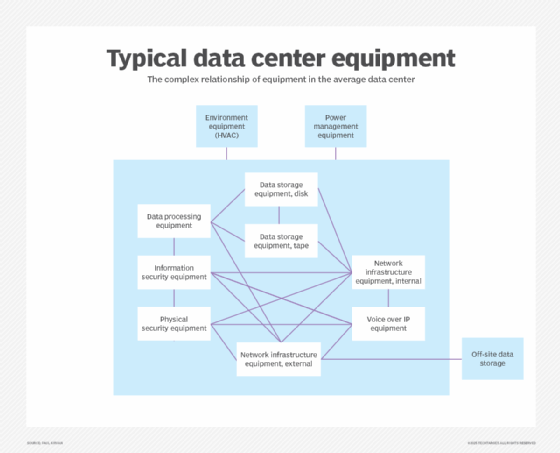
Data center considerations for AI workloads
The following are the specialized capabilities data centers need to support AI workloads. These capabilities can vary depending on the type of AI deployment.
Power capacity
All applications -- or, more specifically, the servers that host applications -- require power. But AI apps tend to demand more electricity than traditional ones.
This doesn't mean businesses need a data center with high-power capacity to host anything AI-related. The amount of power a data center needs to supply to AI workloads depends on many factors, such as the following:
-
Training vs. inference. Generally speaking, training AI models is a more energy-intensive task than deploying a model for inference. Training places a constant load on energy-hungry compute resources; with inference, however, the load can fluctuate.
-
Specialized hardware. AI workloads that use specialized hardware devices, like GPUs, typically require more energy than those that run on standard CPUs.
-
Workload complexity. The more data an AI workload has to process, and the more complex the data is in structure, the more energy the workload generally requires. An AI application that generates product recommendations based on a narrow data set will likely use less energy than one that steers a self-driving car by assessing multiple streams of real-time data.
Software utilities, such as PowerTOP, can track energy usage on a process-by-process basis and provide a valuable estimate of the power AI applications consume. Some servers offer hardware-level power monitoring, though it isn't always granular enough to report power use by individual applications or processes. For businesses selecting an AI data center, they must determine how much energy their AI workloads use, then choose a data center with sufficient spare energy capacity to support them.
It can be helpful to consider how data centers generate their power. Most rely on the public power grid, which is increasingly strained. This creates the risk that a data center won't always be able to source energy equal to its total theoretical capacity. Some facilities address this challenge by deploying on-site power generators, also known as behind-the-meter power. However, it typically costs more to rent space in a data center that features this extra energy assurance.
Cooling capacity
Power consumption goes hand in hand with cooling capacity. Power-hungry workloads can generate more heat, which requires more powerful data center cooling systems.
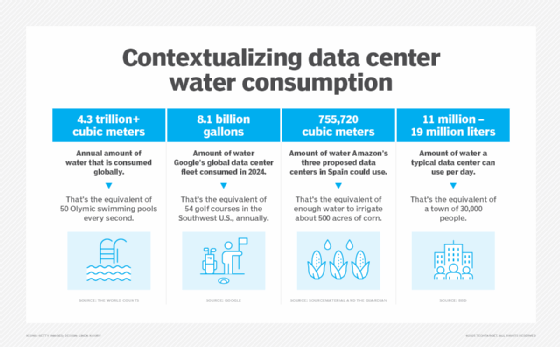
Here again, though, cooling requirements of AI workloads can vary significantly -- and so can the approaches data centers use to dissipate heat from servers. Evaporative cooling, a technique that uses water evaporation to lower temperatures in server rooms, is the most common strategy. But it results in high water consumption, which isn't ideal for companies concerned with sustainability. More advanced cooling options include various types of liquid cooling, a more sustainable way to dissipate heat from servers that run hot while supporting compute-intensive AI workloads.
Network infrastructure and connectivity
Some AI applications require high-performing networks. Specifically, they could require the following:
-
High bandwidth. More bandwidth means more data moving across the network in less time.
-
Low latency. Lower latency reduces the time it takes for data to move across a network.
-
High reliability. A highly reliable network is one that rarely fails or experiences slowdowns.
Whether an AI workload requires networking infrastructure capable of delivering these features depends in large part on what the workload does. For AI training, low latency and high reliability aren't usually priorities because there is no need to move data in real time, and training workloads can tolerate networking disruptions. High bandwidth might be important for training, depending on whether users need to move training data over the network.
In contrast, for inference, low latency is often critical, especially for AI workloads that need to respond in real time, such as chatbots or fraud detection systems. AI applications can also require high reliability if they support mission-critical operations that would disrupt an entire business.
When comparing data center networking capabilities, consider which interconnection options a data center offers. Data center interconnects provide dedicated network connections between facilities, resulting in higher network performance and reliability for data that needs to move between data centers. For AI workloads that require high bandwidth, minimal latency or high reliability, interconnects are a valuable resource. But again, not all AI workloads need those capabilities.
Location
Data center location can affect AI workloads in several important ways:
-
Network latency. Generally speaking, the closer a data center is to users, the lower the network latency will be. Thus, an AI application that needs to collect information from users and generate responses in real time will typically perform better if it's hosted in a data center that is geographically proximate to those users.
-
Data sovereignty. Data sovereignty refers to rules imposed by governments or regulators on data security and privacy. Because some AI workloads process sensitive data, it can be important to consider which data sovereignty requirements apply to information hosted in a data center, depending on the jurisdiction in which the facility is located.
-
Power sourcing. Because regional power grids generate electricity in different ways, the type of power a data center uses and the amount available can vary. When deploying an AI workload, these variations can be significant from a power assurance standpoint. In addition, some regions offer easier access to sustainable energy sources than others.
-
Disaster susceptibility and recovery. While most modern data centers can withstand physical disasters, their susceptibility to environmental or man-made catastrophes can vary by location. Businesses should choose data centers in more reliable areas for any mission-critical AI workload.
The location of a data center can play a major role in AI performance, scalability, sustainability and reliability. The good news for businesses is that data centers are available in a variety of locations, especially in colocation facilities where multiple businesses rent data center space.
Operational expertise and support
In general, businesses are responsible for deploying and supporting their own AI workloads. But some data centers offer services that can help. They span two main categories:
-
Managed IT services. A data center provider offers services like hardware management or data backup.
-
IaaS. Some data centers let customers rent servers that the data center operator manages. This is similar to public cloud IaaS services, but with more control over hardware deployment.
Whether a business needs these services depends on the AI workloads it's deploying and its capacity to manage them in-house. Physical proximity to the data center can be a factor, as it's harder to manage AI workloads hosted in a data center far from a company's own IT staff. Businesses can perform many IT tasks remotely, but hardware-related tasks require a physical presence in the data center, unless the data center provider offers services to handle this work on behalf of customers.
Chris Tozzi is a freelance writer, research adviser, and professor of IT and society. He has previously worked as a journalist and Linux systems administrator.