Software rollout plans can make unfinished work look more settled than it is.
The date is on the calendar. The vendor has a timeline. Testing has a window. Training has a slot. The business has been told when the system will be ready.
None of that is bad. It is also not proof that the work underneath the plan is ready.
That matters because integration is no longer only about whether one system can exchange data with another. That is still the baseline. The harder rollout question is whether data, workflows, automation, AI agents, business rules and human handoffs can move together without creating conflict underneath the surface.
That is where orchestration and context start to matter.
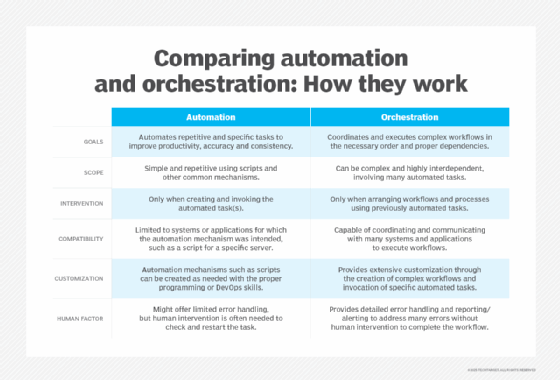
Orchestration determines when work should move, pause, route, escalate or wait because another system, agent, automation or business process is already acting. Context determines whether the same action is appropriate in this specific moment, for this user, in this workflow, under these rules and with this data.
The language can also get slippery. Vendors might use orchestration and contextual awareness in different ways, even when they are pointing at the same basic premise. In one product, orchestration might mean workflow routing. In another, it might mean coordinating agents, enforcing policies, adding human checkpoints or monitoring actions across systems. Context might mean user permissions, workflow state, customer history, business rules, data grounding or some other signal the software uses to decide what should happen next.
That makes the buyer question more practical: What exactly is being coordinated, what context is being used, and who controls the rules when the rollout reaches live work?
This does not make every rollout an AI project. It does mean software rollouts increasingly have to support more complexity under the hood while promising a simpler experience to users.
A system can connect and still fail the work. A field can move and still lose context. A workflow can technically pass from one application to another and still conflict with another process. An automation can complete its task and still create a problem for the next team. An AI agent can act quickly and still act at the wrong moment.
That is the uncomfortable part.
Integration does not only fail when systems cannot connect. It also fails when no one has tested what the connection is supposed to carry, coordinate and understand.
Integration does not only fail when systems cannot connect. It also fails when no one has tested what the connection is supposed to carry, coordinate and understand.
Here are five integration checks to make before software rollouts harden.
1. Check what data actually has to move
The first integration question is usually too simple: Can the data move from one system to another?
That matters, but it is not enough.
A better question is: What has to move, in what form, with what meaning, under what rules and for whose decision?
Data does not travel alone. It carries definitions, timing, ownership, permissions, business rules and process assumptions. CRM and ERP integration is a familiar example: A customer record, supplier status, employee profile, product item, invoice, work order or inventory field might look clean inside one system and become confusing once it lands somewhere else.
That is how ERP data fragmentation starts to matter. It is not just that different systems keep different versions of the same record, but that those differences can slip into the rollout as if they are already understood.
A customer might be ready for service in one system but blocked for credit reasons in another. A supplier might look approved until the process crosses into a region or category with different rules. Inventory might look available until another system shows it is reserved, quality-blocked or tied to a planning assumption the rollout team did not test.
Those are not exotic edge cases. They are the kinds of ordinary enterprise mismatches that become expensive when they are found late.
Before rollout plans harden, teams need a data governance strategy for the records that matter most. They should know which records must move, which system owns the truth, which fields matter for decisions and where local definitions could break the larger process.
They should also know what context has to travel with the data. A field value might not be enough. The receiving system might need to know where the data came from, whether it is current, which process created it, which approval applies and whether another workflow is already using it.
The goal is not to clean every piece of data before launch but to know which data cannot be wrong, incomplete or stripped of context.
2. Check the handoff on which the workflow depends
Integration is often described as system-to-system connection. The business usually experiences it as a handoff: A purchase request becomes a requisition. A sales order becomes a fulfillment step. A customer issue becomes an escalation. An employee change becomes a payroll, benefits or access update. A project milestone becomes a finance, staffing or reporting event.
Some of those handoffs are technical. Many are organizational.
That is why workflow ownership has to be checked before the rollout plan gets too far. A system might know where the next step goes, but the business might not know who owns it once it gets there.
That is when software change stalls. The platform might be live, the integration might work, but the everyday process can still sit between teams because no one owns the transition from one system, department or decision point to the next.
This is where orchestration gets practical: Who acts next? What triggers the next step? What should wait? What should escalate? What happens if another system, automation or agent is already working on the same record, customer, case, employee or order? Those questions matter because orchestration is not just about making work move faster. Sometimes the right action is to stop, pause or route the work differently because another process has priority.
That is why timing matters as much as connectivity. Closing a service case might be the wrong move if billing is still working through a dispute. Removing access might create a problem if an approved transfer has not finished moving through the right systems. Procurement might think a supplier is ready to advance, while risk still has a review open. The same applies to AI agents. Access to the record is not the same as permission to act on it.
The handoff has to know more than where the next system is; it has to know when the next step is appropriate: Who owns the work when it leaves one system and enters another? What does the receiving team need to know? What information has to travel with the handoff? What should happen if the next system rejects the record, lacks a field or flags a conflict? Who is allowed to fix it?
Those questions can feel small compared with the larger implementation plan.
They are not small; they are where the user experience, business process and system design meet. If that meeting point is unclear, employees fill the gap with emails, spreadsheets, side conversations and workarounds. That might keep the rollout moving, but it also creates the next integration problem.
3. Check exceptions before they become post-launch surprises
Every rollout plan handles the happy path. The harder test is the exception path: What happens when the customer record is incomplete? When a supplier is missing required information? When a finance approval is late? When a product code changed in one system but not another? When an employee change affects HR, payroll, access and reporting at the same time?
The answer cannot be, "Someone will handle it." Someone probably will. But that is not the same as a process.
Exceptions are where integration assumptions become visible. They show whether the business understands the process well enough to support it after launch. They are also where contextual awareness becomes more than a vendor phrase.
A standard workflow can handle the standard case. But an exception usually requires the system, automation, agent or person to understand something about the moment: the customer status, the region, the approval level, the workflow stage, the data source, the compliance rule, the service history or the business consequence of acting too soon.
This matters because enterprise software at scale is rarely one clean sequence. Business process management software tools can help map, automate and monitor parts of that work, but the rollout team still has to understand the workflows, records, approvals, rules, integrations and human judgment points that have to hold together under pressure.
A rollout can survive some uncertainty. It cannot survive endless exception handling that no one owns.
That is why teams should test a handful of ugly cases before the plan locks -- not only the most common transaction, the standard workflow, the path the vendor demo showed.
Test the awkward cases. Start with the records and workflows people hope will not come up during launch: the customer with two identifiers, the order that changes after approval, the employee whose role and manager change at the same time, the supplier that is fine for one region but blocked in another. Those are the cases that show whether the process knows when to continue, when to stop and when a person has to decide.
That is where teams learn whether the integration really supports the work.
Signs integration assumptions are not ready
Integration risk usually shows up before launch if teams know where to look. Watch for these warning signs:
· Teams define the same customer, supplier, employee, product or order in different ways. · Handoffs still depend on email, spreadsheets or someone remembering the next step. · No one is sure who fixes a rejected, incomplete or conflicting record. · Exception cases have not been tested before the rollout plan locks. · Reporting still depends on manual reconciliation across systems. · Teams disagree about which system owns the truth. · Work can move forward even when another system is already acting on the same record or process. · Vendor language around orchestration or context has not been turned into specific controls. · The post-launch owner of the integration is unclear. · A local workaround is already being treated as part of the process.
None of these signs automatically means the rollout should stop. But they do mean the integration plan needs more work before the software goes live.
4. Check reporting against the integrated reality
Reporting is often treated as something that comes after integration. That is a mistake.
Reporting should be one of the early tests of whether integration is working. Leaders do not only want systems to connect; they want to trust what the connected environment says about the business. If the rollout creates new uncertainty around revenue, inventory, workforce data, customer status, service issues or process performance, the integration problem has moved into decision-making. That is one way costs leak between enterprise software systems.
The cost is not always a failed implementation; sometimes it is slower reporting, duplicated reconciliation, extra manual review, competing dashboards, shadow spreadsheets or leaders who stop trusting the numbers. That is why data quality management should be part of rollout planning, not something teams revisit only after reports start disagreeing.
Before rollout plans harden, teams should ask which reports matter on day one, which reports matter after stabilization and which business questions the integration is supposed to answer. They should also know which data sources feed those reports and where definitions differ across systems.
This is not only a reporting team problem. If a workflow changes but the reporting model does not, leaders might measure the wrong thing. If a field moves but its meaning changes, the report might look right and still mislead people. If teams keep separate local reports because they do not trust the integrated view, the company has not really solved the problem.
Reporting also helps expose orchestration problems. If a process moved forward, leaders should be able to see why it moved, what triggered it, which system acted, whether a person approved it and whether another automation or workflow was involved.
A good integration plan should make reporting boring -- not because reporting is unimportant, but because the numbers should not become a fresh argument every time someone asks whether the rollout worked.
Software rollouts now depend on more than basic system connectivity. As automation and orchestration expand across workflows, teams need to know when work should move, pause, escalate or wait.
5. Check who owns the integration after launch
The final integration check is the one teams most often avoid: Who owns it after launch?
Not who built it. Not who configured it. Not who signed off on the implementation plan. Who owns the integration once people are using it and the business starts finding problems?
That question matters because integrations do not freeze at go-live. Business rules change. Vendors update systems. Departments add fields. Workflows evolve. Regulatory requirements shift. AI vendor negotiations can introduce new features, data terms or pricing structures that change what gets turned on. A team starts using a workaround that becomes normal. A local report becomes the unofficial version of the truth.
The same is true for orchestration and context. The rules that decide when work moves, pauses, escalates or requires human review will need to change. The context a system uses to make or route a decision may need to change, too.
A rollout plan can make integration look like a project phase. The business experiences it as an operating model. That is why early decisions shaping enterprise software outcomes should include ownership decisions, not just technical ones. Someone has to know which integrations are critical, which data flows need monitoring, which handoffs create friction, which reports should be trusted and which orchestration rules need review before they ripple through the stack.
That ownership might sit across IT, business systems, data governance, finance, operations, HR, customer experience or other teams. That is fine. What is not fine is pretending ownership exists because multiple groups are involved.
Shared ownership still needs a model. Teams should know who reviews failures, who approves changes, who updates documentation, who responds when the business process no longer matches the integration and who decides whether a new requirement belongs in the core system or in a local workaround. They should also know who controls the rules when software starts acting more automatically. That includes workflow rules, escalation rules, AI-agent guardrails, human checkpoints and the contextual signals the system is allowed to use. Without that structure, the rollout might succeed technically while the integrated environment slowly becomes harder to manage.
The rollout plan is not the integration plan. It can say when the system will launch, but it cannot prove the work is ready to move.
That is the point of these checks. They are not meant to slow every project or turn every integration discussion into a governance exercise but to catch the places where a clean rollout plan can hide unresolved work: What data has to move? Which handoff matters? What happens when the process hits an exception? Can reporting be trusted? Who owns the integration after launch? Those questions are practical because they sit close to where enterprise software projects actually get into trouble -- not in the abstract, not only in the architecture, but in the daily movement of data, decisions, approvals, reports and work across systems.
They also matter more as software promises simplicity on the surface while handling more complexity underneath. The user might see a cleaner workflow, a better interface, an automated recommendation or a faster answer. But underneath that experience, more systems, rules, data sources, automations and agents might be involved.
That can be useful. It can also be risky if no one knows what is being coordinated, what context is being used and who owns the outcome.
Enterprise software integration is not only about connecting applications. It is also about preserving enough meaning, control, timing and ownership for the business process to keep working after the connection is made. That is why the best time to ask these questions is before the rollout plan hardens.
After that, the questions do not go away. They just get more expensive.
James Alan Miller is a veteran technology editor and writer who leads Informa TechTarget's Enterprise Software group. He oversees coverage of ERP & Supply Chain, HR Software, Customer Experience, Communications & Collaboration and End-User Computing topics.