18 enterprise email security best practices for 2026
Safeguard your organization. Train employees to avoid password reuse, spot phishing attempts and encrypt messages, among other email security best practices.

Email security best practices haven't changed much over the years: Use strong passwords, block spam, don't trust offers that seem too good to be true and verify requests -- even from known entities.
These longstanding practices, however, have not stopped email from being a significant security vulnerability. CISA reported that more than 90% of successful cyberattacks begin with a phishing email, making it one of the riskiest tools used by enterprises today. The issue has been compounded by a 131% year-over-year increase in emails containing malware, according to a 2026 Hornetsecurity report, with phishing remaining the leading infection vector at 46%, followed by compromised credentials at 25%.
To prevent these risks, organizations must follow a strong set of email security best practices. Organizations should share the following guidance with their employees and implement appropriate controls and technologies to protect this vital means of communication.
Create strong passwords
One of the most important email security best practices is to use strong passwords. Password security advice has changed in recent years. Previous thinking was that complex equaled strong. But forcing employees to create complex passwords, such as }m}{4p#P@R9w, usually ends with users writing their passwords on a sticky note or saving them in an insecure file on their desktops.
NIST maintains that password length, not complexity, is the key to password strength. Using passphrases -- the stringing together of a few words, such as kittEnsarEadorablE -- is one method to create longer, easy-to-remember yet difficult-to-guess passwords that help defend against attackers who use dictionary attacks to target weak passwords.
If you plug these two examples into Security.org's How Secure Is My Password? tool, you will find that }m}{4p#P@R9w would take 400,000 years for a computer to crack, while kittEnsarEadorablE would take 6 trillion years.
Stronger passphrases include strings of unrelated words. For example, per Security.org's calculator, the passphrase authoRbeacHkeyboarD would take 300 trillion years for a computer to guess.
Recommend employees use passphrases and, as an organization, create a company password policy that communicates password requirements and expectations.
Don't reuse passwords across accounts
Password reuse is a major security threat. Malicious actors know that trying a reused password on a breached system often unlocks other accounts. Therefore, if an attacker compromises an account that uses the same credentials as others, the attacker can easily gain access to those other accounts. Password reuse is especially dangerous when employees use the same passwords for corporate and personal accounts.
Encourage employees to follow password hygiene best practices, including creating strong, unique passwords or passphrases for each account. This is a pain point for many users, especially those with dozens or hundreds of logins to remember. Use single sign-on or a password manager to help alleviate the challenge.
Consider changing passwords regularly -- or not
The frequency of password changes has been a topic of debate over the past decade. Changing passwords every 90 days used to be the norm. The assumption was that frequent password changes help keep systems secure, but in reality, they often lead to user frustration and the use of less secure passwords. More often than not, Password1 becomes Password2 after 90 days.
NIST has now recommended against forcing periodic password changes unless an organization has reason to suspect a compromise or data breach. Note, however, that some compliance regulations, such as PCI DSS, require frequent password changes.
Companies must weigh the benefits of regular password changes against employees' tendency to use weaker passwords that are easier to remember and, therefore, easier for attackers to exploit.
Use MFA
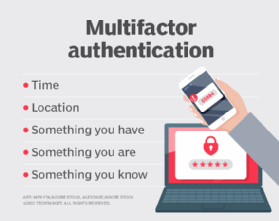
MFA involves using more than one method to authenticate a user's identity. For example, a username and password in combination with a one-time password or fingerprint biometric. Adding a second -- or third, or more -- factor to the authentication process adds a layer of defense and helps mitigate common email threats, such as brute-force attacks and password cracking. Microsoft reported that using MFA can help prevent 99% of credential-based attacks.
Mandate the use of MFA and recommend that employees protect their personal accounts with MFA wherever available. Consider adopting phishing-resistant MFA. This approach uses methods that are resistant to MFA bypass attacks, such as push bombing and SIM swapping.
Learn how to spot phishing scams
While email security products filter many spam emails, a significant number still reach employees' inboxes. These unwanted messages can contain increasingly sophisticated phishing, spear phishing or whaling attacks.
One of the best ways for employees to keep their email secure is to understand how phishing works. Teach employees the following telltale signs of phishing scams during security awareness training:
- Typos. Many phishing emails contain grammatical errors or misspelled words.
- Sender email address. Phishing emails often come from spoofed or incorrect email addresses.
- Generic greetings. Be wary of emails to "Dear" or "Customer," or that lack a salutation altogether.
- Requests for data. Never trust an unsolicited email that requests personal, corporate or financial data.
- Impersonators. Phishing scams have evolved into attacks that impersonate known users and employees. Always verify sender legitimacy.
Tell employees to use caution when opening potentially malicious emails and to never respond to, click links in or open attachments from emails that appear suspicious.
Be on the lookout for impersonators
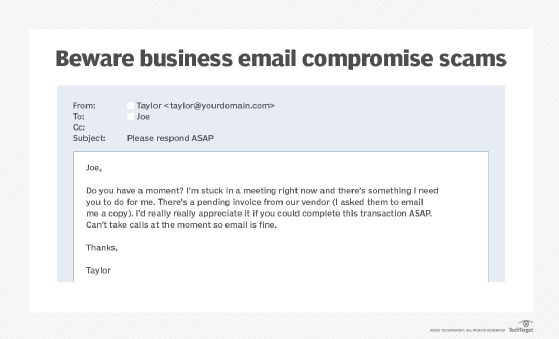
Business email compromise (BEC) is an increasingly popular tactic that malicious actors use to exploit organizations. These highly targeted campaigns involve attackers impersonating C-level executives or trusted partners to trick employees into performing actions such as transferring money or sharing sensitive data.
Teach employees how to spot BEC scams. For example, instruct users to be on the lookout for emails that convey a sense of urgency, ask for unusual transactions or contain other phishing traits. Advise employees to double-check the legitimacy of a request whenever in doubt.
Be wary of email attachments
Many email attacks rely on the ability to send and receive attachments that contain malicious executable code. Email security gateways and antimalware software detect malicious sources and block most malicious attachments. These attachments, however, can also come from trusted sources whose credentials have been exploited by attackers.
Employees should be cautious of attachments, even when the organization uses email-scanning and malware-blocking software. Tell them to use extra vigilance before opening an attachment that has an extension associated with an executable program, such as EXE (executable file), JAR (Java application file) or MSI (Windows Installer). Files such as Word documents, spreadsheets and PDFs can also carry malicious code, so advise users to exercise caution when handling any type of attached file. Scan files with an antimalware program or avoid opening them altogether. If employees are unsure if an attachment is legitimate, advise them to contact their manager and the IT department.
Don't click email links
Hyperlinks in emails can connect to a web domain different from the one they appear to represent. Some links might display a recognizable domain name -- such as www.techtarget.com -- but, in fact, direct the user to a different, malicious domain. Attackers also use international character sets or misspellings to create malicious domains that appear to be those of well-known brands.
Advise employees to always review link contents by hovering the mouse pointer over the link to see if the actual link is different from the displayed link. Note that even this can be spoofed -- though most modern email programs should catch such links. When in doubt, users should type domain names directly into the browsers to avoid clicking links in emails.
Don't use business email for personal use and vice versa
While it might be tempting and convenient for employees to use their corporate email account for personal matters, an enterprise email security best practice is to prohibit this. Likewise, don't send work-related emails from personal accounts. Mixing business and personal accounts can expose them to threats such as spear phishing. Outline acceptable email use policies and restrictions in a corporate email policy.
Only use corporate email on approved devices
Users can access email from practically anywhere and on any internet-connected device. While convenient for employees, this could become a security disaster for an organization. If company email is opened on devices that don't have the proper security controls, attackers could exfiltrate users' credentials, email and data. Require employees to access email only on company-approved and trusted devices.
Encrypt email, communications and attachments
An email is like a postcard: Every person and system that it comes into contact with can see its message. Email encryption solves this problem, ensuring that anyone who intercepts the email cannot read its contents. This helps prevent many email security issues, such as man-in-the-middle and BEC attacks. Most major email services offer encryption capabilities.
Encrypting the message isn't enough, however. Also encrypt communications between the organization and the email provider. Encrypt attachments as well, even if the email they are attached to is encrypted.
Back up email
Recommend that employees back up important emails to a secure location. This ensures critical email communications remain available in the event of a security incident, such as a ransomware attack.
Avoid public Wi-Fi
Employees might see public Wi-Fi as a blessing, but they should be reminded that these connections are vulnerable to attacks. If employees log into corporate email on public Wi-Fi, anyone on that network could also access their email. Malicious actors can use open source packet sniffers, such as Wireshark, to monitor and gain access to personal information over email. Even if users don't actively check email on public Wi-Fi, almost every system is set to automatically update inboxes when a device connects to a network. If users are on Wi-Fi, so is their email, putting account credentials at risk.
Instruct employees to only connect to secure, known Wi-Fi networks.
Use email security protocols
The following three email security standards are key to filtering spam messages:
- DomainKeys Identified Mail. The DKIM standard uses asymmetric cryptography to prevent email spoofing. A digital signature added to an email verifies the message was not altered after it was sent. If the signature doesn't match the email domain's public key, it is blocked. If it does match, it is delivered.
- Sender Policy Framework. SPF verifies that an email came from its source and is authorized to send an email from that domain. If verified, the email gets delivered. If not, the email is blocked.
- Domain-based Message Authentication, Reporting and Conformance. The DMARC protocol extends DKIM and SPF. Using DMARC, domain owners can publish their DKIM and SPF requirements, as well as specify what happens when an email fails to meet those requirements, such as reporting back to the sending domain.
While these technical controls prevent spoofed emails, they do not stop all unwanted messages.
Implement the principle of least privilege
While not directly related to only email security, organizations should adopt POLP to limit employees' access rights to only those required to do their jobs. If an employee's credentials are compromised, POLP can help prevent attackers from gaining full access to all of the company's resources.
Use email security tools
Beyond implementing the proper protocols, organizations should create a layered email security strategy that includes multiple tools. For example, consider adopting antimalware, antispam, antivirus, email filtering, email security gateways, firewalls, mobile device management, data loss prevention and endpoint protection tools, such as endpoint protection platforms, endpoint detection and response, and extended detection and response.
Additionally, use email monitoring systems to detect potential insider threats and compromised accounts. These tools alert security teams to the following:
- Out-of-the-ordinary user behaviors, such as logging in from unusual locations or outside of regular business hours.
- Suspicious email patterns, such as changes in display names, message tone or requests for sensitive data.
- Email content, such as malicious links or attachments containing sensitive data.
- Other threat indicators, such as large numbers of attachments being sent, which might indicate data exfiltration, or suspect URLs and IP addresses, which might indicate communication with an attacker's domain or command-and-control server.
Lock devices and log out of email
Advise employees to lock their devices when not in use. Leaving email open on devices that are accessible to others is a security risk. Also, urge employees to log out of their email when it's not in use and when they have finished work for the day.
Educate and train employees
Last but certainly not least, invest in a corporate cybersecurity awareness training program. Hold regularly scheduled trainings to educate employees on security best practices, keep users up to date with corporate security policies, explain employees' roles in keeping the company safe and educate users about security threats.
Email security is an important topic in these trainings. Explain the company's email security policy, common email security threats and recommended email security best practices.
Sharon Shea is executive editor of TechTarget Security.