12 content collaboration platforms for enterprises in 2026
When evaluating content collaboration platforms, business leaders have several options and must choose carefully to find one that best fits their needs.

Content collaboration platforms enable organizations and their employees to manage files, streamline processes and maintain a smooth workflow from idea to delivery.
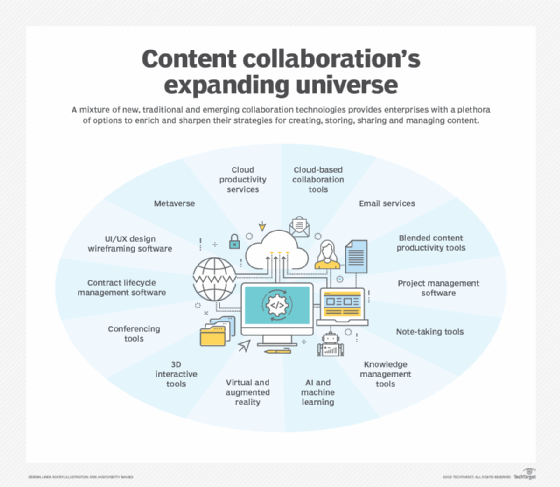
Over the last few years, content collaboration software has gone from a nice-to-have to an absolute must-have in technology stacks. Driven by a shift to hybrid and remote work environments -- and the addition of social and AI-powered workflows -- content collaboration continues to evolve rapidly.
For enterprise content collaboration buyers and decision-makers, the stakes are high. Teams must evaluate content collaboration tools for usability and productivity, but also for security, regulatory and industry compliance. Other essential considerations include granular administrative controls, integration with existing systems and long-term ROI. Choosing the wrong platform can create data silos, increase risk and complicate governance strategies.
What is content collaboration software?
Content collaboration tools help teams upload and organize content, facilitate file sharing and perform simultaneous workflows. These collaboration tools are typically cloud-based software that supports project management, information management, analytics and document version control.
Features to consider in content collaboration tools
Most content collaboration platforms share similar features, such as the ability to upload, store and share documents, annotate documents, chat and comment on files. Modern tools also commonly include mobile apps for iOS and Android devices, as well as APIs to integrate with third-party extensions and software. The critical features organizations should consider when choosing content collaboration software include the following:
- Real-time editing and commenting. Regardless of physical location, multiple individuals can work on a document simultaneously, which streamlines workflows and improves efficiency for deliverables.
- Version control. If someone accidentally deletes important information in a document, version control lets users restore previous versions. Some content collaboration platforms also include the ability to track who made changes so users can easily discuss any edits.
- Security. While some industries, such as healthcare and finance, are tightly regulated to protect data, every organization must consider security when choosing a content collaboration platform. Security features can include encryption, multifactor authentication, data residency options and role-based access to minimize damage if a user's credentials are compromised. Many enterprise platforms also support compliance frameworks such as HIPAA, SOC 2 or GDPR.
- Integration with other tools. Usually accomplished with APIs and prebuilt connectors, integration enables organizations to connect their systems to improve processes. Common integration assets include CRM platforms, collaboration suites, e-signature tools, project management tools and vertical line-of-business apps.
- Governance and lifecycle management. Larger organizations should look for capabilities such as retention policies, legal holds, data classification and audit logging to manage content through its lifecycle and to support e-discovery.
Top enterprise content collaboration platforms
While organizations have many content collaboration platforms to consider, the right choice depends on an organization's needs. For example, a company might prioritize a platform with strong project management capabilities, advanced analytics, AI-powered features or strict security and compliance controls to protect highly regulated and sensitive data.
Explore 12 enterprise content collaboration platforms that have risen to the forefront of the industry based on reviews from IT professionals and end users. This list is in alphabetical order.
1. Bitrix24
Bitrix24 combines tools like CRM, file storage, kanban boards, workflow automation and document sharing into its content collaboration platform. Bitrix24 Drive -- its file storage tool -- supports third-party integrations with other tools such as Box, Dropbox and Google Drive, allowing real-time editing and collaboration.
The most commonly cited strengths of Bitrix24 are its project management and CRM capabilities, which can facilitate internal communication and task tracking. However, others caution the UX can feel complex because some tools and settings are hard to find or configure.
Bitrix24 offers five pricing plans. When billed annually, the Basic plan is $46 monthly for five users, while the Standard plan is $87 monthly for 50 users. The Professional plan is $175 monthly for 100 users, and the Enterprise plan costs $325 monthly for 250 users. Customers can also choose a free plan, which offers a more limited tool set.
2. BoostHQ
Promoted as a knowledge sharing platform, BoostHQ by SkyPrep has many of the hallmark tools and features of a content collaboration platform. Its tool set includes file and content sharing, the ability to organize content based on customized groups, categories and tags and an online learning community that lets users start discussions and upvote comments on a piece of uploaded content. Users highlight its integration with Google Docs and its Chrome browser extension that lets users share web content with teammates.
Users on Capterra acknowledge BoostHQ's shortcomings in accessing content offline and that the Q&A feature isn't mobile-friendly.
BoostHQ offers a free 14-day trial. Pricing information for paid plans isn't readily available on the vendor's website.
3. Box
Box is a cloud platform that enables file sharing and collaboration through user-created workflows and project management tools, including tagging other users, annotating documents and building automated processes. Box has integrations with more than 1,500 apps and offers a developer platform for custom integration.
Through a partnership with Adobe, Box provides users with PDF tools that include creating and adding electronic signatures to PDFs, which enables users to complete more tasks within Box rather than switch between browsers. Box has added AI-powered features for content classification, threat detection and workflow automation. Some users note upload times can be slow for large files and that Box doesn't offer end-to-end encryption.
Box offers four pricing plans for business users: Business, Business Plus, Enterprise and Enterprise Plus. When billed annually, Business is $15 per user monthly, Business Plus is $25, Enterprise is $35 and Enterprise Plus is $50.
4. Dropbox
While best known for its file storage capabilities, Dropbox is also a content collaboration platform. It supports integration with tools such as Zoom and Slack, includes project management functions such as assigning tasks and creating workflows, and allows for annotations on documents -- whether they are PDF, Microsoft 365, Google Workspace or image files.
Business users highlight Dropbox's strong syncing performance, straightforward interface and granular sharing controls. However, some caution that sync and update times can be lengthy with large libraries and that more advanced workspace customization options would be helpful.
Dropbox offers two pricing tiers for organizations: Standard and Advanced. When billed annually, Standard is $15 per user per month, and Advanced is $24.
5. Egnyte
Egnyte positions itself as an AI-powered content cloud that combines secure collaboration, data governance and content intelligence. The platform helps organizations manage mission-critical content across teams and locations while maintaining granular control over access, sharing and compliance. Egnyte integrates with tools such as Microsoft 365, Google Workspace, Box, Salesforce and Autodesk.
Key capabilities include secure file sharing, ransomware detection, content lifecycle management and advanced workflows. Egnyte provides centralized governance features, such as data classification and policy enforcement, which are especially valuable to enterprises with sensitive or regulated data.
Egnyte offers four business-focused plans: Business, Enterprise Lite, Elite and Ultimate. When billed annually, pricing for Business is $22 per user per month, Enterprise Lite is $38 per user per month and Elite is $46 per user per month. Ultimate pricing is available upon request. Egnyte offers a 15-day free trial for new users.
6. Egress Secure File Sharing and Collaboration
Egress Secure File Sharing and Collaboration lets users set up secure workspaces to organize content. It offers real-time file editing and annotation and enables system administrators to set retention policies, revoke file access and enforce granular sharing rules. Egress also tracks all admin and user activity and creates audit logs to help support compliance and e-discovery.
Customer testimonials from Gartner and Capterra said Egress offers a seamless installation, is easy to use and provides strong security and compliance features. Other users caution that the interface can feel outdated, and the platform is a little slow on startup or when handling large files.
Pricing information is not readily available on the vendor's website.
7. Google Drive
Google Drive is a cloud-based storage component of Google Workspace that lets users collaborate on projects using Google's app suite -- which includes Docs, Sheets and Slides -- and other file types like Word documents, PDF files, CAD files or images. Users can leave comments, tag other users and search using Google's technology to find files.
Individual users have My Drive, which lets the owner choose with whom to share files. Alternatively, a project manager or designated employee manages the shared drive and determines the content recipients and their access levels. Enterprise customers can take advantage of centralized admin controls, data loss prevention and advanced security features. Google has also introduced AI capabilities, such as Gemini and Workspace Studio, to help automate content creation and workflows.
Users from Capterra said Google Drive integrates well with other apps, is easy to use for real-time collaboration and provides good customization options. Still, some have reported that Google Drive needs better encryption, and that version control can be tricky.
Google Workspace offers four pricing tiers: Business Starter, Business Standard, Business Plus and Enterprise. When billed annually, Business Starter is $7 per user monthly, Business Standard is $14 and Business Plus is $22. Pricing information for the Enterprise tier is not readily available on the vendor's website.
8. M-Files
M-Files is an information management and document management platform designed to connect all enterprise content and support business workflows, governance and compliance. Instead of relying solely on traditional folder structures, M-Files uses metadata and context to organize documents.
For collaboration, M-Files supports document-centric workflows across creation, review and approval, along with version control and audit trails. The M-Files Hubshare component enables organizations to create secure external portals and workspaces for clients and partners, extending collaboration beyond the firewall without losing control over sensitive information. M-Files Ment and related tools add automation and clause libraries for document generation and contract workflows.
Pricing information is not readily available on the vendor's website.
9. Microsoft 365 and OneDrive
Microsoft 365 is a suite of productivity apps that includes OneDrive, a Microsoft cloud storage service with file sharing capabilities. Through Microsoft 365, users can share and collaborate on files inside and outside their organizations, while OneDrive offers access control, real-time data synchronization and version control.
OneDrive integrates with other Microsoft 365 products, allowing users to co-edit documents in real time, track changes and receive automatic notifications about changes. Google Android and Apple iOS users can also access content via mobile apps, helping users continue working on documents, regardless of where they are.
For security and compliance, Microsoft offers advanced data loss protection, sensitivity labels and detailed auditing. Users can generate links to content they send through email or the OneDrive menu. These links are convenient but can also be a security liability. To combat these concerns, Microsoft lets owners expire links after a specified amount of time and retract links to avoid long-term access.
Microsoft 365 with OneDrive offers three pricing plans for businesses: OneDrive for Business, Microsoft 365 Business Basic and Microsoft 365 Business Standard. When billed annually, OneDrive for Business is $5 per user monthly, Business Basic is $6 and Standard is $12.50.
10. Notion Enterprise
Notion is a workspace platform that combines documents, wikis, databases and lightweight project management. Enterprise teams use Notion to centralize knowledge bases, run projects, document processes and collaborate on structured or unstructured content. Notion AI adds capabilities for summarization, content drafting and querying information within a workspace.
Notion Enterprise builds on the core product with features such as single sign-on, SCIM user provisioning, granular admin controls, advanced security and compliance options, workspace analytics and customer support. These features help larger organizations standardize deployment and governance while still giving teams flexibility to design their own pages and databases.
Notion offers three pricing plans for businesses: Plus, Business and Enterprise. When billed annually, Notion Plus is $10 per user monthly and Business is $20. Enterprise pricing is not available on the vendor's website. A free version is also available.
11. ShareFile
ShareFile lets users create workflows, co-edit documents, collect real-time feedback and gather e-signatures. The platform can restrict documents to view-only and offers click trails and detailed audit logs so users can see who was in the document at what time. ShareFile is often used in industries that handle sensitive client data, such as financial services and professional services firms.
According to users, it's relatively easy to integrate with Microsoft products and collaborate securely outside the organization. But ShareFile doesn't integrate well with non-Microsoft products, and some users indicate that support can be slow to respond.
ShareFile offers four pricing tiers: Advanced, Premium, Industry Advantage and Virtual Data Room. When billed annually, pricing for the Advanced tier is $16 per user monthly, the Premium tier is $25, Industry Advantage is $41.67 and Virtual Data Room is $67.50.
12. Zoho WorkDrive
Zoho WorkDrive is another content collaboration platform that includes a suite of productivity apps -- such as Writer, Sheet and Show -- and integrates with the broader Zoho ecosystem. The platform supports offline work, with any changes syncing to the team folders as soon as there is internet access. Users can set permissions by role and control who can view, edit or download files.
User reviews often cite Zoho WorkDrive as a good alternative to Google Drive and praise its integration with other Zoho products, as well as its centralized admin dashboard for managing teams and shared items. However, some users say file uploads can take a long time and that customer support isn't as responsive as they'd like.
Zoho WorkDrive offers three pricing tiers: Starter, Team and Business. When billed annually, Starter is $2.50 per user monthly, Team is $4.50 and Business is $9.
Editor's note: This list was compiled based on a combination of market reports and vendor rankings from leading research firms, plus additional research by TechTarget editors. This article was updated to reflect developments among content collaboration platforms.
Christine Campbell is a freelance writer specializing in business and B2B technology.