
putilov_denis - stock.adobe.com
Hybrid meeting hardware tackles equity challenges
Hybrid meeting equity improves when IT and AV leaders focus on the experience. New AI-based products from Crestron and Logitech help participants see and hear each other better.

Hybrid meeting equity, where in-room and remote participants can communicate seamlessly and easily, remains one of the toughest challenges in supporting hybrid work. Despite advancements in meeting room technology, an experience gap remains between attendees physically present in the room and those attending virtually.
"The whole meeting equity thing is still not happening," said David Maldow, founder and CEO of Let's Do Video. "Everyone has the same problem."
The problem, Maldow said, is that IT and audio/video (AV) leaders focus only on the room when planning the ideal meeting room experience, such as the table layout or where the screen should go. Instead, they should focus on the meeting experience itself, ensuring all participants are clearly framed with high-quality audio.
"It's a huge challenge trying to get outside participants to feel like they're full participants," said Blair Pleasant, president and principal analyst of COMMfusion. "It's hard to raise your hand and speak up when you're remote, and everyone is having face-to-face conversations."
Video conferencing hardware vendors are introducing new AI-based hybrid meeting hardware, such as cameras and speakers, that are designed to enhance the hybrid meeting experience.
"Hybrid work has matured, but the infrastructure underneath is struggling," said Brad Hintze, EVP of global customer success and marketing at Crestron Electronics. That creates challenges in building a consistent experience across meetings and in creating spaces that make employees want to return to the office, he said.
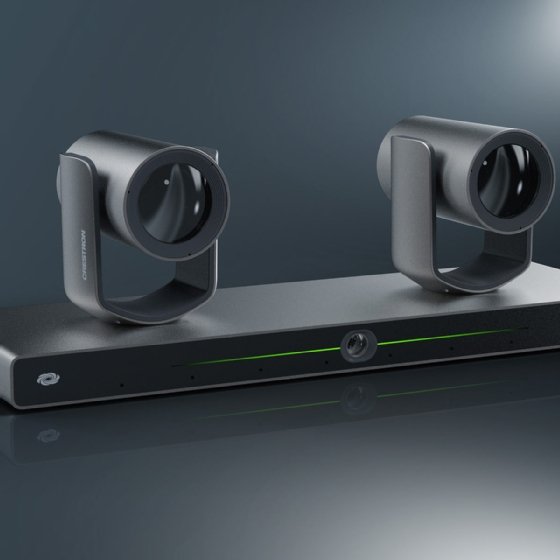
Crestron recently announced new products that will be available later in 2026 to address these challenges and improve hybrid meetings.
- AutoMeasure. A new feature in Intelligent Room Designer that uses computer vision and spatial intelligence to optimize camera and microphone placement in a room.
- Collab Compute. A compute platform with edge AI to support native Microsoft Teams and Zoom Rooms experiences.
- 80 Series Touch Screens. A three-screen portfolio that supports room scheduling, in-room controls and unified communications platform control.
- 1 Beyond i12D Camera. A single device with two 4K PTZ (pan, tilt, zoom) cameras and a 4K wide-angle lens built into the base, built-in microphones and AI capabilities.
- DM NAX Intelligent Audio. An audio ecosystem that includes an audio processor, microphones and speakers.
Similarly, Logitech also announced two new cameras for its Rally video conferencing portfolio, which will be released later in 2026.
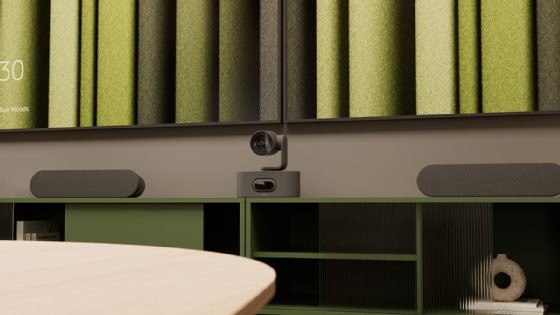
- Rally AI Camera. A low-profile camera with intelligent capabilities, such as speaker framing and occupancy detection. It is certified for Microsoft Teams and Zoom Rooms and works in tandem with Teams and Zoom AI meeting features.
- Rally AI Camera Pro. The Pro camera offers the same AI capabilities, but features a dual-camera design for larger, more complex meeting spaces.
RTO drives large room comeback
As offices reopened following the COVID-19 pandemic lockdowns, the use of large meeting rooms declined. Organizations prioritized outfitting smaller meeting spaces with video capabilities, as most employees were working from home and didn't need large spaces for meetings.
"For a while, no one was talking about the big meeting rooms because we didn't need them," said Pleasant. "But now with hybrid work and return to office, these rooms are important again."
These rooms are complex, high-value environments that often require more sophisticated setups, said Holly Zhou, senior product marketing manager at Logitech.
The Rally AI Camera Pro is a dual-camera device designed for large meeting rooms. It includes a PTZ camera and a digital camera built into the base to support a multicamera view. The Rally AI Camera Pro also includes a dedicated chip to support AI capabilities, such as occupancy detection, speaker and group framing, meeting boundaries and presenter view.
Crestron's 1 Beyond i12D camera also provides a multicamera view for medium and large meeting spaces, with two 4K PTZ cameras and a wide-angle camera in the base, as well as built-in microphones and AI capabilities like group framing and speaker tracking.
Prioritize high-quality audio
While IT and AV leaders prioritize the quality of video capabilities to support hybrid meeting equity, the audio quality can sometimes fall by the wayside. But audio is also a key component for meeting equity.
"On a scale of one-to-10, audio importance is an 11 and video importance is a four," said Maldow.
It can be annoying when video quality degrades or becomes choppy, but the meeting can continue if a participant must turn off video. But a meeting can't continue if the audio is bad. Not only would participants not be able to clearly hear or speak to each other, but AI assistants also attending the meeting would not be able to produce accurate meeting transcriptions or summaries.
"Audio has to not just be good -- it has to be amazing in every room," Maldow said. But improving audio quality doesn't have to be a significant investment, he said. IT and AV leaders can deploy microphone and speaker pods from their chosen vendor or compatible third-party hardware that connects to their video bar or camera.
The Logitech Rally AI Cameras, for example, are compatible with Logitech's own speaker pods, and audio systems from third-party partners like Biamp, Nureva, Q-Sys and Shure.
Crestron's DM NAX audio platform offers an ecosystem of peripherals to enhance audio setup in meeting spaces of all sizes. Huddle rooms, for example, may only need a speaker pod placed at the center of the table for good meeting audio. A larger, more complex room would require a more advanced setup with microphones and in-ceiling Power over Ethernet speakers to ensure everyone in the room can be heard.
The DM NAX platform also has AI capabilities to enhance audio performance during meetings, such as acoustic echo cancellation, automatic gain control, noise reduction and auto mixing.
Don't neglect training
While the goal of these new hybrid meeting products is to require as little user intervention as possible, it's still important to provide education to ensure employees fully understand how everything works.
Employees don't need an intensive training session or to have someone from IT on standby when launching a meeting. But simple video tutorials can go a long way in helping employees run more effective hybrid meetings. The less work employees have to do to facilitate meetings, the more likely they are to adopt the technology, Pleasant said.
"If you're intimidated by the technology, then you're not going to use the room," she said. "You're going to do a Zoom from your desktop, and that's not really effective."
Katherine Finnell is senior site editor for Informa TechTarget's unified communications site. She writes and edits articles on a variety of business communications technology topics, including unified communications as a service, video conferencing and collaboration.