Wireless security: Differences between WEP, WPA, WPA2, WPA3
As wireless networks have evolved, so have the protocols for securing them. Get an overview of WLAN security standards, and learn the differences among WEP, WPA, WPA2 and WPA3.
In wireless security, passwords are only half the battle. Choosing the proper level of encryption is just as vital, and the right choice determines whether your wireless LAN is a house of straw or a resilient fortress.
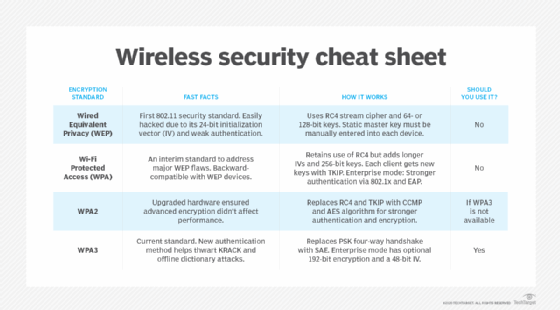
Wireless security protocols have evolved over time to address issues, enhance compatibility and strengthen security compared to their predecessors. Wired Equivalency Protocol (WEP) is the original wireless standard developed by the IEEE in 1997 to provide a security standard for wireless networks. Being new for its time, WEP had several security vulnerabilities that were later addressed in 2004, when Wi-Fi Alliance released Wi-Fi Protected Access (WPA) as its successor. WPA built upon WEP by addressing its security flaws.
WPA was more of a temporary standard used to address the latter's issues, as it soon became obsolete in 2004 in favor of WPA2, a faster and more secure protocol. WPA2 was a long-term standard that remained the most dominant security protocol until 2018, when Wi-Fi Alliance introduced WPA3. Although WPA3 is the latest wireless security standard, most organizations continue to use WPA2.
Why wireless encryption matters for enterprises
Encryption is the process of converting data into ciphertext that requires the proper keys for decryption, making it difficult to decode. Encryption happens at many layers. Business applications and web commerce are all encrypted, whether using an encrypted Wi-Fi connection or a VPN, so wireless network encryption is arguably less significant than it once was.
Wi-Fi encryption, in addition to the application-specific encryption in use, provides a comprehensive security baseline for all client devices. This prevents unencrypted applications from posing a security risk. Encryption also helps make the WLAN environment more secure from a topology perspective, as a defense against other potential vulnerabilities.
How unsecured wireless networks create risks
Wireless networks require security protocols to ensure they remain secure, efficient and are compatible between various devices. Wireless networks without these standards could potentially face multiple security risks, such as the following:
- Compromised data. An unsecured network is at risk of being compromised by internal or external threat actors seeking to steal data, eavesdrop or perform other malicious activities. Anyone within range can intercept the radio waves carrying Wi-Fi traffic without the need to access physical hardware directly.
- Expanded attack surface. Threat actors can use unsecured wireless networks as a point of vulnerability to gain access to the broader enterprise network. Encryption doesn't necessarily fix this problem, but attackers who see a WLAN with outdated encryption protocols in place might attempt to exploit other weak spots in the wireless network.
- Malware distribution. Hackers who gain access to the network can distribute viruses, ransomware or other malware across devices connected to it. This can lead to data breaches that create network downtime and lead to financial loss for the organization.
How each wireless security protocol works
Most wireless APs come with the ability to enable one of four wireless encryption standards:
- Wired Equivalent Privacy (WEP).
- Wi-Fi Protected Access (WPA).
- WPA2.
- WPA3.
WEP is the first generation of wireless security protocols, followed by WPA. However, organizations should avoid these older WLAN security standards, as they have been deprecated. Not only are WEP and WPA easily crackable by commoditized applications, but they also indicate that the client devices restricted to them are outdated and could jeopardize WLAN performance.
How WPA2 works
As the successor to WPA, WPA2 was ratified by the IEEE in 2004 as 802.11i. WPA2's strength comes from using Advanced Encryption Standard and Counter Mode with Cipher Block Chaining Message Authentication Code Protocol, an authentication mechanism.
- AES. Developed by the U.S. government to protect classified data, AES comprises three symmetric block ciphers. Each cipher encrypts and decrypts data in blocks of 128 bits using 128-, 192- and 256-bit keys, relying on the increased processing power of modern Wi-Fi hardware and client devices.
- CCMP. Protects data confidentiality by allowing only authorized network users to receive data. It uses cipher block chaining message authentication code to ensure message integrity.
KRACK vulnerability exposes WPA2 flaws
WPA2 was a significant step forward in Wi-Fi security, but two major flaws eventually emerged:
- The key exchange used in WPA2 has inherent weaknesses that make it a poor fit for sensitive data.
- WPA2-Personal, which uses preshared keys, is only as strong as the PSK password used to secure it.
KRACK vulnerability
WPA2 has a major drawback known as the key reinstallation attack (KRACK) vulnerability, which exploits the reinstallation of wireless encryption keys. WPA2-Enterprise has a stronger authentication scheme than WPA2-Personal due to its use of Extensible Authentication Protocol. However, the KRACK vulnerability exists at the encryption stage. As a result, it affects all WPA2 implementations.
Industry analysts widely acknowledged KRACK as a serious WPA2 security flaw. The finding prompted technology providers to quickly roll out software patches to mitigate risk until the arrival of the next generation of wireless security. But many experts argued the KRACK vulnerability would prove difficult to exploit in the real world.
Weak PSKs compromise the four-way handshake
A new Wi-Fi network connection begins with a cryptographic four-way handshake between an endpoint and AP.
- Both devices prove they know a preestablished authentication code -- Pairwise Master Key (PMK) in enterprise mode and PSK in personal mode -- without either one revealing it explicitly through a series of back-and-forth messages.
- The client device sends a cryptographic response to the AP to confirm that both devices generated the same encryption key.
- The AP passes a traffic encryption key to the client.
- If the endpoint doesn't acknowledge it has received the key, the AP assumes a connectivity issue, resending and reinstalling it repeatedly.
KRACK attackers -- who must be within physical range of both the client and the network -- can trigger, capture, analyze, manipulate and replay those retransmissions until they're able to determine the key, break encryption and gain access to network data.
The four-way handshake method also makes WPA2 networks with weak passcodes vulnerable to offline dictionary attacks, a type of brute-force attack that involves systematically trying hundreds, thousands or millions of pre-compiled possible passwords, out of earshot of the target network.
An attacker could capture a WPA2 handshake, take that information offline and use a computer program to compare it against a list of likely codes. This process continues until they find a code that aligns logically with the available handshake data. Dictionary attacks are less likely to succeed against long and complex passwords with combinations of uppercase and lowercase letters, numbers and special characters.
How WPA3 works
In 2018, Wi-Fi Alliance began certification for WPA3, the most recent and most secure wireless security standard. As of July 2020, Wi-Fi Alliance required all devices seeking Wi-Fi certification to support WPA3. New features and requirements include the following:
- Protected Management Frames. Required in WPA3 and optional in prior standards. PMFs help guard against eavesdropping and forging. It also standardizes the 128-bit cryptographic suite and disallows obsolete security protocols. WPA3-Enterprise has optional 192-bit security encryption and a 48-bit IV for heightened protection of sensitive corporate, financial and governmental data.
- Stronger CCMP. WPA3-Personal uses CCMP-128 and AES-128, whereas the enterprise version with 802.1X offers stronger protection options.
- More secure cryptographic handshake. Replaces the legacy PSK four-way handshake with simultaneous authentication of equals. SAE eliminates the reuse of encryption keys, requiring a new code with every interaction. Without open-ended communication between AP and client or the reuse of encryption keys, cybercriminals can't easily eavesdrop or insert themselves into an exchange.
- Wi-Fi Easy Connect. Introduced by Wi-Fi Alliance alongside WPA3. Wi-Fi Easy Connect simplifies the onboarding process for IoT devices without visual configuration interfaces using a mechanism such as a QR code scan.
- Wi-Fi Enhanced Open. Safeguards connecting to public Wi-Fi networks by automatically encrypting information between each client and AP using a new unique key.
- Opportunistic Wireless Encryption. Provides an automatic key exchange for devices that support it. OWE also offers eavesdropping-resistant encryption with no user intervention.
WPA3 is not impervious to threats, however. WPA3 has design and implementation flaws known as Dragonblood vulnerabilities. These include two downgrade attacks, in which an attacker forces a device to revert to WPA2, and two side-channel attacks, which enable offline dictionary attacks. However, according to Wi-Fi Alliance, vendors could readily mitigate them with software upgrades.
WPA3: The most secure Wi-Fi protocol
Experts agree WPA3 is best for Wi-Fi security, as it's the most up-to-date wireless encryption protocol. Some wireless APs do not support WPA3, however. In that case, the next best option is WPA2, which is widely deployed in the enterprise space today.
Because WEP or WPA are outdated and insecure, network administrators should replace any wireless AP or router that supports WEP or WPA with a newer device compatible with WPA2 or WPA3.
Best practices for Wi-Fi deployment and migration
There is no single best approach to wireless security. Successful implementation begins with defining specific requirements tailored to the situation and client device capabilities. Not all environments require the most comprehensive security, the necessary infrastructure and the costs that come with it.
Certain situations, such as those involving PCI or HIPAA, for example, require stronger security than others. Wi-Fi security also needs to be designed for compliance where regulatory guidance is mandated. In other situations, organizations must weigh the decision to use 802.1X-based security or PSK-based encryption. This decision comes down to the ease of use and the complexity of implementation.
Organizations can secure even an open wireless network by only allowing clients to access the internet or a targeted in-house destination with secure applications.
Defining requirements is often one of the most challenging aspects of wireless security. Implementation difficulty will depend on complexity of the requirements. Organizations might find they need multiple types of security in one environment for different use cases. The choice will require ongoing periodic auditing or penetration testing, as well as monitoring for new vulnerabilities of current protocols that become obsolete.
Jessica Scarpati is a Boston-based freelance writer. She is the former features and e-zine editor for Informa TechTarget's SearchNetworking Media Group.
Alissa Irei is senior site editor of Informa TechTarget's SearchSecurity.
Lee Badman is a network architect specializing in wireless and cloud technologies for a large private university. He's also an author and frequent presenter at industry events.