HRIS vs. HRMS vs. HCM: Key differences and similarities
Learning what the terms HRIS, HRMS and HCM mean -- and how they're different -- is an important step in the software buying process. Here are some ways to tell them apart.
The HR tech marketplace can seem like one big alphabet soup, and getting clear on the main types of HR systems is essential before buying.
The technologies that likely cause the most confusion when choosing an HR software system are some of the most important to understand:
- Human resource information system (HRIS).
- Human resource management system (HRMS).
- Human capital management (HCM) system.
Here's a look at HRIS vs. HRMS vs. HCM, and the differences and similarities between them.
What is HRIS?
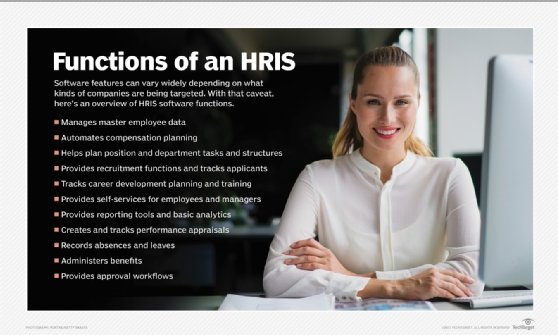
A human resource information system (HRIS) is software designed to provide a centralized repository of employee data and other features needed to manage core HR, or the basic processes and administrative functions of an HR department. The most common ones are employee records management, benefits administration, payroll, reporting, analytics, absence management, organizational charts, job descriptions and employee and manager self-service.
An HRIS might also support the basic documentation and administrative tasks of some talent management processes, such as recruiting, applicant tracking, training administration and performance management.
The HRIS is often referred to as the document of record for employee data. This data can then be pushed to other systems in the organization that rely on accurate and complete employee data, such as systems managed by IT and finance.
What is HRMS?
According to most sources, a human resource management system (HRMS) includes the functionality of an HRIS, but adds a full complement of talent management modules to the typical HRIS functions. For example, an HRMS might include recruiting, onboarding, performance management and compensation planning.
An HRMS also offers users a more comprehensive data set when it comes to reporting and analytics.
What is HCM?
Human capital management (HCM) is a comprehensive set of practices and tools used for recruiting, managing and developing employees.
HCM goes far beyond the mostly administrative functions of core HR to include the more strategic "soft" disciplines geared to developing people's potential, such as talent management and employee engagement. It views employees as valuable assets that leaders need to manage strategically. HCM practices help guide HR teams on how to act proactively, rather than reactively, to get the best value from a workforce.
HCM is also the name of the broadest category of HR software: HCM suites that combine core HR with talent management and newer HR tools, such as employee surveys, engagement, recognition and succession management.
Similarities between HRIS, HRMS, and HCM
The core functionality offered by an HRIS is included in each type of system. Therefore, if you purchase an HRMS or HCM system, you do not need to also acquire an HRIS.
The three types of systems will offer similar administrative and reporting functions. For example, each type of system will offer functionality to automate workflows, manage security and report on the data that’s been collected. Also, each system will offer AI features to assist in different areas.
In each case, you will need a system administrator to manage the system. This person, often a member of IT, will be the person responsible for updating and maintaining the HRIS and educating other employees on how to use it.
All three types of systems can be on premises or cloud-based, though the latter is increasingly the preferred choice. Cloud computing provides a number of benefits, such as easier software updates, better scalability and fewer IT resources.
Differences between HRIS vs. HRMS
In many HR circles, an HRIS and an HRMS are considered the same thing. The HR tech industry has largely moved away from differentiating between the two.
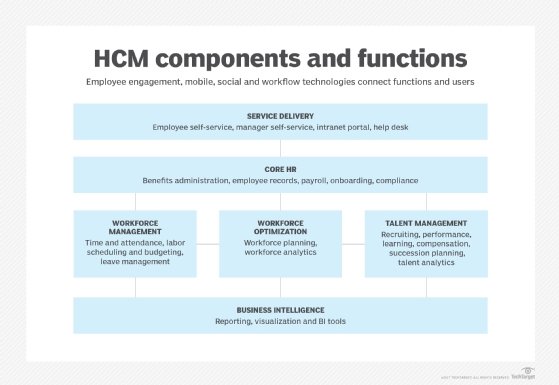
However, traditional terminology differentiates the three types of systems based on their comprehensiveness. As you move from an HRIS to an HRMS and then to HCM, you add more functionality to the system. As noted, HCM refers to much broader software suites and more expansive employee management functions than are typically handled in an HRIS or HRMS. For example, HCM software usually has numerous talent management features that provide ways to better manage and optimize each stage of the employee lifecycle, such as recruiting, onboarding, performance management, learning, succession planning, compensation planning and employee engagement. An HCM suite might also include workforce management functions, such as workforce planning, analytics and scheduling. These additional functions, in turn, provide more capable reporting and dashboards, and reduce the number of systems employees and the HR team need to use.
It is important to note that the additional functionality of an HRMS or HCM suite comes at a cost. While some organizations will take advantage of everything offered by the system, others might instead choose to license an HRIS and then license additional features of HRMSes and HCM suites from vendors who specialize in certain functions. This approach allows an organization to choose the best tools on the market for each task instead of living with a one-size-fits-all HCM suite that technically has every module for managing the employee lifecycle, some of which are too limited to meet the organization's needs.
HRMS, HRIS and HCM: Common goals and benefits
All three terms refer to systems designed for the same broad purpose. They digitize and partially automate the work of HR departments, along with the far-reaching HR-directed processes that the rest of the organization participates in, such as performance management, recruitment and training.
The potential benefits are wide ranging and significant. They include improved employee retention, innovation and productivity, lower turnover, reduced labor costs and ultimately, higher profits. HR systems are also increasingly the platform used to measure and improve the overall employee experience, which can boost employee satisfaction and loyalty and in turn lead to better customer satisfaction.
What matters in choosing an HR system
The most important thing when shopping for HR technology is understanding the HR software features your organization needs and whether a particular vendor's software can deliver them. Whether they sell HRIS, HRMS or HCM is mostly irrelevant, but knowing their target markets can help narrow the list.
The first step is defining the organization's HR challenges, needs and goals, then establishing a buying team made up of a representative sample of executives, HR team members, departmental managers and IT. The team then manages a requirements-planning process in which stakeholders say what they need a new HR software system to do, ranking the capabilities by importance.
Next, the buying team scans the market in search of the best HR software that could potentially meet the requirements and sends a request for proposal (RFP) to a shortlist of the most promising vendors. In some organizations, especially small and medium-sized ones, the buying process might be less formal than issuing an RFP. Instead, a key member of the buying team will contact vendors directly to gather additional information and choose which ones should continue through the buying process.
After examining the vendors' responses, the buying team calls in a subset of finalists to demo their products using actual use cases from the organization.
By this stage, you're well on your way to naming the product that best meets your needs and signing a contract with the vendor.
Eric St-Jean is an independent consultant with a particular focus on HR technology, project management and Microsoft Excel training and automation. He writes about numerous business and technology areas.
David Essex is an industry editor who creates in-depth content on enterprise applications, emerging technology and market trends for several Informa TechTarget websites.