What is a SAN? Ultimate storage area network guide

A storage area network (SAN) is a dedicated high-speed storage network that interconnects servers and centralized storage systems to provide shared, block-level data access.
The availability and accessibility of storage are critical concerns for enterprise computing. Traditional direct-attached storage (DAS) within individual servers can be a simple and cost-effective option for many workloads, but the storage and the data it contains are closely tied to the host server through interfaces such as SAS, SATA or NVMe. As enterprise environments grew in scale and complexity, organizations required greater storage sharing, centralized management, scalability and availability. These demands helped drive the evolution of the storage area network, or SAN.
SAN technology addresses enterprise storage demands by providing a dedicated high-speed network that interconnects multiple servers and centralized storage systems. This architecture enables storage to be organized into shared pools or tiers that can be centrally managed, replicated and protected. SAN environments can also support technologies such as RAID, snapshots, replication and data reduction features like deduplication to improve storage availability, efficiency and scalability compared to traditional direct-attached storage (DAS). Similar centralized storage capabilities can also be achieved through software-defined storage, hyperconverged infrastructure (HCI) and cloud-native storage architectures.
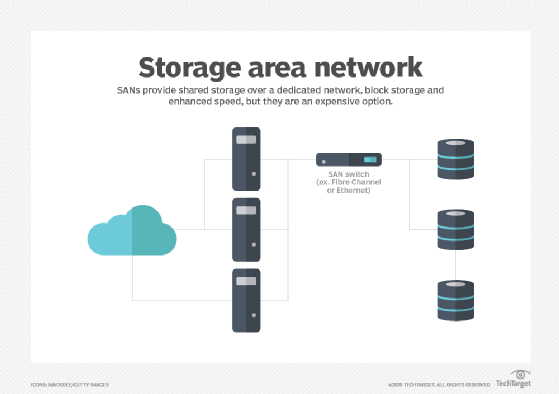
What storage area networks are used for
Simply stated, a SAN is a dedicated storage network that enables multiple servers to access centralized shared storage. One common use of a SAN is storage consolidation. In a virtualized data center, workloads and virtual machines can be deployed or migrated between servers as needed. If workload data resides only on local server storage, that data may also need to be copied, replicated or restored when workloads move or servers fail. To simplify administration and improve protection, organizations often move storage into centralized platforms, such as storage arrays, that support collective provisioning and management.
A SAN can also improve storage availability. SANs are typically designed with redundant network paths, switches and storage controllers so that if one connection or component fails, traffic can be rerouted through an alternate path in the SAN fabric. This helps prevent a single cable or device failure from making storage inaccessible to enterprise workloads. Centralized SAN storage can also improve storage utilization by consolidating isolated or underutilized storage resources into a centrally managed storage platform.
Collectively, these capabilities can strengthen an organization's regulatory compliance, disaster recovery and business continuity postures by improving IT's ability to protect and support enterprise workloads. But to appreciate the value of SAN technology, it's important to understand how a SAN differs from traditional DAS.
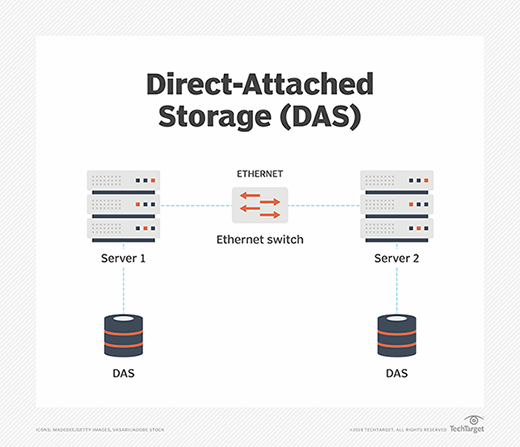
With DAS, one or more storage devices are directly connected to a specific server through a dedicated storage interface, such as SATA or SAS. The storage is typically used for applications and data running on that server. Although data stored on that server can be shared with other systems, the communication usually occurs over the shared IP network or LAN alongside normal application traffic. Transferring large volumes of data across the shared network can consume significant bandwidth and potentially affect application performance.
A SAN operates differently from traditional direct-attached storage. Instead of tying storage directly to individual servers, a SAN uses a dedicated high-speed storage network to connect servers to centralized storage systems. This architecture enables multiple servers to access shared storage resources while keeping storage traffic logically or physically separate from ordinary LAN application traffic. SAN environments are typically designed to emphasize high performance, scalability and resilience, which can benefit enterprise workloads.
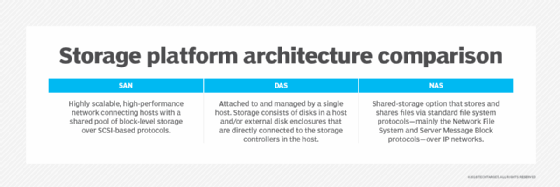
A SAN can support large numbers of storage devices, and SAN-connected storage arrays can scale to provide hundreds or thousands of drives and substantial shared storage capacity. Similarly, servers equipped with appropriate SAN connectivity can access provisioned SAN storage resources, enabling a SAN environment to support many enterprise workloads across multiple servers.
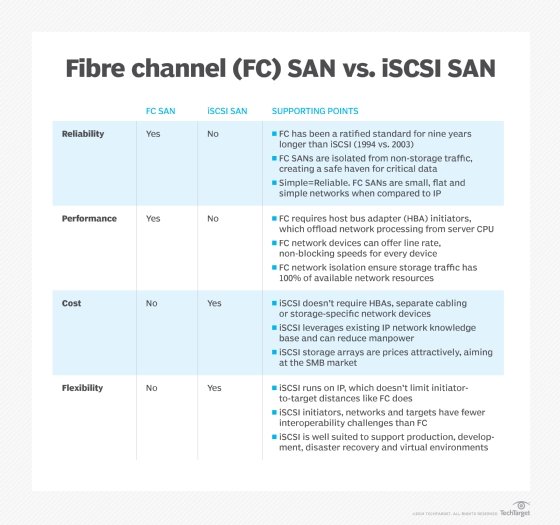
The two principal networking technologies traditionally employed for SANs are Fibre Channel and iSCSI. Newer technologies, such as NVMe over Fabrics, are also used in enterprise environments.
- Fibre Channel (FC) is a high-speed storage networking technology known for its low latency and high throughput. FC SANs commonly operate at speeds such as 32GFC and 64GFC, while newer standards support even higher aggregate throughput. Using optical fiber cabling, FC networks can span distances ranging from a few meters to many kilometers, enabling organizations to centralize block storage while supporting servers across data centers, campuses or metropolitan areas. FC environments are built using Fibre Channel host bus adapters (HBAs), switches and optical or copper cabling that together form a dedicated SAN fabric. FC supports several network topologies, including point-to-point, arbitrated loop and switched fabric, although switched fabric is the dominant enterprise deployment model today.
- iSCSI is a popular type of storage network protocol that enables servers to access shared block storage over standard Ethernet and TCP/IP networks. An operating system typically recognizes iSCSI storage as a standard block storage device, much like a local disk. iSCSI uses initiators and targets: initiators are typically servers or software clients that request storage access, while targets are storage systems or devices that provide block storage resources over the network. Instead of requiring a specialized network like Fibre Channel, iSCSI encapsulates SCSI storage commands within IP packets, which allows organizations to use conventional Ethernet adapters, switches and cabling. iSCSI environments can operate over LANs, WANs and other IP networks, although many enterprises isolate storage traffic for performance and security reasons.
How a SAN works
A SAN is essentially a network designed to connect servers with shared storage resources. The goal of a SAN is to move storage out of individual servers and centralize it so storage resources can be more easily managed and protected.
Traditionally, this centralization has been implemented physically through dedicated storage systems such as storage arrays. Increasingly, however, storage can also be pooled and managed logically through software-defined storage technologies, such as VMware vSAN, which uses virtualization to aggregate storage resources across multiple hosts.
By connecting shared storage to servers through a dedicated storage network separate from the traditional LAN, storage traffic performance can be optimized because storage traffic does not have to compete directly with ordinary application traffic for network bandwidth. This architecture can provide enterprise workloads with high-performance access to large-scale shared storage resources.
A SAN is commonly described as consisting of three distinct layers: the host layer, the fabric layer and the storage layer.
- Host layer. The host layer represents the servers connected to the SAN. These hosts commonly run enterprise workloads, such as databases and virtualized applications, that require shared storage access. In addition to standard Ethernet networking used for ordinary LAN communication, SAN hosts typically include dedicated SAN connectivity. In Fibre Channel SANs, this connectivity is commonly provided through host bus adapters (HBAs), which use firmware and operating-system drivers to exchange storage commands and data with the SAN fabric and storage systems. Fibre Channel remains one of the most widely deployed SAN technologies, while other SAN connectivity options include iSCSI and InfiniBand in some specialized environments. Each technology presents different performance, scalability and cost tradeoffs, so organizations must evaluate workload and infrastructure requirements carefully when selecting a SAN architecture.
- Fabric layer. The fabric layer represents the cabling and networking devices that form the SAN fabric connecting servers and storage systems. Fabric-layer components can include SAN switches, gateways, routers and protocol bridges. SAN fabrics may use optical fiber connections for longer-distance communication or copper cabling for shorter-range connectivity within a data center. In SAN architecture, a fabric refers to an interconnected switching infrastructure that supports scalable and resilient communication between hosts and storage. SAN fabrics are commonly designed with redundant paths so that if one connection or device fails, traffic can be rerouted through an alternate path.
- Storage layer. The storage layer consists of the storage systems and storage resources connected to the SAN, including HDDs, SSDs and storage arrays organized into pools or tiers. Storage systems commonly use RAID technologies to improve fault tolerance, performance or capacity utilization. Logical storage volumes are presented to hosts as logical unit numbers (LUNs), which identify block storage resources within the SAN environment. Access to SAN storage is controlled through mechanisms such as zoning and LUN masking. Zoning controls communication between hosts and storage devices at the SAN fabric level, while LUN masking determines which hosts are permitted to view or access specific storage volumes.
SAN environments use storage networking protocols to transport storage commands and block data between hosts and storage systems. The most common SAN protocol is Fibre Channel Protocol (FCP), which carries SCSI commands over Fibre Channel networks. iSCSI performs a similar function by encapsulating SCSI commands within TCP/IP packets over Ethernet networks. Other storage networking technologies include Fibre Channel over Ethernet (FCoE), ATA over Ethernet (AoE) and NVMe over Fabrics (NVMe-oF). Some enterprise storage systems support multiple front-end protocols, allowing different hosts and applications to access shared storage using compatible connectivity methods.
To integrate all SAN components successfully, an enterprise must ensure compatibility among the host systems, SAN switches and storage platforms according to vendor interoperability requirements. These requirements commonly include supported HBA firmware and driver versions, switch firmware levels, storage firmware revisions, host profiles or host personality settings and required software patches.
Then, to set up the SAN, organizations typically need to do the following:
1. Assemble and cable together all the hardware components and install the corresponding software.
a. Verify firmware, driver and software compatibility versions.
b. Set up the HBA.
c. Configure the SAN switches.
d. Set up the storage array.
e. Configure zoning, multipathing and LUN masking as needed.
2. Change any configuration settings that might be required.
3. Test operational processes for the SAN environment, including normal production processing, failover behavior and backup operations.
4. Establish a performance baseline for each component as well as for the overall SAN environment.
5. Document the SAN installation, configuration and operational procedures.
SAN fabric architecture and operation
The core of a SAN is its fabric: the scalable, high-performance network that interconnects hosts -- servers -- and storage systems. The design of the fabric plays a major role in determining the SAN's performance, reliability and complexity. In its simplest form, an FC SAN can directly connect server HBA ports to corresponding ports on SAN storage arrays, often using optical fiber cabling to support high-speed communication across greater physical distances.
But such simple connectivity schemes belie the true power of a SAN. In practice, SAN fabrics are typically designed to improve storage reliability and availability by eliminating single points of failure. A common SAN design strategy is to provide at least two connections between critical SAN components so that an alternate network path remains available between SAN hosts and storage systems if one path fails.
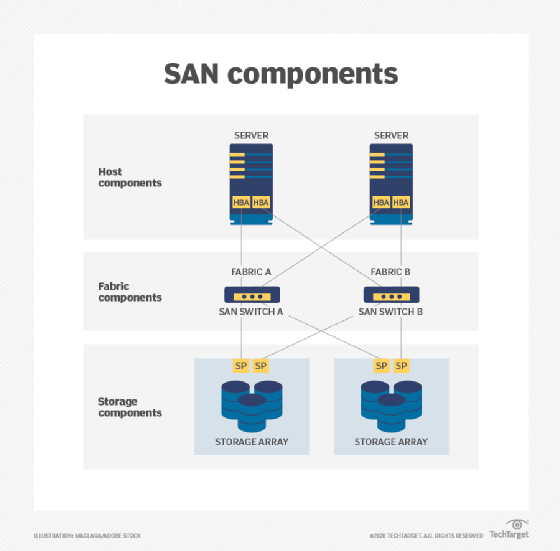
Consider the example in the image above, where two SAN hosts communicate with two SAN storage systems through a redundant SAN fabric. Each server uses redundant SAN connectivity, often through multiple HBA ports or multiple HBAs connected to separate SAN switches. Each SAN switch then connects to redundant storage target ports or storage controllers on the storage arrays. This dual-fabric architecture helps eliminate single points of failure. If a single cable, switch or connection fails, multipathing software can typically maintain communication between the servers and storage systems through an alternate SAN path.
At a fundamental level, a SAN operates through interactions across the SAN fabric. When a host server requires access to SAN storage, the operating system generates storage I/O requests using SCSI commands. In a Fibre Channel SAN, those commands are encapsulated into Fibre Channel frames according to the Fibre Channel Protocol. The host's HBA transmits the frames across the SAN fabric through optical fiber or copper cabling. SAN switches route the frames to the appropriate storage target or storage array. Within the storage system, storage processors or controllers interpret the request and access the underlying storage resources needed to satisfy the host's request.
Understanding SAN switches
SAN switches are central components of the SAN fabric. Similar to other types of network switches, SAN switches receive Fibre Channel frames, determine the appropriate destination and forward the traffic through the SAN fabric to the intended storage or host device. SAN fabric topology is defined by the number and type of switches deployed -- such as edge, modular or director-class switches -- and by how those switches are interconnected. Smaller SANs may use compact switches with a few dozen ports, while large enterprise SANs can use director-class switches supporting hundreds of ports. Multiple SAN switches can be interconnected to build large-scale SAN fabrics capable of supporting thousands of servers and storage devices.
A fabric alone is not enough to ensure storage resilience. In practice, storage systems incorporate technologies such as RAID, error handling and automated recovery features to improve availability and fault tolerance. Enterprise storage platforms also commonly support capabilities such as thin provisioning, snapshots, cloning, data deduplication and compression to improve storage efficiency and data protection. Although a well-designed SAN fabric enables shared access to storage resources, techniques such as zoning and LUN masking are used to restrict host access to authorized storage volumes for improved security, stability and operational control across the SAN.
Alternative SAN approaches
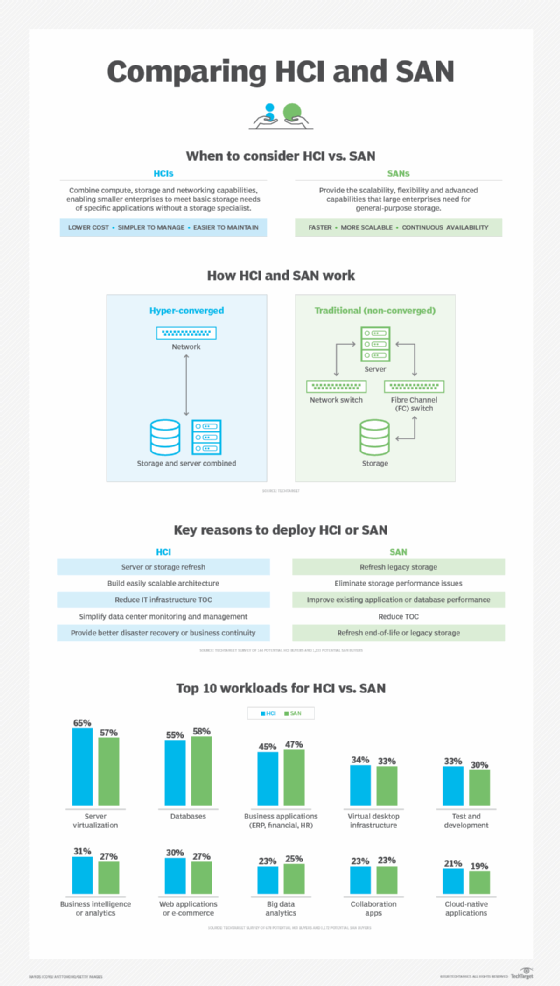
Although SAN technology has been available for decades, enterprise storage architectures continue to evolve. Organizations increasingly deploy software-defined storage, unified storage platforms, converged infrastructure and HCI to provide scalable and centrally managed storage services that can complement or replace traditional SAN architectures in some environments.
- Virtual SAN. Virtualization technologies work closely with shared storage environments by improving flexibility and resource utilization. In Fibre Channel SAN environments, technologies such as Cisco VSANs provide logical segmentation within a physical SAN fabric and enable administrative isolation, traffic separation and improved fault containment without requiring separate physical infrastructure. Separately, VMware vSAN's software-defined storage platform pools local storage resources across clustered hosts to create shared storage for virtualized workloads. VMware vSAN also supports capabilities such as policy-based storage management, storage pooling, resiliency features and non-disruptive workload operations across the cluster.
- Unified SAN. SANs are traditionally associated with block storage commonly used by enterprise applications and databases, while file-based storage has historically been provided through network-attached storage (NAS) systems. Unified storage platforms combine support for multiple storage protocols -- including file protocols such as SMB and NFS, and block protocols such as Fibre Channel and iSCSI -- within a single storage system. These platforms often provide enterprise storage features such as snapshots, replication, tiering, encryption, compression and deduplication across multiple storage types. However, different storage protocols and workloads can place different performance and latency demands on the storage system, so some enterprise applications may still benefit from the predictable low-latency characteristics of dedicated block-based SAN environments.
- Converged SAN. One common disadvantage of traditional Fibre Channel SANs is the cost and operational complexity of maintaining a dedicated storage network. iSCSI helps reduce SAN costs by enabling storage traffic to run across standard Ethernet infrastructure. FCoE was developed to support converged networking by transporting Fibre Channel frames across Ethernet networks, allowing IP and storage traffic to share common physical infrastructure. FCoE works by encapsulating Fibre Channel frames within Ethernet frames, but it requires specialized end-to-end support such as Data Center Bridging (DCB)-capable networking equipment. The added complexity of converged networking, combined with evolving Ethernet and storage technologies, limited broad FCoE adoption in many enterprise environments.
- Hyper-converged infrastructure. The use of hyperconverged infrastructure (HCI) has grown significantly in enterprise data centers in recent years. HCI integrates compute, storage and virtualization resources into clustered nodes that can be added and managed as a unified platform. Using software-defined storage and virtualization technologies, HCI pools available resources so administrators can provision virtual machines and storage from centralized management tools. The primary goals of HCI are simplified deployment, streamlined management and scalable infrastructure growth. Some newer HCI architectures support more flexible scaling by allowing compute and storage resources to expand more independently. Although HCI is not a traditional SAN architecture, it can replace or complement SAN deployments depending on workload and operational requirements.
SAN benefits
Whether traditional or virtualized, SANs offer several important benefits for enterprise workloads.
High performance. SANs commonly use dedicated storage networking designed to deliver high throughput and low-latency access to shared storage resources. Fibre Channel has traditionally been the dominant SAN technology, although iSCSI and other Ethernet-based storage networking approaches are also widely used.
High scalability. SAN environments can scale to support large numbers of servers, storage devices and storage systems. Additional hosts and storage resources can be added as organizational capacity and performance requirements grow.
High availability. Enterprise SANs are commonly designed with redundant fabrics, switches, storage controllers and communication paths to reduce single points of failure and maintain storage access if individual components or connections fail.
Advanced management features. Enterprise SAN storage platforms commonly support capabilities such as encryption, deduplication, replication, snapshots and automated recovery technologies to improve storage efficiency, security and resiliency. Many of these features can be centrally managed across shared storage resources.
SAN disadvantages
Despite their benefits, SANs also present several challenges that organizations should consider before deploying or upgrading a SAN.
• Complexity. Traditional SANs -- especially Fibre Channel SANs -- require specialized infrastructure, including HBAs, SAN switches, redundant fabrics and dedicated storage networking. These environments must be carefully designed, configured and monitored, which can increase operational complexity for organizations with limited staff or budgets.
• Scale and cost. SANs are often most cost-effective in environments with substantial storage and performance requirements. Although smaller SAN deployments are possible, some organizations may find alternatives such as iSCSI-based storage, converged infrastructure or HCI platforms simpler to deploy and manage.
• Management. SAN administration can be complex and time-consuming. Tasks such as zoning, LUN masking, multipathing configuration, RAID management, monitoring, logging and security configuration require ongoing operational expertise to maintain storage availability, resiliency and governance requirements.
SAN vs. NAS
Network-attached storage (NAS) is an alternative storage architecture that provides file-based access using protocols such as SMB and NFS, in contrast to the block-based storage access commonly associated with SAN technologies such as Fibre Channel and iSCSI. SANs connect servers to shared block storage resources, while NAS systems provide centralized file storage services over standard IP networks.
Although both approaches store data centrally, there are differences between a SAN and NAS that allow them to be optimized for different types of workloads. SANs are commonly used for block-oriented workloads such as databases, virtualization and transactional enterprise applications, while NAS platforms are frequently used for shared file storage and unstructured data such as documents, images, videos and user files.
Like SANs, NAS systems support centralized storage management, backup and data protection features. NAS deployments often use standard Ethernet infrastructure, which can simplify deployment and reduce costs compared to traditional Fibre Channel SAN environments. However, SANs are often preferred for workloads requiring consistently low latency and high-performance block storage access.
SAN and NAS technologies are not mutually exclusive and commonly coexist within the same data center. In some cases, organizations may consolidate separate storage systems using unified storage platforms that support both file- and block-based storage protocols. Both SAN and NAS deployments can be upgraded to boost performance, streamline management, combat shadow IT and address storage capacity limitations.
Margaret Rouse is an award-winning writer and technologist known for her ability to explain the value of emerging technology to business users.