Zoom integrates agentic AI across platform portfolio
AI Companion 3.0 is breaking down communications silos across meetings, calls, chat and contact center. New custom AI agents also automate sales, IT and marketing workflows.

LAS VEGAS -- At Enterprise Connect, Zoom announced the expansion of agentic AI capabilities across its entire portfolio, rolling out AI Companion 3.0 to the Zoom Workplace app, Zoom Business Services and Workvivo.
Aiming to address the fragmentation of data captured across collaboration tools and workflows, Zoom's agentic AI embeds workflow automation directly into meetings, calls, chat and contact center interactions.
"Where we're going is about using AI to create," said Jeff Smith, interim chief product officer at Zoom. "The two things you need to create are a rich repository of trusted data and the services that you can take action on."
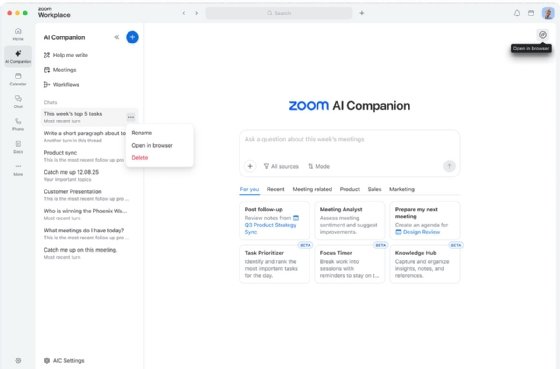
One new AI Companion capability is an AI notetaker, called My notes, which can be used for in-person, Zoom, Microsoft and Google meetings. Users can jot down quick thoughts in their personal notes, and the notetaker can expand with key takeaways.
Zoom also introduced updates to its Custom AI Companion add-on to enable organizations to deploy prebuild AI agents for sales, IT and marketing that automate repetitive tasks. Users can also create AI agents for their personal workflows or send an agent to an admin to share across teams. Additional updates to the add-on include new third-party integrations and enhanced personalization for users based on job roles, preferences and focus areas.
Zoom enters productivity space
Zoom introduced AI-driven Docs, Sheets and Slides to enable employees to create documents and presentations by pulling information directly from meeting conversations and chats.
AI can't replicate the ideas humans generate through interaction with each other, Smith said. But AI can automate tasks, such as building project plans, presentations and templates. This frees up users to spend more time on meaningful collaboration.
The introduction of productivity tools to Zoom highlights a growing market trend. Unified communications and collaboration tools have been adjacent to end-user computing in the digital workspace, but now they are overlapping, said Gabe Knuth, an analyst with Omdia, a division of Informa TechTarget.
"AI is taking this a step further by integrating communications and collaboration workflows and data into the productivity apps where the work gets done," Knuth said.
However, the goal is not for Zoom to replace popular productivity suites from Microsoft and Google, said Leo Boulton, head of products, solutions and industry marketing at Zoom. Instead, Zoom's Docs, Sheets and Slides integrate with Microsoft 365 and Google Workspace, enabling employees to continue working in their Zoom environment. Documents can also be exported to Microsoft and Google file formats.
"You can look at them as extending the power of Zoom AI Companion by turning conversations and meetings into finished work," Boulton said.
Zoom Workplace updates
Zoom is also updating its Workplace platform to offer a simpler, unified experience across desktop, mobile and web applications. New features include the following:
- Zoomie Group Assistant. This group facilitator, which functions across meetings, chat and Zoom Rooms, can answer questions on behalf of a group and provide real-time meeting support.
- Zoom Chat. New AI capabilities better help users manage information, including custom chat agents, summaries for longer threads, prioritizing key messages and highlighting next steps.
- Deepfake risk detection. The security feature, which provides real-time alerts when synthetic audio or video is detected, is available to users attending both internal and external meetings.
Zoom Phone updates
The addition of AI Companion 3.0 to Zoom Phone enables organizations to do more with their conversation data. Agentic workflows can perform follow-up tasks, such as sending emails or identifying next steps. Additional AI capabilities added to Zoom Phone include the following:
- SMS for Virtual Agent AI Receptionist. This feature enables agentic self-service text interactions for customer engagement, such as answering questions and collecting information. It can also escalate conversations to a human if needed without disrupting the conversation's flow.
- Zoom Phone Mobile. With this function, users can make calls with their native dialer and access Zoom Phone features, like call queues.
- Customer Engagement Pack. Offering a real-time view of customer engagement prioritized by activity and importance, AI can flag interactions that require immediate attention.
- Operator Connect for Microsoft Teams. This feature provides centralized telephony management within Zoom and delivers Zoom PSTN to Teams.
Katherine Finnell is senior site editor for Informa TechTarget's unified communications site. She writes and edits articles on a variety of business communications technology topics, including unified communications as a service, video conferencing and collaboration.